Kanban boards from your Azure DevOps queries
Manage business requests and other work item types alongside your team's Azure Boards. Follow the backlog work behind each request and see which items need attention.
For Azure DevOps Services (cloud). Coming soon to the Visual Studio Marketplace.
From business request to delivery progress
AnyKanban shows the work a query returns in three views. Use the Board to follow workflow states, the List to review and reorder items, and the Aging chart to see which work needs attention.

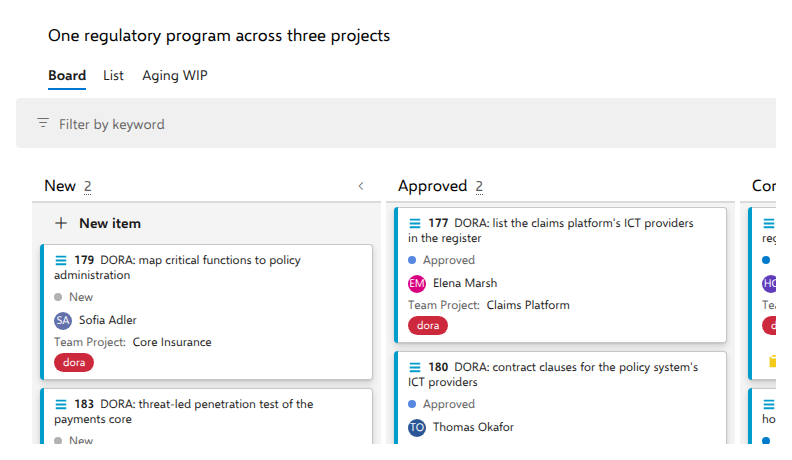
Cards in columns built from your workflow states.

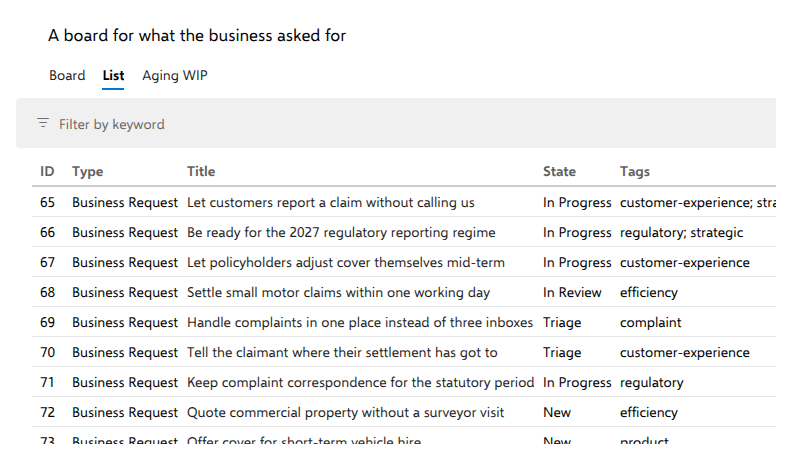
Compact rows across states. Drag items into order when reordering is enabled.

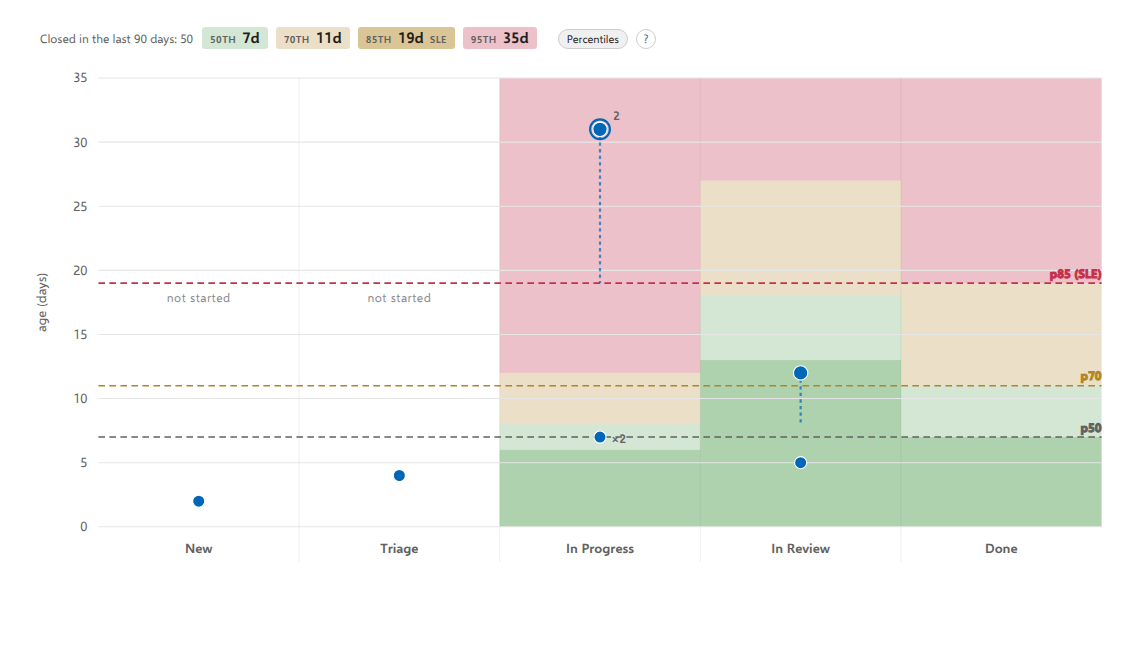
Each item's age against finished work of the same types, on the Aging WIP tab.
Teams can keep their native Azure Boards Kanban boards. Use AnyKanban for business requests, work outside the backlog and initiatives that span projects.
Azure Boards organizes boards around a team, a project and a backlog level. AnyKanban gives you a board for work that crosses those boundaries.
Give requests their own workflow and follow the backlog work that delivers them.
Manage support requests, feedback and risks in the workflow states your process already defines.
Watch the support boardBring one initiative's work items from several projects of your Azure DevOps organization onto one board.
Watch one program across three projectsA team can also work on an AnyKanban board in its own Azure Boards layout. It stays in step with the native board and adds the Aging chart.
Link a business request to the backlog work that delivers it. Its card shows what is finished, and you can open the count to inspect the items behind it.
Try it in the live demo: open a request's progress count.
Watch a business request and the work behind itCompare the age of work in progress with finished work of the same types in the same projects, and see which items need attention. Start the daily meeting at the red end.
The chart and its percentile comparisons use Azure DevOps Analytics. Stakeholders can use the board but cannot open this chart.
Try it in the live demo: open Aging WIP and select a point in a red area.
Watch the aging chart walkthroughMove a request to another planning period and compare the updated cost and effort with the capacity you set. Set a baseline to see, at the next review, what was added, what moved and what left the plan.
Try it in the live demo: move a request to the next period and watch the totals change.
Watch an increment come back within capacity
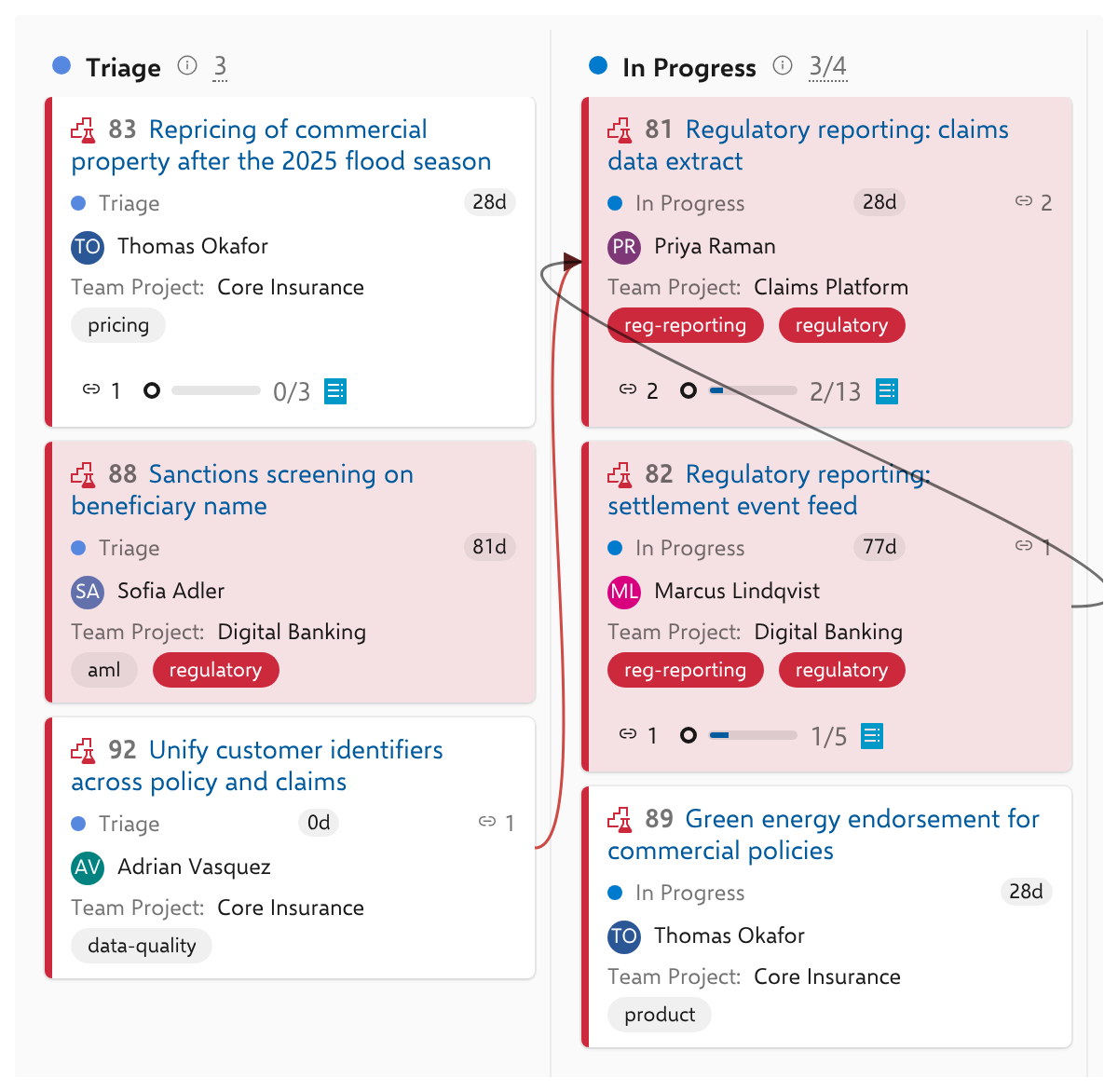
Show predecessor and successor links across projects. Red arrows flag work that is running ahead of its prerequisite.
Point a backlog board at your request board, and it marks the work that sits out of request order. On a shared board you can turn on Take priorities, which shows the proposed changes and writes nothing until you apply them.
Watch Take priorities reorder the backlog
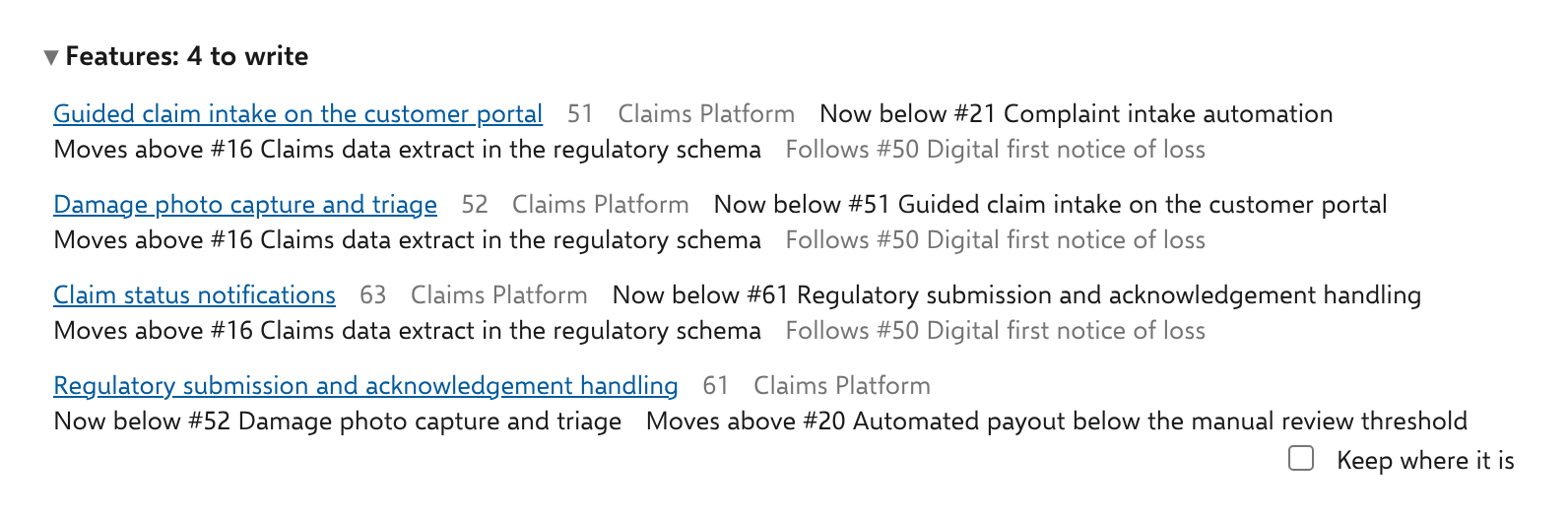
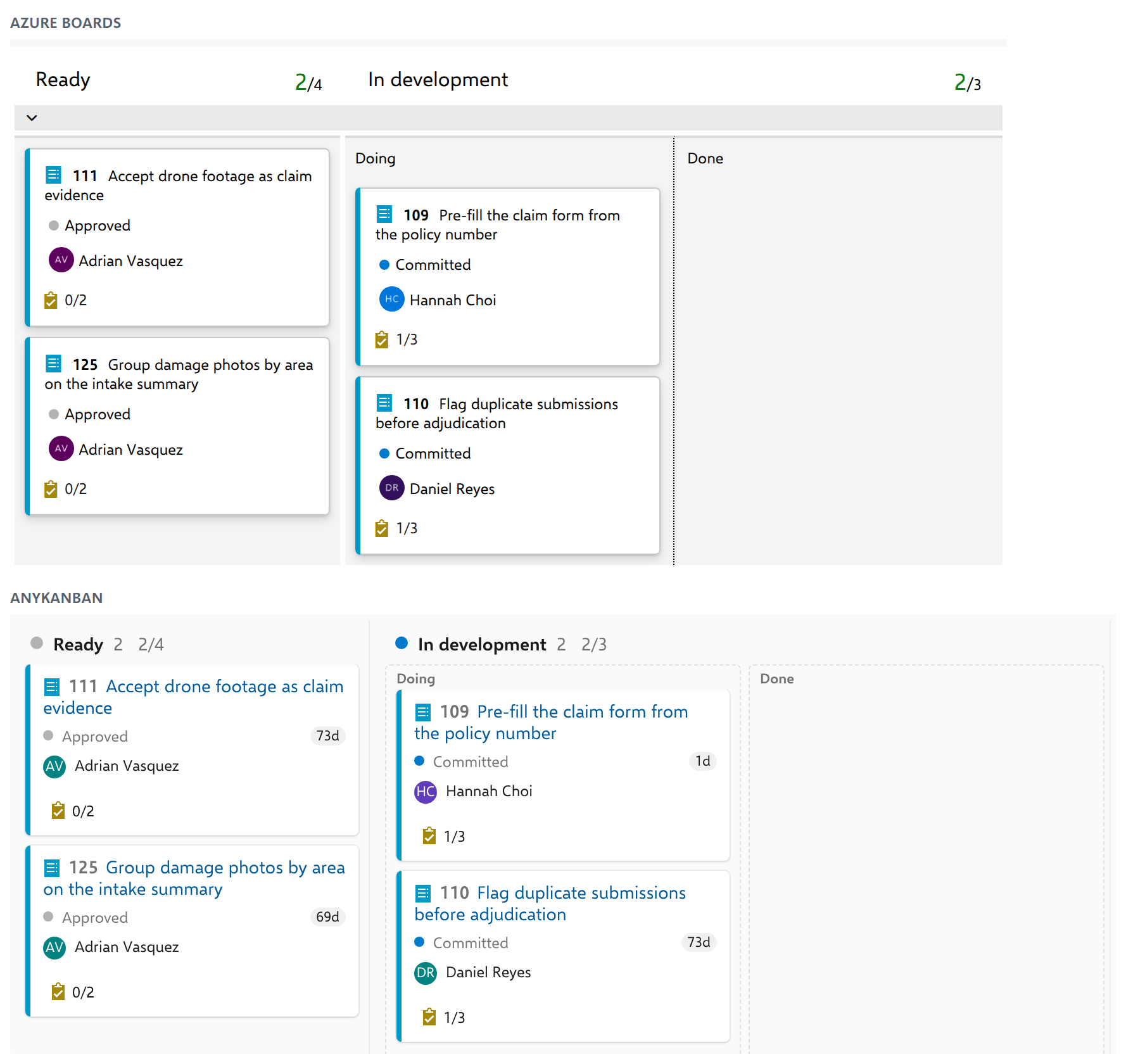
Keep the columns, split columns, WIP limits and swimlanes your team already uses in Azure Boards. A card moved in either view moves in both.
See everything it does in the documentation.
AnyKanban runs inside Azure DevOps. Work item reads and updates go directly to your organization, using the signed-in user's permissions. There is no AnyKanban backend in that path, and the extension sends us no telemetry.
Board settings are stored in your organization's Azure DevOps Extension Data Service. Review the extension's permissions and data handling before you introduce it.
Read the security and data handling details, and share them with whoever approves the extension.
Each request runs as the signed-in user, with that user's existing Azure DevOps permissions. Filing a board under a team decides where it appears in the board list and scopes it to that team's work. It does not make the board private to the team. A shared board is listed to the people who can read work items in its project's top-level area, or, when it is filed under a team, in one of that team's areas. A board in your own list is private to you. The list is curation, not protection: shared board definitions stay readable through the Extension Data Service by anyone with their own token, and Azure DevOps decides which work items each person can see.
Board definitions, preferences and other saved settings use your organization's Azure DevOps Extension Data Service. AnyKanban does not use browser storage to persist them. You can choose to download exports. Azure DevOps itself and Microsoft's interface library may use browser storage separately.
Aggregate usage counters also stay in your organization. They contain numbers only, never work items, titles, queries or people. You can inspect, turn off and delete them.
What the Extension Data Service holds:
AnyKanban reads queries, reads and creates or updates work items, saves its settings in Azure DevOps, and reads Analytics history for aging. It has no access to code, builds or releases.
An administrator can use field setup to add fields to an inherited process. The exact plan is shown before the administrator chooses Execute plan. Count users reads aggregate access-level totals, with no names or user list. The installation dialog and security documentation list the requested permissions.
The extension loads no CDN scripts, external fonts or tag managers. This website counts visits with Cloudflare Web Analytics, which sets no cookie, and loads no scripts for advertising or profiling. Payment checkout uses Paddle, our merchant of record.
Published by Agilist Information Technologies Ltd in Zagreb, Croatia, an EU member state. Legal information lists the company identifiers, and you can reach us at support@anykanban.com.
Free while your organization has 5 or fewer paid Azure DevOps users. Larger organizations can evaluate the full product free for 60 days.
€18 per paid Azure DevOps user, with a €450 minimum and a €4,500 maximum per organization. Excluding VAT. Paying for two years at once costs 10% less.
Includes every project, query, board and feature, plus updates released during the term and a license ID for software asset management records.
The same product, with services defined in an individual written agreement. Managed changes the contractual arrangement, not the product's feature set.
The count covers your whole Azure DevOps organization, including people who do not use AnyKanban. A paid user means anyone whose access level in Organization settings > Users is not Stakeholder. Stakeholders can use AnyKanban in any number without increasing the license price.
You declare the paid-user count at purchase and each renewal. The price stays fixed during the term: growth costs nothing extra, and a lower count does not reduce that term's fee. For several organizations or a group of legal entities, license each organization separately or request one quote covering a named list.
We answer every email, from free organizations as much as from licensed ones. A guaranteed response time comes with a signed Managed agreement.
An online purchase starts a subscription through Paddle for one year or two, which renews for the same term automatically until canceled. Paddle handles refunds under its Refund Policy. See our refund and cancellation terms.
An administrator can select Count users on the AnyKanban page in Organization settings. AnyKanban reads aggregate access-level totals and offers a link to the buy page with the non-Stakeholder total filled in. You can still edit it. The count is not stored, and it leaves Azure DevOps only if you follow that link. No names or user list are read.
Record the key from your license certificate on the same settings page. It shows the license ID, licensed organization, declared paid-user count and term. The key is verified in the browser without a network call and stored in your own Azure DevOps organization.
Yes. Teams keep their native Azure Boards Kanban boards and the way they work on them. AnyKanban adds boards for the business requests and initiatives that connect that work, over the same work items.
A team can also work on an AnyKanban board filed under it, in the team's own layout and with the Aging chart added. A card moved in either view moves in both. On a board of backlog items, reordering is off unless it is turned on for that board, or as your organization's default for new boards, and a board that reorders the backlog shows a banner saying so.
Anyone in your Azure DevOps organization, including Stakeholders, who are not part of the paid-user count. Each person's own Azure DevOps permissions decide which work items they can see and change.
The Aging chart needs Analytics access, which the Stakeholder access level does not include. A card's count of days in its current state needs no Analytics, so Stakeholders still see it.
Anyone whose access level in Organization settings > Users is not Stakeholder, whether or not they use AnyKanban. The count covers your whole Azure DevOps organization, and Stakeholders are free in any number.
The live demo runs in your browser today, with no sign-up and nothing to install. AnyKanban is coming soon to the Visual Studio Marketplace, with a free 60-day evaluation in your own organization.
The buy page shows the price for your organization and how to buy, and you can request a quote at support@anykanban.com.
AnyKanban is built and supported for Azure DevOps Services (cloud). Azure DevOps Server (on-premises) is not currently supported. Contact support@anykanban.com before buying if you use Server.
Use the link in your Paddle receipt or Paddle's buyer portal to manage the subscription.
Paddle handles refunds under its Refund Policy, and its Buyer Terms govern the sale. See our refund and cancellation information.
When a license ends, the corresponding right to use AnyKanban ends. Your boards, configuration and work items remain in Azure DevOps.
Yes. A saved query can return types that your process keeps outside the backlog, such as business requests, support requests or risks. AnyKanban gives them a board with columns based on their workflow states. You do not need to add them to a backlog first.
Yes. Cross-project queries are supported for both reading and updating work items within the same Azure DevOps organization. The columns follow the host project's state model, and each user's permissions still apply.
On a board of Epics or Features, the rollup follows the backlog hierarchy beneath each card. For business requests outside the backlog, it follows the backlog work connected through Related links and its descendants. Open the count to see the breakdown by backlog level and the items behind it.
When you follow business requests through their delivery across teams, need a board for support requests, risks or other work outside the backlog, or want to see which work in progress needs attention.
Try the demo for a first look. Once installation is available, explore the features with your own work during the 60-day evaluation.
No. The extension reads and writes work items in your Azure DevOps organization. Board settings and aggregate usage counters stay there too. AnyKanban sends us no telemetry or error reports. If you contact us or make a purchase, the information you choose to submit is handled as described in the Privacy Policy.
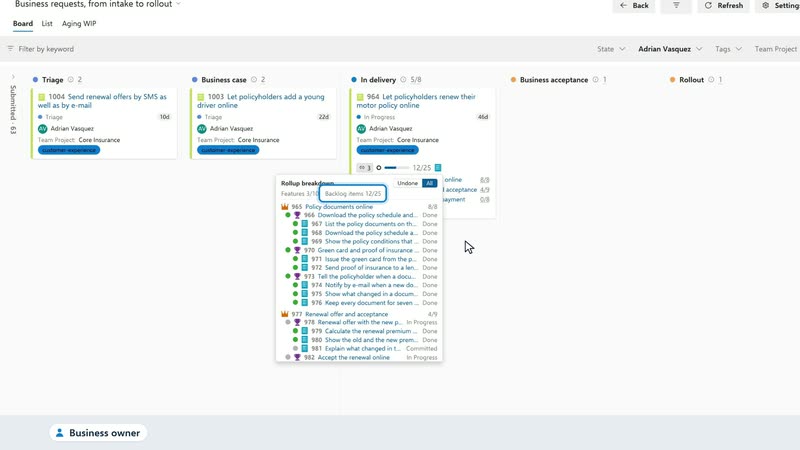
Open the live demo and inspect the backlog work behind a business request.
Coming soon to the Visual Studio Marketplace, with a free 60-day evaluation in your Azure DevOps organization.
Questions about using it in your organization? Contact us. If someone else needs to approve the extension, share this page and the security documentation with them.