Security and data handling
This page is written for security reviewers, architects and data protection officers assessing AnyKanban for use in a regulated environment. It states what the extension does, what it requests, what it stores and where. Just as importantly, it states what the extension deliberately does not do and what we will not claim.
Applies to: Azure DevOps Services (cloud).
Naming: the product is AnyKanban, and its Marketplace extension id is
query-kanban, the working name it was built under. Both refer to the same extension.
In five sentences
- AnyKanban is a browser-side Azure DevOps extension. It executes inside your organization, in the signed-in user's browser, as that user.
- It requests four scopes:
vso.work_write,vso.extension.data_write,vso.analyticsandvso.memberentitlementmanagement. The last two are read-only, and all four read or write only inside your own Azure DevOps. Nothing else. - It stores board configuration, per-user view preferences, board baselines and, for the seconds a page reload takes, a reload snapshot inside your own Azure DevOps, through the Extension Data Service. Work item content is held in memory for the life of the tab, with two exceptions, both stored in your Azure DevOps. A board baseline records the ids, titles and lane values of the items each lane held when somebody pressed Set baseline. A reload snapshot holds what a board on the AnyKanban hub was showing while the page reloads to renew its sign-in, and is deleted as soon as the page is back. A person's view preferences can also hold the filter they leave on a saved query's page: the words they typed and the states, people, tags and field values they chose, kept until they clear it.
- It sends no telemetry, no error reports and no license call of any kind, and the extension itself sends nothing out of your organization. The one thing that can leave is what the buy link on the AnyKanban page in Organization settings carries: your organization name and, once you have counted or typed it, the number of users to be licensed. It reaches our buy page only if an administrator chooses to follow that link. It does keep a handful of usage counters, inside your own Azure DevOps, written through the same extension-data path as a board definition, and yours on the organization settings page: exportable as JSON, switchable off and deletable. They are numbers only; no work item, title, query or person appears in them. Nobody outside your organization can read them without a token you issue. The only outbound calls the extension makes are Azure DevOps REST calls to your own organization's services. Most go through the platform's own typed clients; the few that do not are named under Telemetry, analytics and outbound connections, and nothing is fetched from a third-party CDN.
- The vendor is an EU company with no server and no database behind the extension and no copy of your work item data, so there is none of it for us to hand over, lose or delete on your behalf. What we do operate sits behind buying the product and writing to us, never behind running it: one Cloudflare Worker that issues license certificates and e-mails them to the buyer, and also forwards the website's contact form to our support mailbox, and the object storage that keeps the certificates and the order data behind them. The extension never calls it. See Vendor, jurisdiction and sub-processors.
How this page is evidenced
The statements below come from two sources: a review of the source tree each release is built from, and an audit of an earlier shipped package (version 0.4.8), meaning the .vsix unpacked and grepped. That package audit has not yet been repeated against the current release. Every pipeline build also opens the package it produces and checks that it carries no source maps, no development-only entry and no file outside a fixed allow-list. Auditing the package matters: a reviewer greps the package, and the package is what your organization installs.
Two honest limits on that evidence:
- It is static evidence. We publish no recorded trace of runtime network traffic. See What we do not claim, and Verify it yourself, where the checks are reproducible in minutes.
- The package-level checks (the absolute-URL inventory and the storage grep over the unpacked
.vsix) describe version 0.4.8; the source-level checks are current. Ask for the audit against the exact version you are reviewing; the same checks are re-runnable on any release.
Where the software runs, and where data is processed
| Question | Answer |
|---|---|
| Where does the code execute? | In the signed-in user's own browser, inside an iframe on the Azure DevOps page, loaded from the Marketplace-installed extension package |
| Where is work item data processed? | In that browser tab, in memory, for the life of the tab |
| Where does work item data travel? | Only between the browser and your own Azure DevOps organization's services: dev.azure.com for work items, and your organization's own Analytics service for the history behind the aging percentiles. Most calls go through the platform's typed REST clients; the few that do not are named in the paragraph below this table |
| Does the vendor host anything the product needs? | No. There is no AnyKanban server, API, database, queue or job that the extension talks to. Uninstalling the extension leaves nothing running anywhere. (We do run a license-issuing Worker, described under Vendor, jurisdiction and sub-processors. It is part of buying the product, and no installed board ever calls it) |
| Who is the data controller? | You are. The vendor never receives work item data, so it is not a processor of it |
Every REST call the extension makes goes through the typed clients of azure-devops-extension-api, which the Azure DevOps SDK binds to the host organization, meaning the organization whose page the extension is running on. Three calls are the exception and are worth naming: the Analytics read behind the aging percentiles, the question we ask your Azure DevOps about whether the current user may read work items at a project's root, and the field setup's process transport. Each uses fetch, each against a host the platform resolves at run time rather than one written in our source, and each is itemised in the table below. All of them are bound to the host organization, and there is no code path that constructs a URL to anywhere else.
The license page's user count uses a hand-written client that declares one route: the aggregate entitlement summary. It reaches your organization's member-entitlement service on the *.vsaex.visualstudio.com host resolved by the platform at run time. The hostname differs from dev.azure.com, but it is still your organization's service and no host is written into our source.
Requested permissions (scopes)
Both manifests declare exactly four scopes, and an executable test in the build (src/__tests__/architecture.test.ts, "requests only the approved extension scopes") fails the build if that list changes. Widening the scopes cannot happen quietly.
Screenshot pending: The scopes shown in the Azure DevOps install dialog
| Scope | What Azure DevOps grants with it | Why AnyKanban needs it |
|---|---|---|
vso.work_write |
Read and write work items, queries, boards, area and iteration paths | Read: run the saved query (WIQL), hydrate the returned items, read the work item type's state model and field metadata to build the columns. Write: everything a drag does: set System.State, write the process's order field for in-column ordering, write a swimlane field, set the split-column boolean or the board's column field when several columns share a state, and, on a board that declares a team, that team's own board column fields, so the card moves on the team's Azure DevOps board too. Beyond a drag it commits inline field edits, closes or reopens a checklist item by its checkbox, adds a Related or Tested By link from a card to an existing item, creates a new child item linked to a card, and creates an item from the first column. On a shared board whose Take priorities option is on, and only after its preview and a press of Apply, it also writes the process's order field of the backlog items that preview listed, on the board's own level and on the levels above and below it, and nothing else on those items. Also used for validateOnly requests, which ask the server whether a write would be allowed without making it: a transition before the user drops a card, and every Take priorities write before the first one is made |
vso.extension.data_write |
Read and write this extension's own documents in your account | Stores board definitions and per-user view preferences inside your Azure DevOps, via the Extension Data Service. It is scoped to this extension's id and cannot read another extension's data |
vso.analytics |
Read only, against your organization's own Analytics service | Reads the completion dates and Analytics-computed cycle times of closed items, and the start dates of items still in flight, which together are the cycle-time history the aging percentiles are measured against. It reads the last 90 days, and asks once more over 365 days when those 90 days hold too few closed items. Only while a per-column aging number is on screen, it also reads each item's state changes over the last 90 days (work item id, revision, state and the date of the change). The days-in-state number on a card is NOT this: it comes from a work item field the board already reads. Read-only by definition: the scope grants no write of any kind, and the queries name only the projects the board's own cards come from, several of them on a cross-project board, and never the organization at large |
vso.memberentitlementmanagement |
Read only access to member entitlements | When an administrator presses Count users, reads aggregate totals by access level and shows how many non-Stakeholder users need a license |
Why not something narrower. Azure DevOps offers no read-only-plus-partial-write work scope. vso.work is read-only, and the moment a board must move a card it needs vso.work_write. There is nothing between the two.
Azure DevOps offers no aggregate-only member-entitlement scope. The granted scope is broader than the operation AnyKanban uses. The shipped client calls only the aggregate summary, and architecture tests reject the per-user route.
Counting the users to be licensed
AnyKanban is licensed by the number of non-Stakeholder users in your organization. Press Count users on the AnyKanban page in Organization settings to calculate that number from your Azure DevOps access-level totals.
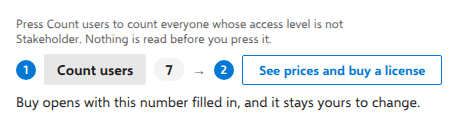
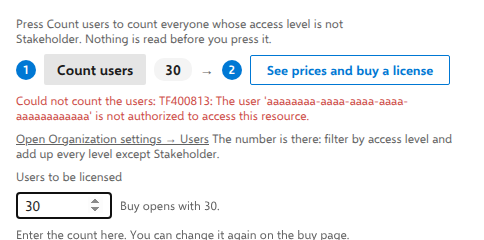
The read happens only when you press the button. It returns numbers by access level, with no names, mail addresses or identities. The result is not stored or sent to Agilist. If you continue to the buy page, the non-Stakeholder total is passed as an editable prefill.
What is deliberately not requested
vso.code*, vso.build*, vso.release*, vso.identity, vso.graph, vso.profile, vso.security_manage, vso.serviceendpoint*, vso.settings_write, vso.test_write, vso.packaging*, vso.wiki*, vso.notification*, vso.dashboards_manage, vso.tokenadministration, vso.tokens.
The write variant of vso.memberentitlementmanagement is not requested. Neither are the identity or graph scopes.
What that rules out, in plain terms. AnyKanban cannot:
- read or write source code, branches, pull requests or repository settings;
- see pipelines, builds, releases, artifacts, variable groups, service connections or any secret they hold;
- enumerate your organization's users, groups or profiles at rest. Card avatars are initials, not photographs, because the board itself never requests identity images. One detail worth stating plainly: editing an identity field opens Microsoft's identity picker component, bundled with the extension and rendered inside its iframe, rather than a host dialog. It works through the organization's identity service, exactly as the same control does on the work item form. When it opens, it lists the people you picked recently. As you type, it searches, and it returns only what your own permissions allow. Its suggestions can show each person's picture, and picking a person adds them to your recently picked list, which Azure DevOps keeps for you. AnyKanban itself stores none of these results and sends them nowhere else;
- read wikis, test plans, test suites or test results. A Test Case work item can appear on a board because it is a work item; test execution data is a different API surface and is not requested;
- change process templates, states, rules or backlog levels, with one deliberate, narrow exception for fields. Here the honest statement is stronger than "we lack the permission": Azure DevOps covers process customization under
vso.work_write, which the extension holds, so this is a rule kept by choice rather than by inability. Exactly one path exercises it. The field setup on the organization settings page shows an administrator the precise operations, which are to create a field, to put a field on a work item type, and where Azure DevOps requires it to first give the process its own copy of that type, and performs them only when that administrator presses Execute plan, as that administrator, under their own permissions. It never touches states, rules, backlog levels or system processes, never removes or deletes a field, never changes a work item form, and every field it creates starts empty and off the form. Every process write outside that one module is still rejected by a build-failing test, which also pins the import chain so a process write is unreachable from any board surface (src/__tests__/architecture.test.ts). ⚠️ Because this sits inside a scope you already granted, Azure DevOps shows no separate permission prompt for it, which is precisely why nothing runs until your administrator clicks; - manage extensions, tokens, notifications, dashboards or organization settings.
What is stored, and where
| What | Where | Scope | Contents |
|---|---|---|---|
| Board definitions | Extension Data Service, collection boards |
Default, shared across the organization, or User, private to the person who created it. A board created from the template gallery is saved in User when its creator picks My board list, and in Default when they pick A team's group or Project board list; when a team was already chosen on the way in, that team's group is preselected. A personal board moves to Default later only when someone moves it there with Move to… |
Board name, project id, query id or the board's own WIQL query text (template-created boards carry the query instead of pointing at a saved one), work item type, which fields appear on cards, which fields the List view shows as columns and in what order, style rules, tag colors, WIP limits, column order, definition-of-done texts, split-column and swimlane field names, the iteration or area node a board generates its swimlanes from, the names of up to two numeric fields a board sums per swimlane with an optional capacity per lane, and the id of the team a board is filed under, the id and display name of the person who created it (recorded when they create or import the board, or move a board from their own My board list to a shared list, whatever it recorded before, with the name as Azure DevOps reports it for that person's own session then or when they next save it, shown in the sentence that says who can change the board and never used to decide anything), an optional folder name, the backlog level at which estimates are summed (the field is the process's and is not stored), and the id of a request board a board of backlog items compares its order with. Configuration only, no work item content: a WIQL text is a filter definition, not work item data |
| Per-user view preferences | Extension Data Service, collection prefs |
User, private to that user |
How one person likes their own view set up: which view (Board, List or Aging) was last used, which columns and lanes are collapsed, the widths that person gave List view columns, which board was last opened and which board that person chose to land on, how the rollup flyout lists items, which board notices that person chose not to see again on a given board (recorded by notice name, never by work item), whether the Aging WIP chart's first-run explanation has been dismissed, which board-list groups that person has opened or shut, whether that chart draws its percentile lines and shading, whether that person sorts a given board by its requests' order and, for each saved query whose page that person left filtered, that filter: the words typed and the states, people's display names, tags and field values chosen, kept until that person clears it or closes the filter bar. That filter is the only thing here that can hold values from the work items, and only the ones the person typed or chose. No titles, and no ids of anything except a board definition |
| Board baselines | Extension Data Service, collection baselines, one document per board |
Default, shared across the organization, because a baseline is a fact about the plan everyone who opens the board reads |
Per board: for each lane, the moment its baseline was set, the name and user id of the person who set it, how the board's lanes were configured and which work item type it showed (so a board that changed either is not compared against it), and the id, title and lane-field value (for example the iteration path) of every work item that lane held at that moment. This is the one stored document that carries work item content: titles, so that an item which has since left the board can still be named. It is written only when someone presses Set baseline, replaced when someone sets a new one, rewritten without that lane's entry when someone clears one lane's baseline from that lane's header (clearing the last lane leaves an empty document with no work item content, which the board reads as no baseline), deleted when someone clears the whole board's baseline with Clear baseline, and deleted with its board when the board is deleted in the hub. The baseline from the iteration start (7298) writes nothing here or anywhere: it is read from the work items' own history, through the same query the board runs, each time the board loads |
| Board snapshot for a planned reload | Extension Data Service, collection reloadSnapshots, document current |
User, private to the person whose board it is |
What one board was showing on the AnyKanban hub a moment before AnyKanban reloaded the Azure DevOps page to renew its sign-in: the board's columns, lanes and settings, and for each card the work item ID, title, state and the field values the board uses to draw it, such as who it is assigned to, its tags and the fields shown on it. Of a person, only the name the card shows and an identifier are kept. Nothing that reaches a card through a link (checklist rows, related items, rollups) is included, because those arrive with the fresh read. It exists only to make that reload smoother: the board draws it at once instead of an empty page, and a fresh read replaces it within seconds. It is short-lived. It is written only just before such a reload, which happens about once an hour while a board stays open on the hub and never on a dashboard. It is read and deleted as soon as the page is back, and a snapshot more than five minutes old is never shown. If the reload does not happen, for example because the browser closes in that second, the snapshot is deleted the next time the AnyKanban hub opens for that person. A board too large for one document is reloaded without a snapshot |
| License record | Extension Data Service, collection license |
Default, shared across the organization |
The signed license key from your certificate, recorded by an administrator. It contains the license ID, the organization it was issued for, the paid-user count you declared at purchase, and the term |
| Organization defaults for new boards | Extension Data Service, collection boardDefaults, document current |
Default, shared across the organization |
The starting values a new board is proposed with: whether cards show a Bug chip beside the other child types, and whether a new board may write backlog rank. Settings only, with no work item content, and changing them never reaches a board that already exists |
| Which board is using which fields, and which fields AnyKanban created | Extension Data Service, collection fieldPairs, documents allocations and createdFields |
Default, shared across the organization |
A board's own id and a number. Two boards recording card placement in the same field would overwrite each other, so each reserves its own from the set the setup provisions, and this is the list of who reserved which. The second document lists the reference names of fields AnyKanban itself created, so the setup can tell one of its own from one of yours that happens to carry the same name, and never write through a field that is not its own. No board name, no query, no project, no person, no work item content |
| Evaluation start | Extension Data Service, collection evaluation, document start |
Default, shared across the organization |
One date: the first day AnyKanban ran in your organization. Nothing else: no user, no board, no work item, not even a time of day. It is written once and never rewritten, and it exists so the organization settings page can say how much of the free 60-day evaluation is left instead of asking you to remember when you installed. Azure DevOps does not record an install date we could read; lastUpdated moves on every auto-update, so an evaluation measured from it would restart itself on our release cadence. |
| Aggregate usage counters | Extension Data Service, collection usage, document counters |
Default, shared across the organization |
Numbers only, from the enumerated list in src/domain/usageCounters.ts, never a work item, a title, a query or a person. Exportable as JSON, switchable off and deletable on the organization settings page |
| Everything else, meaning the work items themselves (apart from what a board baseline records, a reload snapshot for the seconds it exists, and the values a filter left on a saved query's page names, above) | Memory only, for the life of the browser tab | none | Dies when the tab closes. No cache on disk |
All collections live inside your own Azure DevOps account. The correct phrasing throughout our documentation is "stored in your Azure DevOps", never "we store your data", because there is no "we" in the storage path at all.
Concurrent edits to those documents are handled with the platform's __etag: a conflict re-reads the stored document and retries, and a persistent conflict raises an error rather than overwriting someone else's change.
The license record, in the terms a reviewer will ask about
What happens to a recorded license key is a signature check, and it happens offline. Nothing is sent anywhere for licensing: there is no activation call and no licensing request of any kind.
- The license key is signed by us and verified in your browser, against a public key compiled into the extension bundle. Verification is arithmetic on data already on the page. There is no endpoint involved, and there is nothing for a proxy or firewall to allow.
- What the page does with it. It reports what your certificate says and, when the term has ended, links to renewal. The signature exists so the page shows what we issued rather than what somebody typed.
- Why the record exists. A software-asset audit asks where the license is recorded, and an administrator should be able to see when the term ends without opening a filing cabinet. Record the key you were issued.
- The paid-user figure on the certificate is the one declared at purchase. The AnyKanban page in Organization settings can calculate it from aggregate access-level totals when an administrator presses Count users. See Counting the users to be licensed above.
Two facts a reviewer should note about board configuration:
- A shared board is stored at
Defaultscope, which means it is shared and not permission-gated by Azure DevOps: any user who can use the extension can technically edit its definition, and the Extension Data Service accepted a shared-document write and delete from a Basic member when we measured it. A personal board is stored atUserscope, in its creator's own document set, until someone moves it to a shared list. In the product, AnyKanban offers changes to a shared board (its settings, a WIP limit in a column header, its level, Move to… and Delete) to the person who created it, to people Azure DevOps answers yes for when asked about Edit project-level information in the project and, on a board in a team's group, to that team's administrators. Everyone else sees the settings read-only. We measured that answer for a member of Project Administrators (yes) and a Basic member (no). A member of Project Collection Administrators who is not also a Project Administrator has not been measured: AnyKanban leaves the request'salwaysAllowAdministratorsoption at its default, as it does for every permission it asks about, which is what should make such an administrator answer yes, and until we have watched it do so we do not state that it does. A project administrator changes any shared board they can open, which is not every shared board: one that reads a team Azure DevOps no longer returns, for example because the team was deleted, is listed for its creator alone and its link opens for nobody else, so only its creator can change it in the product. If that board also records no creator, it is listed for nobody and opens for nobody, administrators included, and the product has no route to it: Export leaves it out and only counts it. Its definition stays in the Extension Data Service, where anyone who uses the extension can read it outside AnyKanban's screens, as with every shared definition, and an export taken before the team was deleted is the only way to bring it back through the product. That is a guard against accidental change, and it is not access control. Nothing in a board definition is confidential by itself, but the board's membership is a saved query, and changing the query changes what the board shows. - Deleting a board in the hub deletes that configuration document and the board's baseline. No work item is touched.
What is not stored
- No work item content is persisted by the extension anywhere except in a board baseline and, for the seconds a page reload takes, a reload snapshot: not on the vendor side, not on disk, not in a cache with a lifetime beyond the tab. Both are named in the table above. When somebody presses Set baseline, the ids, titles and lane values of the items on that board at that moment are written into your Azure DevOps, where every reader of the board can see them, until someone replaces or clears it. A reload snapshot is private to the person whose board it is, and is deleted as soon as the page is back. A person's preferences can also keep the filter they left on a saved query's page, private to them: the words they typed and the states, people's display names, tags and field values they chose, never an item.
- No stored credentials, tokens or secrets. For each request, the extension asks Azure DevOps for an access token that Azure DevOps issues to the extension for the signed-in user, limited to the scopes listed above, and sends it as a bearer token. The token is kept in memory in the browser tab and is never written anywhere by the extension.
- The shipped package contains no browser-storage call. A grep of the unpacked VSIX for
localStorage,sessionStorage,indexedDBanddocument.cookiereturns zero hits. The only component in the repository that uses browser storage is the development harness behind the standalone demo, which is excluded from production builds and is absent from the package, confirmed by the package's own file list.
One precision that matters, and that we would rather state than have a reviewer discover: do not read that last point as "no browser storage occurs on the page." The Azure DevOps host page around the extension uses browser storage regardless of us, so the broad claim is false and disprovable in one look at the browser's developer tools. The narrow claim is the true one:
AnyKanban writes nothing to your device, and nothing leaves your Azure DevOps.
Filing a board under a team arranges a list. It does not restrict one.
A board may be filed under a team, and the board list is grouped and filtered accordingly: a board that reads a team is listed for those who may read work items in at least one of that team's area paths, a project board that reads no team for those who may read work items at the project's root, and every board for the person who created it. The answers come from Azure DevOps itself rather than from a rule of ours. Azure DevOps shows every team and every area path of a project to a user who may read work items in one area only, which is why the question is about the work items rather than about the teams.
Read the next sentence before drawing a conclusion from that. The Extension Data Service has no per-document access control. Every board definition in the shared set is readable by anyone who can read any of them, with their own token, in one REST call, outside AnyKanban's own screens. AnyKanban does not open a board from its link for a reader it does not list the board for, and says only that the board does not exist or that they cannot read the work it shows. In a project that has boards, a link naming no board at all gets the same sentence, so the sentence alone does not tell anyone whether a board exists. That is the same curation as the list, not a boundary: the definition stays readable through the service, and a dashboard tile still shows the board it was set up with to everyone who can see the dashboard. Filing decides what is IN YOUR LIST and what AnyKanban opens for you. It does not decide what you may read, and no wording in the product says otherwise; a build-time rule refuses the vocabulary of entitlement in those strings so it cannot start to.
What genuinely protects the work is the layer that always did: Azure DevOps's own permissions on the work items, applied per card and per viewer. A board spanning three projects shows each reader exactly what they may see, with no setting of ours involved. That is why there is no second place to configure who sees what, and why a person who may read one area path sees only that area's cards on a project-wide board.
Telemetry, analytics and outbound connections
There is no telemetry and no connection to any host other than your own Azure DevOps. The evidence:
⚠️ Usage counters are analytics, and we would rather say so than have you
discover it. AnyKanban keeps usage counters: how often a board is opened,
how often the rollup breakdown is expanded, and a handful more. They are
analytics in the ordinary sense of the word, so "no analytics, in any form"
would mislead. The fact that matters is that nothing leaves your
organization. The counters are written into your own Azure DevOps through
ExtensionDataService, exactly like a board definition. The architecture test
that forbids any call to an outside host passes with them in place, and every
call the grep below finds goes to your own organization, itemised in the table. You can read them, turn
them off and delete them on the Usage tab of the organization settings
page.
| Check | Method | Result |
|---|---|---|
| Outbound HTTP from our code | grep -rn "fetch(|XMLHttpRequest|sendBeacon|WebSocket|EventSource" src/ --exclude-dir=__tests__ --exclude-dir=harness --exclude-dir=testUtils |
Three hits, all to your own organization, and they are three different things. src/data/analytics.ts GETs the cycle-time history the aging percentiles are measured against from your own Analytics service (the vso.analytics scope above), and, only while a per-column aging number is on screen, the state changes behind it. src/data/callerPermissions.ts asks four questions about the person using the extension. The first is whether they may read work items at this project's root, and the answer decides whether project-wide boards appear in their list, so the list follows the permissions you already configured rather than a rule of ours. The second is whether they may read work items in each of a team's own area paths, and the answer decides whether boards that read that team appear in their list. The third is whether they hold Edit project-level information for the project, and the answer decides whether AnyKanban offers them changes to shared boards they did not create. The fourth is whether they hold Edit instance-level information for the organization, and the answer decides only whether the AnyKanban page in Organization settings shows its shared settings read-only to them. None sends data, and they use three kinds of request. _apis/securitynamespaces/{id} returns a security namespace's description, from which the file takes the bit of the permission it asks about, looked up by the permission's name, so no bit is written into our source. _apis/wit/classificationnodes/Areas returns the project's area tree, with each area path's name and identifier, because a permission on an area is asked by those identifiers. It is read only as deep as the deepest area path a team names, and never more than 14 levels. _apis/permissions/{namespace}/{bit} carries that bit and one or more tokens, which are area identifiers or the project's or organization's own token, and its reply is one boolean per token. The second question also reads each team's own area paths, through the typed Work client rather than fetch. Every one of these requests passes the same throttle as the rest of the product, so none is sent while Azure DevOps has asked the extension to slow down, and every one of them is time-bound: a request that gets no answer in time counts as unanswered, and so does the question it belongs to. A question can chain several requests, so it has no fixed total wait. Unanswered leaves the board listed and the control offered. src/data/processApi.ts is the field setup's transport: it reads your processes and, only when an administrator executes the plan on the organization settings page, creates fields and puts them on work item types, checked at run time against an allowlist of exactly four reads and three writes, so it can send nothing else and in particular nothing that deletes. Two of the three are raw because the platform ships no typed client for their route at all: there is no Analytics client and no permissions client in azure-devops-extension-api. The third, processApi.ts, is raw deliberately: the typed process client pins an API version (7.2-preview.2) that Azure DevOps Server 2022 rejects per call, and using it would put the process-writing identifiers into shipped code, where no build rule could tell an intended call from an accidental one. In all three cases no host is written into our source: the Analytics address comes from the platform's resource-area lookup, and the other two use the organization address the Azure DevOps host itself reports at run time, which is why the build's absolute-URL test still passes. Everything else goes through the typed Azure DevOps clients, bound to the host organization by the SDK. This grep does not find the license page's user count, and you should know that before you rely on it: that call goes through the package's own request machinery rather than fetch, so it is invisible to this pattern exactly as the work item calls are. Grep userentitlements for it, which returns one hit, one route and the aggregate summary, and routeTemplate in src/platform/memberEntitlementClient.ts for the whole of what it may ask. |
| Absolute URLs in the shipped bytes | grep -rhoE "https?://" over the unpacked VSIX |
Five distinct hosts at the version 0.4.8 package audit, our own domain added to the product's text since, and from version 0.4.104 the project and license addresses in the third-party notices file, none of them requested by the extension, itemised below |
| Analytics or error-reporting SDK | Dependency review of package.json |
None. The runtime dependencies are UI, state and SDK packages only |
| Remote configuration, license activation call | Source review | None. A recorded license key is verified offline against a public key in the bundle; no activation or configuration call exists in the package |
| Third-party CDN (fonts, scripts) | Webpack configuration and bundle inspection | None. Fonts are inlined as data: URIs, described below |
| Browser storage in shipped code | Grep over the unpacked VSIX | Zero hits, as above |
The absolute URLs present as text in the package, each accounted for. The first five rows are from the version 0.4.8 package audit; the sixth comes from the current string catalog and is not yet confirmed by a fresh package grep; the last is a file the package carries from version 0.4.104:
| Host | Where it appears | Is it ever requested? |
|---|---|---|
www.w3.org |
SVG and XML namespace declarations | No. A namespace URI is an identifier, never fetched |
reactjs.org |
React's own error messages ("visit … for the full text") | No. A string literal in a warning |
fb.me |
The same React error messages | No. A string literal |
aka.ms |
A license comment inside the azure-devops-ui icon-font CSS |
No. A CSS comment |
raw.githubusercontent.com |
dist/vendor/vendor.js.LICENSE.txt, the es6-promise license text |
No. A text file webpack emits beside the bundle, and never loaded |
anykanban.com |
The product's string catalog: the documentation links in the Aging chart's help and in a card's menu, and the buy link on the license page | Not by the extension. Each is an ordinary link that opens in a new browser tab only when the reader clicks it. The buy link carries the organization name and, once counted or typed, the number of users to be licensed |
github.com and other project hosts |
dist/THIRD-PARTY-NOTICES.txt: each open-source component's project address, which the build takes from that component's own package, and the few addresses its license text quotes |
No. A text file the build writes beside the bundle, and never loaded |
There is one occurrence of importScripts in the package: a typeof importScripts feature test inside a promise polyfill, used to detect a worker environment. It is a type check, not a call.
Third-party code and fonts
The extension bundles its dependencies; nothing is fetched from a CDN at runtime.
- Runtime dependencies are React and
react-dom, Microsoft'sazure-devops-ui, the Azure DevOps extension SDK and API clients,dnd-kit(drag and drop) andzustand(state). No analytics, no error reporting, no HTTP client. - Fonts are inlined. The webpack configuration inlines
.woff2assets, and every@font-facerule in the bundle resolves to adata:font/woff…;base64literal. No font request leaves the page, which also means no font CDN sees your users' IP addresses. - No dynamic code loading. There is no
eval-driven module loader, no script injection and no remote configuration. New code reaches your organization only as a new Marketplace version, installed through Azure DevOps' normal extension mechanism. - API version pinning. The typed clients send an explicit API version on every call, pinned by the package version, so platform behavior cannot shift underneath a deployed release without a deliberate upgrade on our side.
Licensing and activation
Licensing is per organization, for one year or two at a time, and contractual.
Nothing is requested from us for licensing. The only calls the extension makes are to your own Azure DevOps. Where a license key has been recorded, its signature is verified offline, in the browser, against a public key compiled into the bundle.
Recording the key is two clicks from the certificate e-mail. It opens the settings page in your own organization with the key on its address, so the field arrives filled in and an administrator presses Save; nothing is recorded until they do. The key travels in that administrator's browser, from their own mailbox, and no request reaches us, before or after. Pasting the key from the certificate into the same page does exactly the same thing, and still works if a mail client has broken the link.
One edition. Every feature is available to everyone. There are no editions and no tiers: one license and the same software for every customer, with the price following the number of paid (non-Stakeholder) users you declare. Managed, available by individual written agreement, is a contract form rather than a bigger license: the signed agreement sets its services and its price.
No remote configuration channel. We cannot change the behavior of an installed version; only publishing a new Marketplace version can.
How the evaluation is reported. The settings page reports which of the EULA's grants covers your organization today:
Free licenseonce a count comes back at or below the free-tier threshold, otherwiseEvaluation: 41 days left, counting 60 days from the first day AnyKanban ran in your organization. That start date is one document in your own Azure DevOps, written once and never rewritten. Azure DevOps exposes no install date we could read, and the nearest field (lastUpdated) moves on every auto-update. Beneath the countdown the page gives the evaluation's end date and says it matters only to an organization above the free-tier threshold. The count is kept nowhere, so after a reload the page shows the countdown again until someone presses Count users, and the two lines are written to agree with each other whichever one is on screen. When the 60 days have passed, the page saysEvaluation ended.The lapsed states state a fact, never a verdict. The page says "No license key is recorded for this organization" or "The term ended on {date}", rather than "this software is unlicensed", which would be false for every organization the EULA covers free of charge at or below the paid-user threshold. The product cannot tell which reader it is addressing, so it says what it knows and names the free tier beneath.
A license is evidenced by the certificate we issue and the invoice for the order, which is what a software-asset-management audit needs. See the EULA for the license terms themselves.
Identity, permissions and the audit trail
- The extension acts as the signed-in user. It grants no additional access and holds no service account. Every read and every write is subject to exactly the Azure DevOps permissions that user already has.
- Every change is a normal work item revision. A drag that changes a state, a reorder that writes the order field, an inline field edit: all of them arrive in Azure DevOps as ordinary work item updates attributed to that user, visible in the item's History. Your existing audit trail already covers every work item change the extension makes; there is no separate log to obtain from us, and none to be missing. One honest exception: board configuration is not work item data and is not covered by that trail. The settings documents carry the platform's
__etagfor concurrency, and a board definition records who created it (What is stored, above), but nothing records who changed a document last and no earlier version is kept, so a change to a board definition is not attributable. AnyKanban offers changes to a shared board only to the person who created it and to administrators (Two facts a reviewer should note about board configuration, above). That makes an accidental change by a colleague less likely and leaves no record of the changes it does allow. - The organization settings page offers its shared settings for change to people with Edit instance-level information. The license record, the defaults for new boards, and the usage counters' switch and delete each belong to the whole organization. So the AnyKanban page in Organization settings asks Azure DevOps whether the signed-in user holds that permission, and shows those controls read-only to anyone who does not, with a sentence saying why. It is a guard against accidental change, not access control: like shared board definitions, these documents are stored at shared scope with no permission of their own (above). When the question cannot be answered, the controls stay offered. Counting users, exporting the counters, the field setup and the per-project switch are not part of it: Azure DevOps answers those itself, and the page shows its answer.
- Writes are revision-checked. Every write to an existing item carries a test on that item's revision; a conflict is retried once against the fresh revision and otherwise reverted with the server's own message. A rejected write is never silent. (Creating an item from the first column is the one write with no revision to test, because the item does not exist yet.)
- Cross-project boards respect per-project permissions. A board's query may return items from several projects, for example Claims Platform, Core Insurance and Digital Banking. Items in a project the signed-in user cannot read are not returned to that user's board at all, the extension does not and cannot elevate. Such items are omitted, and a banner tells that user how many items the query matched and how many the board could load. It cannot name the missing ones, and the column counts that user sees count only what loaded. That is Azure DevOps permissions at work, not a leakage path.
Vendor, jurisdiction and sub-processors
| Item | Detail |
|---|---|
| Vendor | Agilist Information Technologies Ltd (registered equally as Agilist informacijske tehnologije d.o.o.) |
| Registered office | Ede Murtića 4, 10000 Zagreb, Croatia, an EU member state |
| Registration | OIB 50638052915, MBS 080760591 (Commercial Court in Zagreb) |
| Governing law and venue | Croatian law; courts of Zagreb, per the EULA |
| Personal data the vendor holds | The order, contact and billing data needed to issue and administer licenses, plus whatever you put in a support ticket. None of it comes from the product |
No sub-processor of ours touches your work item data, because your work item data never reaches us. That is a narrower sentence than "no sub-processors", and the narrow one is the true one: buying a license does create a record on infrastructure we control, and a reviewer is entitled to know where it sits.
| Party | Role | Does it touch customer work item data? |
|---|---|---|
| Microsoft (Azure DevOps) | The platform the extension runs inside, and already your processor under your own agreement with Microsoft | Yes, as it already does without us |
| Microsoft (Visual Studio Marketplace) | Distribution channel for the extension package | No |
| Cloudflare | Serves the website and documentation as static assets, and runs the license-issuing Worker and the R2 object storage that holds issued certificates and parked orders | No. It processes order-related personal data on our behalf, meaning the buyer's e-mail address, the licensed organization, the declared count and the term, and never work item data |
| Paddle | Merchant of record for online purchases: checkout, payment, invoicing. Card details go to Paddle and never to us | No |
| Microsoft 365 | Our support and sales mailboxes, and the mailbox the licensing Worker sends the license certificate e-mail from | No. Only what you choose to send us in a ticket, and the buyer's certificate e-mail, which carries license details and the buyer's address and never work item data |
Legal bases, transfer safeguards and retention periods for that order data are in the privacy notice, which is the authoritative list of recipients.
About the website, and the one service we do run
The website is served from Cloudflare's global anycast network, not from an EU-only origin, so we do not claim "EU hosting", and a reviewer checking with one dig will find we did not. What is true, and is the answer to the question behind the question:
- The marketing and documentation site is static. It serves pages, documentation and a demo that runs entirely in the visitor's own browser; those assets hold no customer data. That is a claim about the site rather than about us. Order data does sit on infrastructure we control, and the next bullet says where. Two pages are not purely static. The checkout loads our merchant of record's script to take the payment, and the contact form at anykanban.com/contact posts what you type to the Worker described in the next bullet, which turns it into an e-mail to our support mailbox. The contact form loads no third-party script of any kind.
- We do operate one service, and it sits behind buying the product and behind writing to us, never behind running the product. When a purchase completes, Paddle reports it over a webhook to a Cloudflare Worker of ours at
licensing.anykanban.com. The Worker verifies Paddle's signature on that message, signs the license key, draws the one-page certificate and files it in Cloudflare R2 object storage together with the license details and the buyer's e-mail address; an order whose organization or paid-user count is missing or malformed is parked, with the message Paddle sent, for a person to resolve by hand. Those are the only two tests it applies, that the organization must match the shape of an Azure DevOps organization name and that the count must be a positive whole number, and it judges nothing about whether the values are plausible. The Worker then e-mails the certificate to the buyer, from our support mailbox through Microsoft 365, already the processor for our mail, so this adds no recipient to the list below. Where it cannot finish, whether that is a parked order, a failed delivery or a buyer address it could not obtain, it alarms that same mailbox and keeps retrying hourly, so an order stops loudly rather than silently. Its one read endpoint, which lists what has been issued and parked with each delivery's state, is protected by a bearer token and used only by us. The same Worker answers the website's contact form, because it is where our mail channel already is: a submission becomes one e-mail to our support mailbox and is written nowhere, so it adds nothing to what is stored. So there is personal data of ours on Cloudflare, with Cloudflare as processor: order data, and only order data. - The extension never calls that Worker, or any other host of ours, on any code path. Installing the product and buying it are separate acts, and only the second one reaches us.
- The product itself is not hosted by us in any sense. It executes inside your own Azure DevOps organization. A reviewer asking "where is our data processed" gets the answer "in your organization, by your browser". Neither the website's CDN footprint nor the license Worker enters into it.
- The site counts visits with Cloudflare Web Analytics, whose script every page loads from Cloudflare. It sets no cookie and does not identify visitors. The site loads no other analytics, no advertising or profiling script and sets no cookies of ours. Any cookie inside the checkout is the merchant of record's, under its own notice.
Data on uninstall, and removal on request
- Uninstalling removes the extension's surfaces, meaning the Boards hub entry, the query page's Board and Aging WIP tabs and the dashboard widget, and with them all of its code. Nothing continues to run.
- No work item is affected. The extension never owned any work item; it wrote fields on items your organization already owned, and those values (state, rank, your own fields) stay exactly as they are.
- The extension's own documents remain your organization's: board definitions, the organization's default starting values for new boards, per-user preferences, board baselines (with the work item titles they recorded), a reload snapshot (the temporary copy of the open board) if a page reload was interrupted before it could be deleted, the aggregate usage counters, the record of which board uses which fields, the evaluation start date recording when AnyKanban first ran there, and the license record. They live in your Azure DevOps under the platform's own extension-data lifecycle, which Azure DevOps controls rather than us. We could not delete them if you asked, because we have no access to your account.
- If you want configuration gone on your own terms, delete the boards in the hub before uninstalling, which removes their baselines with them; a baseline set on a saved query's own tab belongs to no board in the hub, so clear it with Clear baseline on that tab (use Export first if you want a JSON backup), and on the organization settings page delete the usage counters (Usage) and clear the default starting values (Boards). Per-user preferences hold view settings and the filters you leave on saved queries' pages, and this is the whole list: which groups, columns and lanes you have collapsed, the last-used view, your list column widths, how you last read a rollup breakdown, which notices you chose not to see again on each board, a last-opened and a chosen board id, whether you sort a board by its requests' order, two answers about the Aging WIP chart (whether you closed its first-run explanation, and whether it draws its percentile lines), and, for each saved query whose page you left filtered, that filter: the words you typed and the states, people, tags and field values you chose. Closing the filter bar on that query's page removes it.
- There is no vendor-side erasure request to file for product data, because the vendor holds none. The order, contact and billing data that a purchase creates is a different matter and is held by us; erasure there is a normal request, on the terms in the privacy notice.
What we do not claim
A security page is worth more when it says where it stops. These are the claims we do not make:
| Claim | Status |
|---|---|
| "Nothing is stored in your browser" | False as phrased. The Azure DevOps page that hosts the extension uses browser storage regardless of us. The defensible sentence is the narrow one above |
| "We hold no data of yours at all" | Too broad. The product gives us nothing, but a purchase leaves order data with us, on Cloudflare. The defensible claim is about work item data, which never reaches us |
| "EU hosting" for the website | Not true as deployed. See About the website, and the one service we do run |
| Runtime traffic proof | Not published. The evidence on this page is static. You can record your own trace in ten minutes, as described below |
Verify it yourself
None of the above needs to be taken on trust. A reviewer with the .vsix can reproduce the audit:
- Get the exact bytes. Download the extension package from the Marketplace listing (or ask us for the
.vsixof the version under review) and unzip it, because it is an ordinary ZIP. - Check the scopes.
extension.vsomanifestin the package root lists them, underscopes. There must be exactly four:vso.work_write,vso.extension.data_write,vso.analyticsandvso.memberentitlementmanagement. For the last one, the scope is not the guarantee: grep the package foruserentitlementsand you should find exactly one route, the one endingsummary. - Look for outbound calls. Grep the unpacked tree for
fetch(,XMLHttpRequest,sendBeacon,WebSocket,EventSource, and forhttps?://. Expect hits inside Microsoft's bundled code: the REST client'sXMLHttpRequesttransport, which carries the calls to your own organization, andfetch(in the bundled UI and identity components. What decides the question is not the count of transports but where they point: compare the host list against the table above, and note that the extension never requests any of them. Over our own source the same grep returns three hits once the development-only folders are excluded (--exclude-dir=__tests__ --exclude-dir=harness --exclude-dir=testUtils):src/data/analytics.tsis the Analytics read.src/data/callerPermissions.tsasks your Azure DevOps four questions about the current user. Two decide only which boards are listed for them: whether they may read work items at a project's root, and whether they may read work items in each of a team's own area paths. One decides only whether AnyKanban offers them changes to shared boards they did not create: whether they hold Edit project-level information for the project. The last decides only whether the organization settings page shows its shared settings read-only: whether they may edit the organization's instance-level information. To ask them it reads security namespace descriptions and the project's area tree and sends permission requests, over the three routes the table above lists, each through the product's throttle and with a 15-second limit on the wait.src/data/processApi.tsis the field setup's process transport. Check them the way you would check any transport. No host is a literal anywhere in our source. The Analytics address comes from the platform's resource-area lookup, and the other two use the organization address the Azure DevOps host reports at run time, so they are your organization's own services and nothing else. Those excluded folders contain test doubles that simulate a transport and are not packaged. - Look for storage. Grep for
localStorage,sessionStorage,indexedDB,document.cookie. - Look for fonts and CDNs. Grep for
@font-faceand confirm everysrc:is adata:URI. - Watch it run. Install into a test organization and open a board with the browser's network panel recording. Every request goes to a Microsoft host, and every request that carries your data goes to your own organization:
dev.azure.comfor the board itself, plus your organization's own Analytics host when an aging surface is open. Board definitions and preferences travel through the Extension Data Service, which Azure DevOps serves fromextmgmt.dev.azure.com. The extension's own files load from the Visual Studio Marketplace's asset CDN atanykanban.gallerycdn.vsassets.io; that host is Microsoft's, and it starts with our publisher id only because the Marketplace names it after the publisher. Press Count users on the AnyKanban page in Organization settings and you will see one more: your organization's member-entitlement host, a*.vsaex.visualstudio.comaddress. None of these hosts is ours, on any page, at any moment.
Step 6 is the one we recommend most, because it answers the question the other five only argue. We publish no recorded trace of our own, as What we do not claim says, so the one you record in your own organization is the only such trace there is.
Questions reviewers ask
| Question | Answer |
|---|---|
| Can a board be restricted to one team? | No, and the product never says it can. Filing a board under a team groups and filters the LIST, following who may read work items in that team's area paths; it is not access control, because the Extension Data Service has no per-document ACL. What is enforced is Azure DevOps's permission on the work items themselves |
| Who can change or delete a shared board? | In the product, the person who created it, people Azure DevOps says hold Edit project-level information in the project and, for a board in a team's group, that team's administrators. Members of Project Administrators hold it, which we measured. A member of Project Collection Administrators who is not also a Project Administrator should be answered the same way and has not been measured yet. A project administrator changes any shared board they can open, and a board that reads a team Azure DevOps no longer returns opens for its creator alone, so only its creator can change it. One of those that records no creator opens for nobody, and only an export taken before the team was deleted brings it back through the product. Everyone else sees its settings read-only, and Move to… and Delete say who can. That is a guard against accidental change and nothing more: the Extension Data Service keeps no permissions on its documents and accepted a write and a delete from a Basic member when we measured it. What is enforced is Azure DevOps's permission on the work items |
| Does any data leave our Azure DevOps organization? | The extension sends none. The shipped package contains no call to any host but your own Azure DevOps: every REST client is bound to your organization by the SDK, and our code contains no other outbound call at all. The one thing that can leave is what the buy link on the AnyKanban page in Organization settings carries, your organization name and the number of users to be licensed, and only if an administrator chooses to follow it |
| Do you collect telemetry, usage analytics or crash reports? | We collect nothing. Nothing is transmitted to us or to anyone else, and there are no crash reports. The extension does keep aggregate usage counters inside your own Azure DevOps (board opens, breakdown expansions and similar; numbers only, never a work item, title, query or person). They are yours: exportable as JSON, switchable off and deletable on the organization settings page, and unreadable by us unless you issue a token for your organization |
| Can we turn the usage counters off? | Yes, on the organization settings page, where you can also delete the ones already recorded. Turning them off is remembered for the organization, not per user |
| Where is our data stored? | Work item data lives in the browser tab's memory, with two exceptions: a board baseline records the ids, titles and lane values of the items on a board at the moment somebody pressed Set baseline, and a reload snapshot holds what a board on the AnyKanban hub was showing while the page reloads to renew its sign-in, deleted as soon as the page is back. A filter a person leaves on a saved query's page is kept in that person's own preferences until they clear it. Board configuration, per-user preferences, board baselines and reload snapshots are stored inside your own Azure DevOps |
| What permissions does it need, and why? | Four scopes: vso.work_write (run the query, read the state model, write state/rank/fields on a drag, reorder backlog items after a Take priorities preview on a board where that option is on, create work items through quick add), vso.extension.data_write (its own configuration documents), vso.analytics (read-only: the cycle-time history the aging percentiles are measured against, from your organization's own Analytics service) and vso.memberentitlementmanagement (read-only: how many users hold each access level, read on the AnyKanban page in Organization settings when an administrator presses Count users). None of them reaches outside your organization |
| Can it read our source code, pipelines or secrets? | No. Those scopes are not requested; the extension cannot see them |
| Can it enumerate our users? | No. No graph, identity or profile scope, and no route in the package that returns a user list. It can read how many users hold each access level, an aggregate of integers, on the AnyKanban page in Organization settings, when an administrator presses Count users (Counting the users to be licensed). That is a total rather than a list, and it tells nobody who anyone is. A board records the display name of the person who created it, taken from that person's own session when they create or save it, and no name is ever looked up for anyone else. Avatars are initials because the board itself never requests identity images, and picking a person in an identity field uses Microsoft's identity picker component, bundled with the extension, which hands each search to your organization's identity service through Azure DevOps itself. It returns only what your permissions allow, and AnyKanban keeps none of the results |
| Can it change our process or organization settings? | Organization settings: no. Process: never on its own. One settings-page wizard can add fields to inherited processes and put them on work item types, first giving the process its own inherited copy of a type where Azure DevOps requires that. It works in inherited processes only, never touches states, rules or backlog levels, and never deletes anything. It runs only after your own administrator reviews the listed operations and clicks Execute plan, under that administrator's permissions. A build-failing test rejects every process write outside that path. (Azure DevOps has no separate process scope, because vso.work_write covers it, so "no scope for it" was never the honest answer) |
| Does it use a service account or elevated token? | No. It acts as the signed-in user, with that user's permissions only |
| Is there an audit trail? | Yes, your existing one. Every change is an ordinary work item revision in Azure DevOps history, attributed to the user who made it |
| Any third-party CDN, fonts or scripts? | None. Dependencies are bundled and fonts are inlined as data: URIs |
| Does it phone home for licensing? | No. There is no activation call and no network call of any kind for licensing: a recorded license key's signature is verified offline, in the browser, against a public key compiled into the bundle |
| Who is your cloud provider? | For the product, none. It runs in your own Azure DevOps organization and calls no host of ours. Cloudflare serves our website and runs the license-issuing Worker and its object storage, which hold order data and never work item data |
| Do you have sub-processors? | None that touches your work item data, because none of it reaches us. For the order data a purchase creates, Cloudflare (the license Worker and its storage) and Microsoft 365 (our support mail and the license certificate e-mail) process it on our behalf, and our accounting providers receive the records bookkeeping requires. Paddle is not our processor: as merchant of record it collects and controls checkout, payment and billing data under its own privacy policy. The privacy notice is the authoritative list |
| Are you subject to GDPR? | The vendor is an EU (Croatian) company under EU law. From the product it receives no personal data at all; what it holds is the order, contact and billing data a purchase creates, and support correspondence |
| Where is the vendor established, and under whose law? | Zagreb, Croatia, an EU member state. Croatian law, courts of Zagreb |
| What happens to our data if we uninstall? | Work items are untouched. The extension's own documents stay in your Azure DevOps under the platform's own lifecycle. We hold no copy to delete |
| Can you push code to us silently? | No. New code arrives only as a new Marketplace version through Azure DevOps' normal extension mechanism. There is no remote configuration and no dynamic code loading |
| Can we run our own audit? | Yes, and we encourage it. See Verify it yourself. Every check is a grep over the package you install |
Contact
Security questions, questionnaires and a copy of the audit against a specific version: write to support@anykanban.com, the one address we answer on. Vendor identity and legal terms are in the EULA.