One board across several projects
A regulatory program rarely respects project boundaries. The same change lands in Claims Platform, Core Insurance and Digital Banking at once, and the person accountable for it needs one place to see all of it. Native Azure Boards cannot give them that place: a board belongs to one team, in one project, over one backlog level, so a portfolio spanning three projects has no board at all. A query has no such boundary, and AnyKanban makes the query the board.
This guide is for the process owner who runs such a program and the admin who sets the board up; it assumes you have read the Prerequisites and the User Guide.
The worked example
Twelve change requests, spread over three projects:
| Project | Items |
|---|---|
| Claims Platform | Regulatory reporting: claims data extract, Straight-through payout below €500, Retire the fax intake channel, Photo-based damage assessment for motor claims |
| Core Insurance | Repricing of commercial property after the 2025 flood season, Broker portal: quote validity extended to 30 days, Green energy endorsement for commercial policies, Unify customer identifiers across policy and claims |
| Digital Banking | Regulatory reporting: settlement event feed, Instant payments: 10 second SLA on the retail channel, Sanctions screening on beneficiary name, Decommission the legacy batch clearing interface |
All twelve are of type Change Request, which is not on any backlog. Three teams, one program, and, until now, three separate places to look.
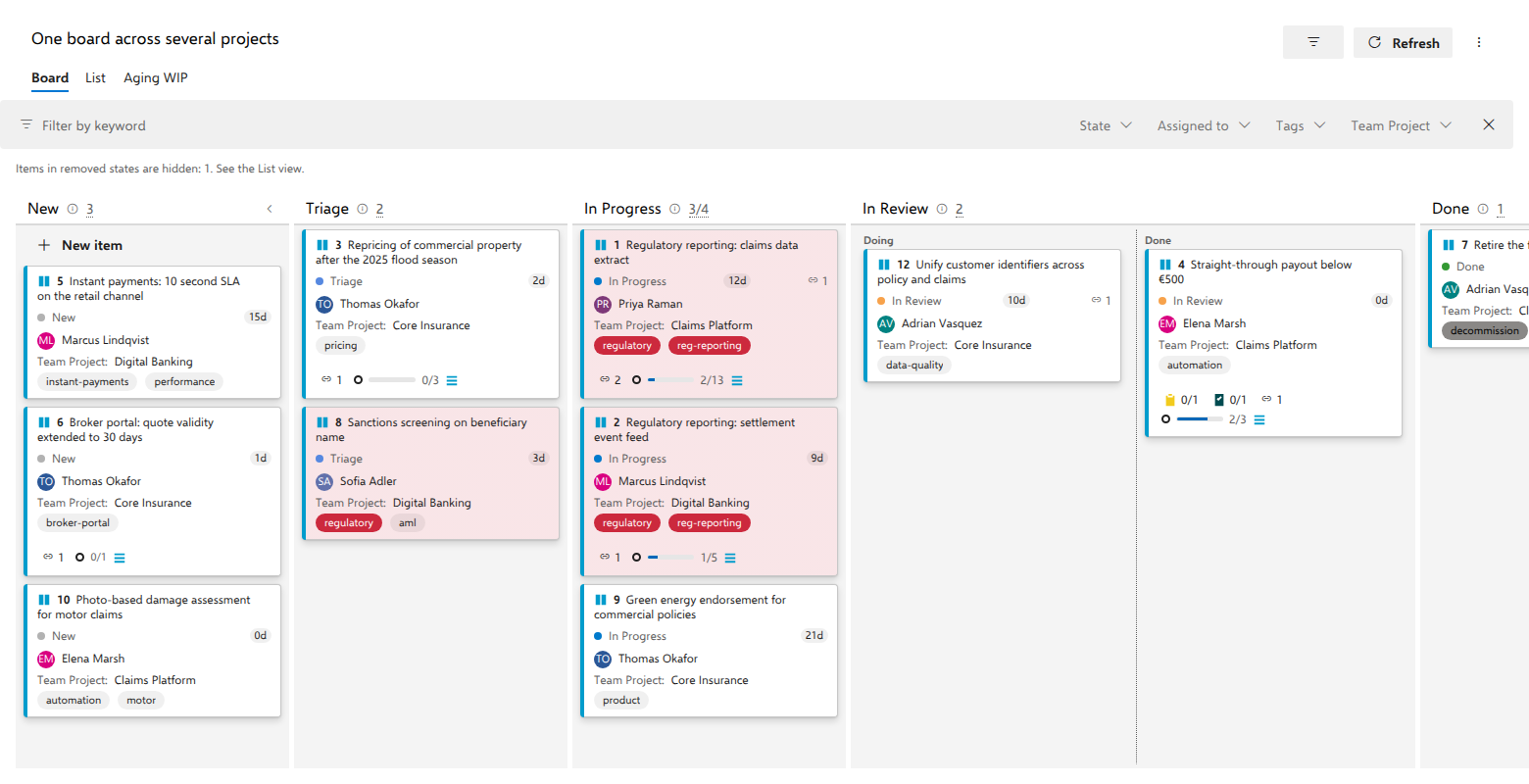
The demo has a second board built the same way, One regulatory program
across three projects. Its query asks for the backlog items tagged dora in
all three projects, so one program's work, DORA, sits on one board while each
item stays on its own project's backlog.
Step 1: the query
Only one thing about it differs from a single-project board: it must be allowed to leave its project.
- In the query editor, turn on Query across projects. Without it, Azure DevOps scopes the query to the project it is saved in and you get one third of your board.
- Keep the query type Flat list of work items, the natural shape for a set of change requests. A tree or direct-links query loads too, flattened to the distinct items it returns; with a work item type configured, that type becomes the cards and items of other levels are counted, visibly, as the tree's structure. One difference to know: As of snapshots are not offered on a link-based query.
- Leave it without an
ORDER BY, or end it withORDER BYthe order field the type derives, ascending, so the board, the List view and the query results page agree on one order. The board derives your process's own order field when the type carries it, otherwise the other platform field. Change Request in the demo carries no Backlog Priority, the order field of its Scrum-derived process, so with Stack Rank on the type it orders by Stack Rank, which is why the example below sorts by Stack Rank. - Save it in Shared Queries, at the top level or one folder down, because the board's query dropdown reads only the first two levels of the query tree, so a query buried deeper will not appear in it.
The query for the example:
SELECT [System.Id]
  FROM WorkItems
 WHERE [System.WorkItemType] = 'Change Request'
   AND [System.TeamProject] IN ('Claims Platform', 'Core Insurance', 'Digital Banking')
 ORDER BY [Microsoft.VSTS.Common.StackRank] ASC
Screenshot pending: Query across projects, flat, ordered by the order field
Membership is now a contract: if an item matches, it is on the board.
Step 2: the board
Nothing in the board settings is specific to cross-project boards. You create the board in the project you run the program from, the host project, and that choice matters for the rest of this page.
- Open Boards → AnyKanban in the host project (Claims Platform here) and select New board, then Use existing query in the gallery that opens.
- Name it, pick the saved query under Backing query, and pick Change Request as the work item type.
- On the Fields tab, add Team Project (
System.TeamProject) to the card fields. Where every card could come from anywhere, the project is the one piece of context the card cannot do without. - Select Create.
Everything else is ordinary board configuration and applies to all three
projects at once: a WIP limit of 4 on In Progress, a style rule Regulatory
deadline coloring every card tagged regulatory, tag colors, a definition of
done on every column, and In Review split into Doing / Done on a boolean field.
Two of those behave differently once projects are mixed:
- The WIP limit counts across projects. In Progress holding Regulatory
reporting: claims data extract, Regulatory reporting: settlement event
feed and Green energy endorsement for commercial policies reads
3/4: one number for the whole program, not three. That is usually the point. - A style rule or a split column can only test a field that exists on the
item. A rule on
Custom.RegulatoryDeadlinematches wherever that field is filled in; where the type has no such field the condition is simply false. Conditions never fail loudly. They fail quietly.
Where the columns come from
The host project's state model, and only that. The board reads the states of the configured work item type in the project the board lives in, orders them by state category (Proposed, In Progress, Resolved, Completed) and starts the board with one column per state. The example board gets New, Triage, In Progress, In Review, Done, taken from Change Request as Claims Platform sees it.
Items from the other two projects are placed by state name. As long as Digital Banking's Change Request also has a state called Triage, Sanctions screening on beneficiary name lands in Triage. The item's own project is never consulted. The same rule applies to everything else read once at load:
| Read from the host project | Consequence |
|---|---|
| The columns (the type's state model) | Every card is placed by state name against this one list |
| Which states are in the Removed category | An item in a removed state is hidden from the board, exactly like native boards, with a count above it, and the List view still shows it |
| Field display names and which fields are identity fields | Card field labels and the native people picker |
| The work item type's color and icon | The card header |
| Which order field the type derives in its own process | Whether a card can be reordered here |
Practical consequence: cross-project boards are comfortable when the projects share one inherited process, and fragile when they do not. If Core Insurance renamed Triage to Assessment on its own copy of the type, those items land in Unmapped.
When a state has nowhere to go
Items whose state is not among the board's columns are never dropped. They collect in an Unmapped column at the right, drawn as soon as the board holds one such item and kept even while the filter bar hides every card in it.
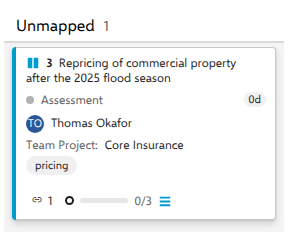
Unmapped is a diagnosis, not a workspace:
- It is not a drop target, because the fix belongs to the query, to the board's work item type, or to the diverging process.
- Swimlanes do not hide it. With swimlanes on, Unmapped appears at the right of every lane row as soon as the board holds any unmapped work, and each row's Unmapped holds only that row's items, so work from a project with a different state model stays on the board.
- Items in a Removed-category state are handled by the host project's definition too. Decommission the legacy batch clearing interface sits in the state Rejected, which is a Removed-category state, so it is hidden from the board with a visible count and stays in the List view. But "Rejected" is only removed-category as the host project defines it. A removed state that exists only in another project is not recognized as removed and goes to Unmapped instead.
The List view is the honest one here: it renders the complete query result, removed-state and unmapped-state items included, in query order. When someone asks "is anything missing?", the List is where you answer.
When you cannot read every project
A cross-project board will meet this case, not might: the query spans three projects and a user has work item read permission in only two. The board loads, and the items that user cannot read are not on it. Azure DevOps leaves unreadable items out of the query result before the board receives it, so the board never learns they exist. The rest of the program is usable. Be clear-eyed about what that costs:
- Nothing on the board says items are missing. The board cannot count what the query never returned, so no notice names the gap. The banner "The query matched {total} items, but this board could load only {loaded}." is for a different case: an item the query did return that the board then could not load, such as one deleted between the query running and the board loading.
- Column counts count what the user can read. A count of
3/4on In Progress means three items this user could read. Two people looking at the same board can legitimately see different numbers, and neither of them is told. - The List view does not compensate. It renders the same query result; an item the query left out is absent there too.
- Links are where the board does notice. A card can link to an item in a project you cannot read. That item is not counted, and the board says "Some linked-item counts are incomplete."
So: align read permissions with the board's audience. Everyone meant to steer the program needs read access to every project it spans, which is a governance decision rather than a board setting. Do not use a cross-project board as a control total; for "is everything accounted for", run the query itself as someone with full access. And where access genuinely cannot be granted, scope the board. A board per accessible scope is honest, and a board that silently under-reports is not.
Writing across projects
The board reads and writes all three projects. Dragging Regulatory reporting: settlement event feed from In Progress to In Review writes the state on the Digital Banking item, from a board hosted in Claims Platform, with no extra configuration. Four things are worth knowing about those writes:
- Rank is one order across the projects that share a process. Reordering
writes the order field on the work item, and the new value is the midpoint
between its neighbors, regardless of which projects the neighbors belong
to, as long as those projects' processes order by the same field. The board,
the List view and the query's
ORDER BYtherefore all show one interleaved order, not three. - A project whose process orders by another field is shown and never reordered. A card from a project on a Scrum-derived process (Backlog Priority) on a board hosted by an Agile project (Stack Rank) sorts after the cards that share the board's order, moves between columns and lanes, and cannot be dragged within a column; its menu says which field it orders by, and the board's settings say so too. If a different project's copy of the type carries neither ordering field, its cards sort after the others, cannot be dragged within a column, and the notice above the board names the type.
- Process rules are the item's own. The moment a drag starts, and again when you open a card's context menu, the board asks the server which target states it would refuse for that specific work item, using validate-only checks that write nothing; the verdicts land while the drag is still in progress. Those verdicts come from the rules that govern that item, in its project, for you, so a Digital Banking restriction dims a column on a Claims Platform-hosted board correctly. Refused columns are dimmed while dragging and left out of the Move to column submenu in the card's right-click menu. There is no setting that turns this off: the probe asks the server rather than interpreting process rules, and it fails open: when it cannot answer, nothing is dimmed and the server decides on the drop.
- Every write is revision-checked, and a rejection is never silent. If someone changed the item first, the board re-reads it and retries once; if the change cannot be applied, whether by a work item rule, a required field or no write permission in that project, the card reverts to server truth and a message card shows the server's own explanation. There is no separate "you lack permission" text: what you see is what Azure DevOps said.
Inline add is the one exception to "the board writes everywhere". The
New item button on the first column always creates the item in the host
project, with the board's work item type, the title you typed, and field values
derived from the query's own WHERE clause. System.TeamProject is never among
them. On this board, inline add means "add to Claims Platform". To raise a change
request in Core Insurance, create it there; it joins the board at the next
refresh, because the query says so.
A card's linked backlog items may live in any project, and the link is always Related, never parent/child, precisely because a cross-project card must be able to point at several teams' delivery work at once without owning any of it.
What the board still cannot do by project
Know these before you promise them to a steering group:
- The keyword box does not match the project. It matches the ID, title, state and tags. The facets beside it are keyword, State, Assigned to and Tags, plus one dropdown per configured card field, so once Team Project is on the cards (step 3 above) a Team Project facet slices the board by project, client-side and at no extra call cost.
- The List view can show the project. Add Team Project to the List's columns in the board's settings (the List tab, or Column options above the list), and every row names its project. How wide each column is stays yours to drag.
- Columns are the board's own, but their states come from the host project. A new board starts with one column per state of the host project's copy of the type. Under Settings, then Columns, you can rename, reorder, add and remove them and put several over one state (Put two columns over one state). Every column still maps to one of the host type's states, so a state that only another project's copy of the type has lands in Unmapped. A board that takes its layout from a team's board shows that team's columns instead, and they are changed on the team's board.
- Dragging keeps working on both views while a filter is active: a drop lands directly above the visible item below the slot, after any hidden items between, so the order you see afterwards is the order you arranged.
Troubleshooting
| Symptom | Cause and fix |
|---|---|
| Only one project's items appear | The saved query is not set to Query across projects, or its WHERE clause still restricts [System.TeamProject] to a single project. |
| Cards from one project all sit in Unmapped | That project's copy of the work item type has state names the host project's type does not have. Align the process, or host the board in the project whose state model you want as the column set. |
| Two colleagues see different column counts | They do not have the same read access across the projects the query spans. Azure DevOps leaves the items a person cannot read out of that person's query result, and no banner reports it. Grant matching read permissions. |
| A drag is refused only for one project's cards | That project's process restricts the transition, or orders by another field (the card menu says which). The message card carries the server's own explanation. |
| New item created the item in the wrong project | Inline add always creates in the project hosting the board. Create the item in its own project instead. |
| A style rule never colors cards from one project | The condition names a field that does not exist, or is empty, on that project's copy of the type. A missing value evaluates to false. |
Checklist
- Saved query is flat, has Query across projects on, and carries no
ORDER BYor sorts by the order field ascending - Query is saved in Shared Queries, no deeper than one folder
- Host project chosen deliberately, because its state model becomes the columns
- The work item type's states match across all the projects the query spans
- The projects the query spans order by the same field; a project on another process family is shown but not reordered
-
System.TeamProjectadded to the card fields - Everyone who steers the program has read access to all the projects it spans