Put two columns over one state
Your team's board has Analysis, Development and Testing. Your process has one state for all three: Active. On the native board those are three columns, and they can be three columns here too: define the columns yourself and let three of them sit over the same state.
Before you start
A named board, a work item type on the General tab, and a text field on
that type to record which column a card is in. The demo process uses
Custom.BoardColumn. Adding a field is a process change, so an admin does it
once, either by hand (Prerequisites) or by executing the plan the
organization settings page composes. AnyKanban never changes your process
without that click.
You only need the field to put two or more columns over one state. Renaming the columns, or reordering them, needs nothing at all.
Steps
- Open the board and select Settings, then Columns in the left rail.
- Pick the field under Column placement field. The list offers the text fields you added to the type, meaning your custom ones. Native and hidden fields are never offered.
- Below it, a strip of tabs lists your columns in board order, seeded from the states; the selected one opens its form underneath. Select + Add column, name it Analysis, and choose its state: Active.
- Use Move up in that same form to put it where it belongs. A new column arrives at the end of the strip, and the settings will not save a column after a completed one. The selection follows the column as it moves, so you stay on the one you are editing.
- Repeat for Development. Both now say Active under state.
- Rename the state-named columns to whatever your team calls them, if you like: select one in the strip and type over its name. A rename keeps that column's WIP limit, definition of done and split setting.
- Select Save.
What you should see
Three columns where there was one, all over Active. Every card that was in the old column is now in Analysis, the first column of its state, because none of them has been placed yet.
Drag one to Development. Its state does not change; nothing about the work
item's workflow moves. What changes is one field: Custom.BoardColumn now reads
Development. It shows on the work item form only if someone has placed the
field there, and a field created by the plan on the organization settings page
is not. You can always add it as a column to query results, or query it in WIQL:
SELECT [System.Id] FROM WorkItems
WHERE [Custom.BoardColumn] = 'Development'
Drag it onward to Done and both change together, in one write: the state becomes Done and the placement follows.
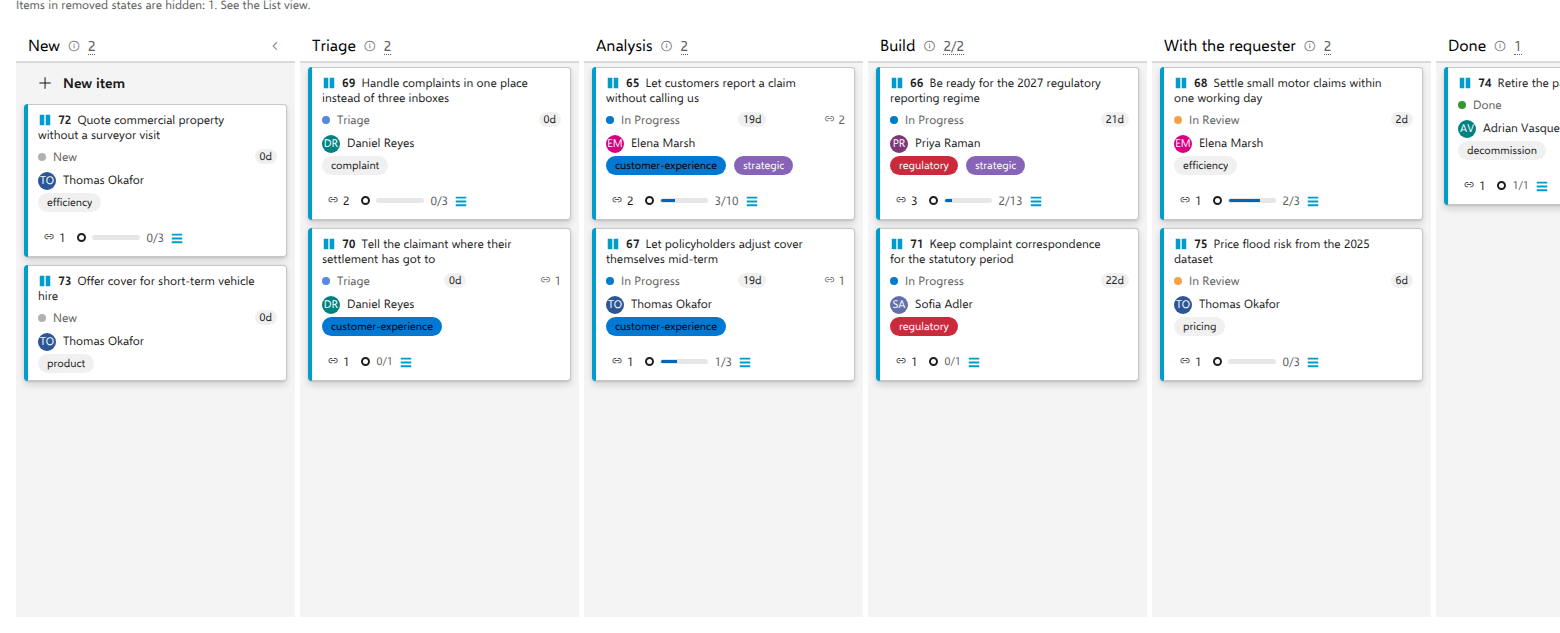
On the demo's business-request board the two columns are Analysis and
Build, both over In Progress, and every card in either one still reads In
Progress on its state row. In Review is renamed With the requester, which
needs no field at all: it is still one column over one state.
Notes
The state is always the truth. A card sits in Analysis because its state is Active and its placement says so. If the placement says something that no longer exists, because you removed the column or renamed it, the card falls back to the first column of its state. Nothing is lost and nothing lands where its state does not allow.
That is also why editing columns never rewrites your work items. Rename, reorder, add or remove as often as you like: no bulk write happens, because no stored value can do worse than stop choosing.
Every state needs a column. The settings refuse to save a layout that leaves one uncovered, because cards in that state would have no column of their own and would collect in the Unmapped column at the right of the board.
Completed columns go last. A column whose state is in the Completed category cannot have a non-completed column after it. Rollups count by category, so that arrangement would report cards as done while the board draws work continuing after them. If the state is not really terminal, the fix is its category in the process, and the message says so.
Without the field, a layout with two columns over one state falls back to one column per state and tells you which field is missing. It does not half-work.
One board's columns are its own. Two boards over the same work item type can name and arrange their columns differently. A board whose columns are one per state never writes the placement field at all, so it cannot disturb the ones that do.