Put the backlog in the order of its requests
The business keeps its requests in order on a request board. When it moves a request up, the backlog items that deliver that request should move up too. Take priorities does that on demand. It works out which backlog items sit out of their requests' order, shows you every change it would make, level by level, and writes them only when you press Apply.
It never runs by itself, and it changes nothing but the backlog order of the items it listed.
Before you start
- A board of backlog items that names a request board in its settings. See work that sits out of request order sets that up, and the marks it draws are the first sign there is something to reorder.
- The board must be shared, under a team's group or in the project's board list. A personal board cannot take priorities, because nobody else could see which board reorders their backlog.
- The board shows its cards in the backlog order: its query has no
ORDER BY, or sorts by the order field ascending. - You can edit the items it will reorder. Every write runs as you, under your own Azure DevOps permissions, and the process's own rules still apply.
Steps
- Open the board and open Settings.
- On the General tab, directly below Request board, tick Let Take priorities from Change Request reorder the backlog. The setting names the request board's own work item type, so on your board it may say Business Request or another type.
- Read the confirmation, press Turn on Take priorities, and press Save.
- Open the … overflow, on the board or in the List view, and choose Take priorities from Change Request.
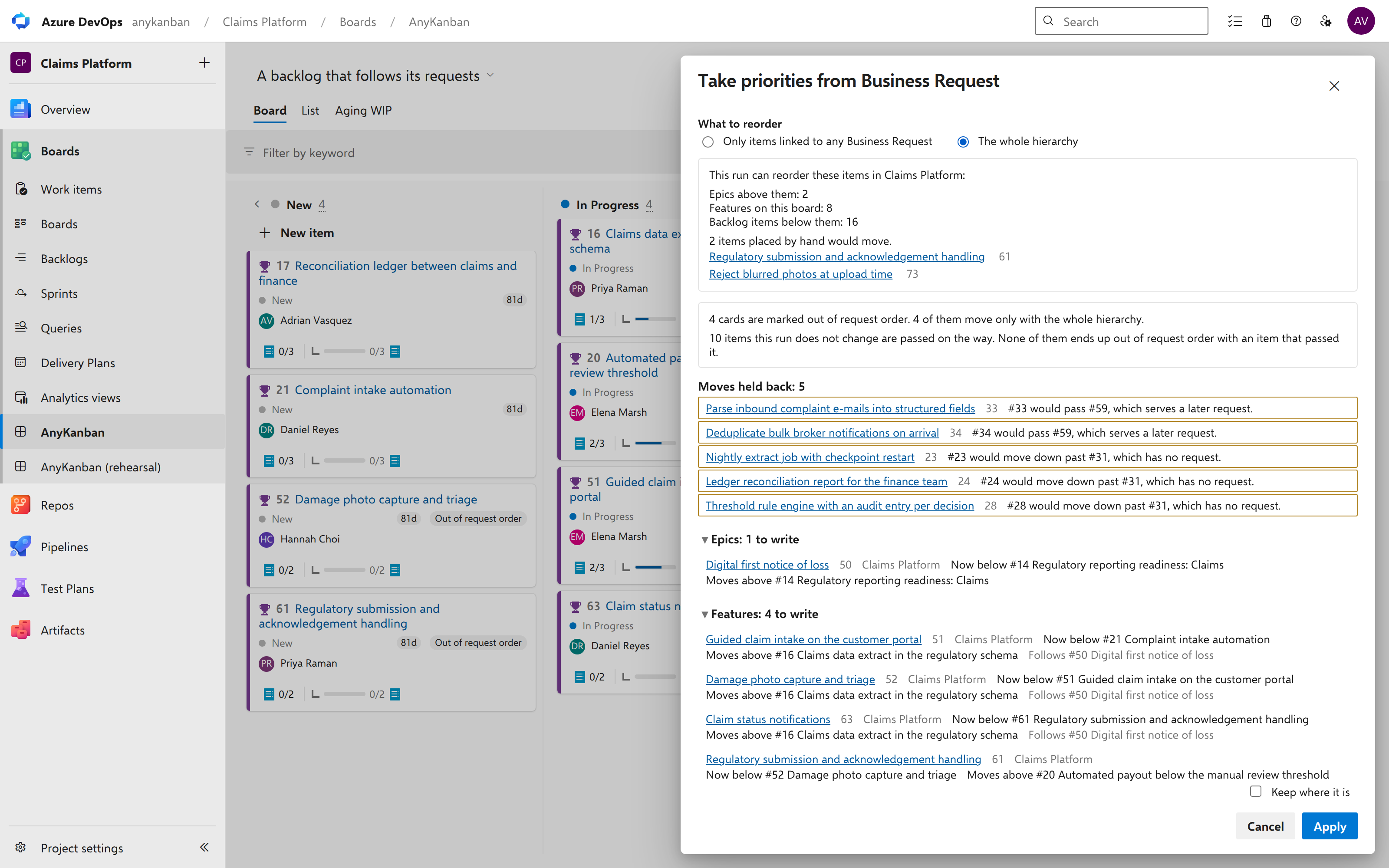
- Under What to reorder, keep Only items linked to any Change Request, or choose The whole hierarchy to reorder every level from the top, items without a request of their own included. The section about it below says when each one fits.
- Read the preview. Expand a level to see each item it would write.
- Press Apply to write it, or Cancel to leave everything as it was.
What you should see
The preview opens in a panel titled after the command. Its first lines say what this run can reorder in the board's project, level by level: the cards on this board, the items above them and the items below them, each with a count. Below that come the items it will leave alone and why, a line about the board's marks, the moves it is holding back, and one section per level listing every item it would write. Each row names the item, its area path, where it is now (Now below #120 Claims intake) and where it goes (Moves above #118 Fleet quote).
When there is nothing to write, the panel says why instead: no item here is related to a request of that type, the related requests cannot order any item, the related items could not be read, or everything is already in request order.
After Apply the panel reports its progress, first while Azure DevOps checks each write and then while they are written, and ends with how many items it wrote. The board picks up the new order on its next refresh, within a couple of seconds.
Notes
Which items move. With Only items linked to any Change Request, the choice the panel starts with, only items with a request of their own: a work item of the request board's type, Related to the item itself, in a state that is not finished or removed. Each such item is placed by the rank of its own request, the best one when it has several. On each level the run keeps the largest group of those items that is already in request order exactly where it is, and moves the rest, each the shortest way: up to directly above the first kept item whose request comes later, or down to directly below the last kept item whose request comes earlier. Each level is planned on its own.
An item that takes its request from an item above it, such as a story under an epic that is linked to a request, does not move with this choice. The whole hierarchy moves those too, and has a section of its own below.
Which levels it reaches. All of them, from the top of the backlog (epics, or a custom level such as initiatives) down to the requirements, and never tasks. On the board's own level it works with the cards of the board's query, in every column. Above them it works with the nearest item on each higher level, and below them with the items under them, down to the requirement level. A level that nothing on the board reaches has nothing to write. Collapsed columns and lanes are included, and the preview says how many cards sit in them.
Whose items it may change. On a board filed under a team, only items in the team's area paths, on every level, the board's own cards included. If the team's area paths cannot be read, the run reorders nothing and says why. On any other board, only items whose area path is one that the board's cards use, or sits under one. The project's root area counts only for the items that sit on it. Items in other areas keep their place and are listed by area. Tick Also reorder these beside an area to include it in this run. The choice is not remembered.
What it never changes. Tasks. The requests themselves. Items in another project. Finished and removed items. Items with no backlog position yet, which the preview lists so you can place them once by hand. Items whose type orders by another field than its level does. Items outside the levels it reaches. Items in other areas, unless you add their area for this run. On each item it writes, it changes the order field and nothing else: no state, no area, no other field, and no link. It never links an item to a request, so a request link is still only ever made by a person.
Items it passes. In a backlog, your items sit among items this run will not change: other teams' work, items without a request, items it may not write. A move passes some of them. The run follows one rule there. An item that has a request of its own is passed only in the direction request order says, so it never ends up out of request order with an item that passed it. An item with no request is passed without being compared. The preview says how many of each a run passes. For everyone else this means that none of their items is written, that their own order does not change, and that where one of their items has a request, yours move past it only in the direction request order says. The whole hierarchy compares by the nearest request instead, so a request taken from an item above counts, and it is stricter about items with no request at all. Its section says how.
Two requests with the same rank are told apart by their id, the way the request board lists them. Items whose request has no place on the request board yet come after every item whose request is ranked, as one group.
Moves held back. When the only way to place an item would pass an item serving an earlier request, an item whose request or links could not be read, or a stretch of the backlog the run could not read in full, that move is held back. It is named with its reason, for example Story 1 would pass #4, which serves an earlier request, and nothing about it is written. A move is never half done: it is written whole, or it is held.
When there is no room. Items sometimes share one rank, or sit so close that no value fits between them. The run then gives new ranks to the shortest stretch of items it may write, keeping their order, and lists each one as Rank rewritten, place unchanged. When even that does not fit, the moves in that stretch are held back.
The marks, and why some do not move. The board marks an item out of request order by its own request or the nearest one above it. The first choice moves only items with a request of their own, so the panel says how many of the marked cards move now, how many would move only with The whole hierarchy, and for the others, why not: they take their request from the item above them and neither choice moves them, they are already in order with the other items that have their own request once the run is applied, they are in another project, your filter hides them, they joined the board after the preview opened, you kept them where they are, or the run may not write them.
Items you cannot open. The preview cannot see an item you have no permission to read. It does not list such items, and it cannot keep a move from passing them, so whenever it lists a write it says so.
Filters. If a filter is on when you open the preview, the run moves only the cards the filter shows, and the levels above and below follow those cards. The other choice, Every card on this board, widens the run to all of them. Both show their count. What the run reorders is fixed when the preview opens, so changing the filter afterwards changes nothing in it.
Bugs. On a board filed under a team whose bugs sit with its requirements, a bug with a request of its own is reordered with the requirements, unless the board shows bugs as a checklist on its cards. On every other board bugs keep their place, and moves pass them like any item the run does not write.
What Apply checks first. If a change you made on the board is still being saved, Apply says so and waits for you to press it again once it has landed. Then it reads everything again, starting with the board's own query. If the query was edited, nothing is written and the board reloads, and if it now sorts the cards by something else, the plan can no longer be applied. If anything else changed the plan, the panel shows the new plan with the differences marked and asks you to press Apply again. Next it asks Azure DevOps to check every write without saving it. An item the process or your permissions would refuse is found there, before anything is written: it keeps its place, is marked, the plan is made again around it, and you are asked again. Only then does the run write, one item at a time, the top level first, reading each level's stretch of the backlog again right before writing it.
When a run stops. At the first item that someone changed while the run was writing, at an item Azure DevOps refuses, when items moved into a stretch it is writing, or when Azure DevOps is limiting requests. Nothing more is written, nothing is retried, and the report says how far the run got. Plan again reads everything again with the same choices and shows what is left to do, and Apply then finishes it. An item Azure DevOps refused stays where it is. The first choice passes it like an item the run does not write, and The whole hierarchy like an item you kept, as its section says.
Who sees the change. Every write is an ordinary edit made as you. It shows in each item's history under your name and reaches anyone who follows the item, as any edit does. Other teams' backlogs show the new order without saying which board it came from.
Turning it on and off. Anyone who can change this board's settings can turn the option on or off. Turning it on asks for a confirmation, and turning it off asks nothing. A new board never starts with it on, an imported board arrives with it off, and moving the board to your own list turns it off. It is separate from Reorder from this board: turning on one never turns on the other.
Another request type in the same project. Two request orders over one backlog would never settle. If another shared board in the same project has this option on and takes its priorities from a different request type, the panel names that board and offers no Apply. A board that only shows the marks does not count.
What it reads. Nothing until you open the preview, and nothing on the board's refresh timer. Opening it reads the request board's settings, the backlog levels, the items above and below the cards, their requests, and the stretches of the backlog the moves would cross, in batched reads that grow by one for every 200 cards and with the length of those stretches, never by one per card. Apply reads again before it writes, and then makes two calls for each item it writes: the check and the write. When a read fails, the panel says why and applies nothing: Azure DevOps is limiting requests (with the time to try again), the request board is gone or no longer gives an order, or the backlog could not be read.
When the command is not there. It needs a shared board of backlog items with this option on, a request board that gives an order, cards in the backlog order, and no As of date. While the board is still loading the command is missing, and it appears as soon as the board has loaded. On a board showing another level through the Level selector, the command is there and says to switch back to the board's own level first.
The whole hierarchy
Only items linked to any Change Request fixes the items whose own request says they are out of place, and leaves everything else where the teams put it. The whole hierarchy rebuilds the order of every level from the level above it. Choose it when the requests are linked high up, for example to epics, the business has reordered them, and the features and stories under each epic should line up behind it.
What it orders. It works from the top level down. On the top level the items with a request come first, in the order of their requests, and the items without one come after them. On every level below, an item follows the item above it: a feature goes wherever its epic ends up and keeps its order among that epic's other features, and the stories follow their features the same way. A story linked straight under an epic follows the epic, after the stories of the epic's features. An item with a request of its own is placed by that request instead, unless it is the same request its parent serves, in which case it stays among its siblings. An item with no parent on a level above and no request goes last on its level. As in the first choice, the run moves the fewest items that reach this order, each the shortest way. It can write many more items than the first choice: one epic that moves can bring every feature and story under it along.
Follows. A row that says Follows #120 Claims intake names the item its new place comes from. Most often that is its parent, or the nearest item above it on a higher level, and the row moves to stay behind that item as the order above changes. An item can also take its request from an item this run does not reorder: a closed item, an item in another project, or an item of a type that sits on no backlog level. Its row then names that item, and its place comes from that item's request. The item it names is not written, so you will not find it among the rows. Either way, a row that says Follows offers nothing to keep, because the item it names decides where it goes.
Keep where it is. An item without a request of its own was most likely placed by hand when the run would move it even if nothing above it moved. Below the top level, that is an item away from where its parent's place puts it among its siblings. On the top level, it is an item without a request that sits above items that have one, which the run puts first. An item on a lower level with no parent on a level above is judged the same way, against the items there that have a request or follow an item above. Such an item offers Keep where it is, and moves unless you tick it. Left clear, an item on the top level moves after the items that have a request. Ticked, it stays where it is for this run. Other moves may pass it, and the items under it follow it where it stays. The choice lasts while the panel is open, Plan again included, and is never stored. What counts as placed by hand is judged against the backlog as it stood when you opened the panel, so this run's own writes never make an item look placed by hand. Writes made before you opened the panel are different. After a run of the first choice, or a run that stopped before it reached the lower levels, the items under the items it moved stayed where they were, so the next time you choose The whole hierarchy they can show as placed by hand. Leave their boxes clear to bring them back under their parents.
What it never does. Everything the first choice never changes, it never changes either: tasks, the requests, other projects, finished items, other areas unless you add them. It changes no parent and no link, so every item stays where it sits in the hierarchy and only its place in the backlog order moves.
Items it passes. This choice compares every item a move passes by its nearest request: the item's own, or else the request of the nearest item above it that has one. So another team's feature under an epic that is linked to a request counts as serving that request, and a move passes it only in the direction request order says. An item with no request at all, of its own or above it, is passed without being compared, with one exception: a move down never passes such an item when it is outside the run, such as another team's unlinked work or an item the run does not reach. That move is held back and named, and a move up may still pass the item. Items you kept, and items Azure DevOps refused when it checked the writes, belong to the run, and the exception does not apply to them. One with a request, its own or one above it, is still passed only in the direction request order says.
Apply and Plan again. They work as they do for the first choice. Apply writes the plan of the choice that is selected, and Plan again keeps that choice and every Keep where it is.