Move a card without dragging
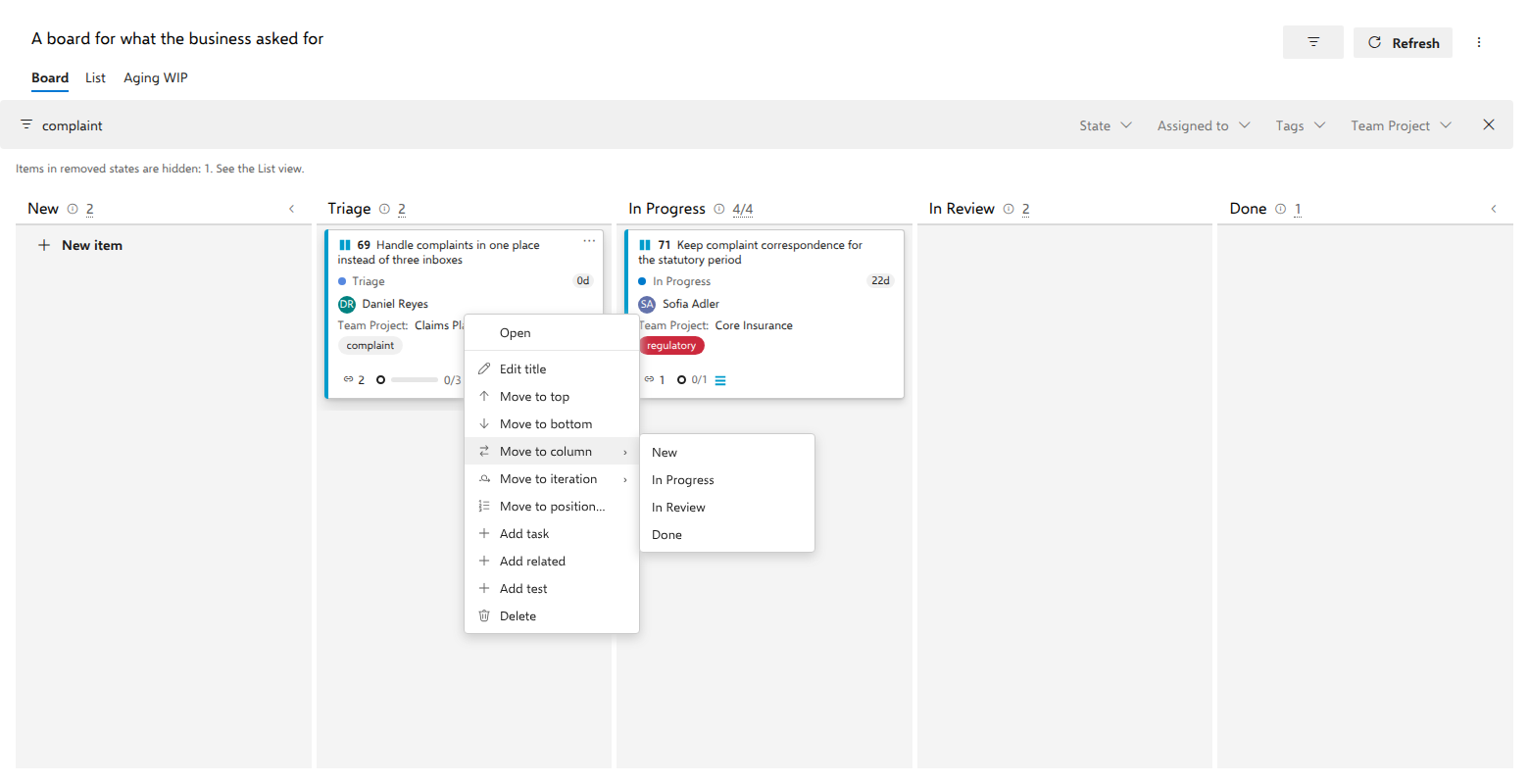
Dragging across a wide board is awkward. The card's right-click menu moves the same card in two clicks. This walkthrough keeps the keyword box narrowing the board to the two complaint requests, and the menu offers the same entries as it would with no filter at all.
Before you start
The menu exists only on a live board. In an As of snapshot the card has no context menu at all, because a snapshot cannot be changed.
Steps
- Open the board.
- Type
complaintinto Filter by keyword. The board narrows to the requests whose id, title, state or tags contain that text. Nothing is switched off: you could still drag a card here. - Right-click the card Handle complaints in one place instead of three inboxes. A small menu opens at the pointer.
- Read the entries. Move to column ▸ opens a submenu with one entry per other column. Move to top, Move to bottom and Move to position… reorder the card inside the column it is in now. The filter from step 2 takes none of them away, and the number Move to position… asks for counts the hidden cards too (see the Notes).
- Open Move to column and select In Progress.
What you should see
The menu closes and the card is at the bottom of In Progress, with the state written exactly as a drag would write it. Ends mean the real ends: Move to top and Move to bottom place the card at the top or bottom of the whole column, not of the handful of cards the filter left visible.
Columns your process rules would reject are not offered at all, because opening the menu asks the server which target states it would accept for you and this item, and rejected columns drop out of the list as the answers arrive.
Notes
Move to top, Move to bottom and Move to position… appear only when the board has an order field it is allowed to write, and they change nothing but the order, never the state, the Doing/Done side of a split column, or the swimlane. On a board of backlog items all three are absent unless Reorder from this board is on in the board's settings; in their place the menu says that the backlog owns the order, or that the query controls it. Where that setting is on and can take effect, and the query sorts by another field, a card of the board's own type names that field instead. On a card sitting in the Unmapped column, use a Move to column entry to give it a state the board knows. Escape closes the menu and returns focus to the card; so do Tab and a click outside it. Walk the entries with ↑ and ↓, which wrap around, or jump with Home and End. Inside a submenu the first Escape closes just that submenu.
Move to position… counts the whole list the card is in, meaning the right swimlane row and the right side of a split column, hidden cards included: with a filter on, the number it asks for is a position in the full column, exactly as the native board counts it. It opens with the card's current position selected, so you type the new number and press Enter. Cancel or Escape closes it and returns focus to the card's ⋯, and so does a save; the same holds for the confirmation Delete asks for.
The same menu is on every row of the List view, behind the ⋯ at the row's right-hand end or a right-click. There Move to top, Move to bottom and Move to position… count the whole List, because the List has no columns, and Move to column moves the item to that column without moving the row. See everything the query returned, in one list goes through each entry as the List offers it.
The submenus work from the keyboard: → or Enter opens one, ↑/↓ walk it, ← or Escape goes back to the main list.