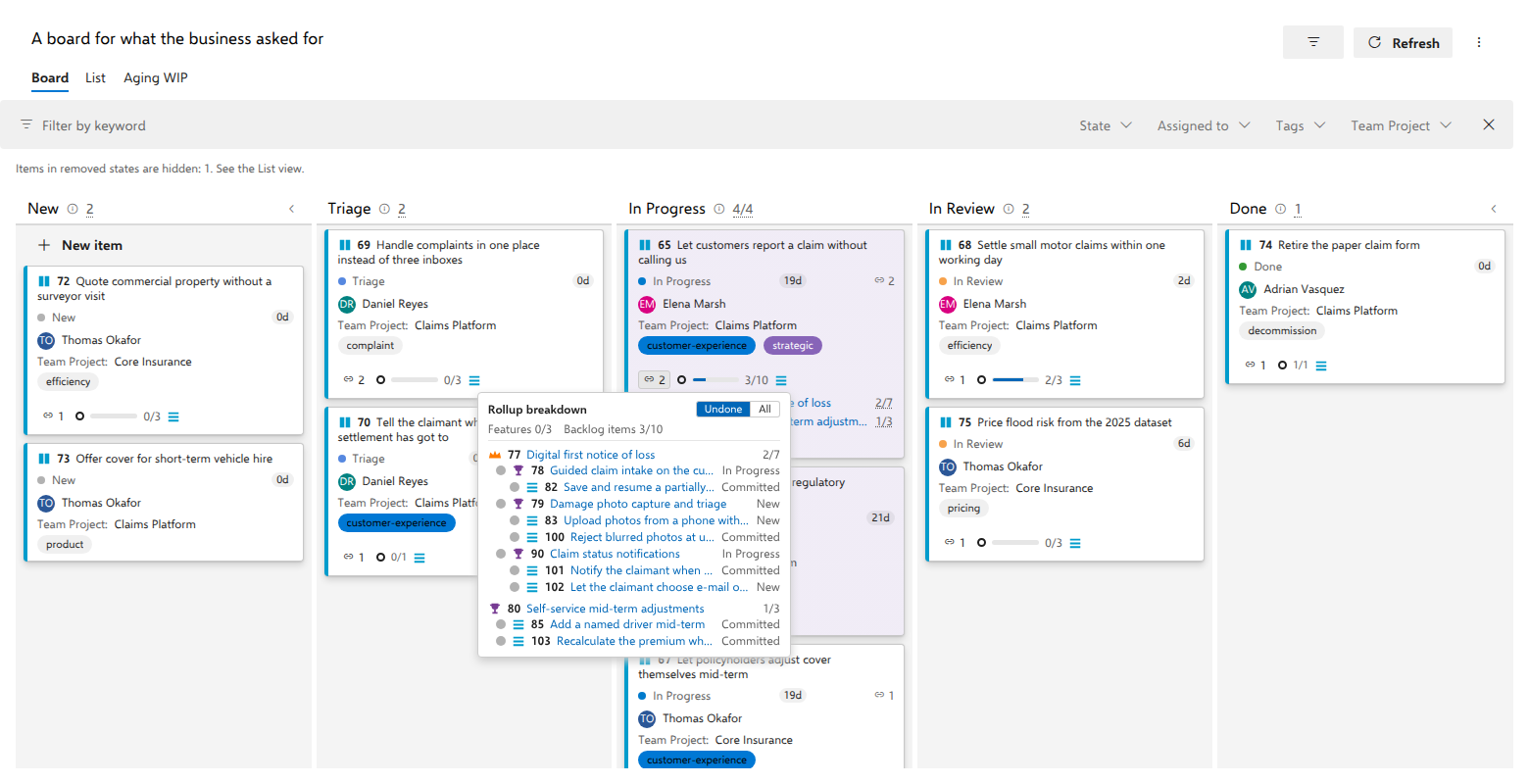
What the rollup counts, and what it excludes
Where it applies. Everything below is about the linked items' rollup, which a board carries when its own work item type sits outside every backlog. A board OF backlog items draws no related rollup at all: the question there is what the card's own children add up to, and the children section answers it in the same units, on the same card.
Short answer: the descendants of a linked backlog item that sit at your process's requirement level, judged done by state category. Everything above that level is visible but does not move the fraction, and everything left out is left out for a stated reason.
Why the requirement level
The requirement level, which is Backlog items in Scrum-derived processes, Stories in Agile and Requirements in CMMI, is the one backlog level that means roughly the same thing in every process family. A bar mixing levels would really measure how finely somebody decomposed their work, and two such bars could not be compared. So the unit is fixed, and it is read from your process: the rollup at the end of the chip row shows the requirement level's type icon beside the count, a screen reader hears "3/10 Backlog items" rather than "3/10 items", and the breakdown names every level in full words.
Intermediate levels are not ignored, they are just not the unit. On the demo card Be ready for the 2027 regulatory reporting regime, which links two epics and one feature nested under the first of them, the rollup reads 2/13 beside the Product Backlog Item icon, and its tooltip reads Rollup breakdown across 3 linked items, while the breakdown strip in the details flyout carries one entry per level: Features 0/5 and Backlog items 2/13. The five features are real and visible; they do not move the bar.
A descendant counts as done when its state category is Completed, judged by its own project's process and never guessed from a state's name.
What is excluded, and why
Four exclusions, each written on its dimmed row in the flyout:
| Reason on the row | What happened |
|---|---|
| Removed (not counted) | The item is in a removed-category state. It leaves both sides of the fraction: counting it as "not done" would make an epic forever unfinishable. |
| Another project (not counted) | The descendant lives in a different project than the linked item it hangs under. Native boards do the same. |
| Unknown state (not counted) | Its process could not judge the state or the type. Guessing here is exactly what the category model exists to prevent. |
| Unavailable (not counted) | The tree promised the item but it did not come back, whether deleted or beyond your permission. The two are indistinguishable from outside, so neither is claimed. |
The fallback, and why it is labeled
A card linked straight to a backlog item whose children are tasks has descendants but none at the requirement level. The count then falls back to that item's direct children, and says so: the item's line in the breakdown reads (child items (direct)) after its count, and the rollup's accessible name uses those words in place of a level name. A silent unit change makes two bars incomparable.
A linked item the total leaves out
A card can link one item with backlog items beneath it and another with none: a Feature broken down into three backlog items, beside a Feature nobody has broken down yet. The rollup then reads 0/3. The second Feature adds nothing to it, because the unit is the requirement level, and counting a Feature as a fourth backlog item would be exactly the mixed bar described above. A linked epic whose features have no backlog items yet, and a backlog item linked straight in whose only children are tasks, stay out of the total for the same reason.
Left out of the total is not left out of sight:
- the rollup's tooltip says how many linked items have nothing to add, for example One linked item has no Backlog items to add, so this count leaves it out;
- the breakdown's strip still has one entry per level that has judged items, whichever linked item they sit under, so the undecomposed Feature appears there as Features 0/1 beside Backlog items 0/3. Each item is in it once, judged by the linked item in its own project, so the order the links were added in never changes the strip;
- its own heading in the breakdown carries its own answer: 0/1 for an item nobody has broken down, or its direct children for a backlog item whose children are tasks.
A linked item can also add nothing because its backlog items cannot be counted here: they live in another project, or you are not allowed to open them. The total leaves that item out as well, but the tooltip never says it has no backlog items, because it may well have some. Those items are reported the way every exclusion is: the warning banner says the counts are incomplete, and the breakdown shows each one dimmed with its reason, from the table under What is excluded, and why above.
When no linked item has backlog items beneath it, nothing is left out: each one counts as itself, or by its direct children, and the total covers them all.
Why the rows need not add up
The card's rollup counts distinct work items: link both an epic and a feature nested under it, and the shared descendants are counted once. Each row keeps its own full truth including the overlap, so a row's count can legitimately exceed the rollup's. The alternative is a card total that depends on link order.
That is the demo card above. Its three rows read 1/8, 1/5 and 1/3, which sum to sixteen, and the rollup still says thirteen: the nested feature’s three backlog items are already inside its epic’s eight, and each of them is counted once.
What the estimate adds up
Beside the count, a rollup shows the sum of your process's effort field,
Σ 13/40: done over total. The field is the process's own, Effort in
Scrum-derived processes, Story Points in Agile, Size in CMMI, whatever an
inherited process mapped, and it is read from the process rather than chosen
per board, for the same reason the order field is: two boards over the same
items must never add up two different fields.
The sum takes the items at one backlog level, the requirement level unless the board's settings say otherwise (Settings, the Annotations tab, Sum estimates at). Estimates often exist on Features before the backlog items beneath them are written, and a feature summed together with its own stories would count the work twice, so one level is summed and the levels above and below it are left alone. A linked item that itself sits at that level adds its own value, however much hangs beneath it. Each item is summed once, however many linked items hold it. A removed item is out of both sides. An item in another project is left out and said when only linked items in other projects reach it. When a linked item in its own project holds it too, it is summed, even where the count lists it under another linked item as another project's. An item its process cannot judge is left out and said.
An item at the counted level without a value is counted, never taken as
zero: the figure carries a ?, its tip says how many are without a value,
the breakdown says it beside the level, and the item's own row reads no
value. A value of 0 is a value. A board whose teams never estimate shows no
figure at all, rather than a 0/0? on every card. Each item is summed by
its own project's process. Where the board's own process maps no effort
field, the settings line says that this project's work is not summed, and
linked work in another project is still summed by that project's field.
Where linked work sits in a project whose process maps none, the tip names
that project and those items' rows print nothing. If the values cannot be
read at all, the count stays, and the tip and the breakdown say the
estimates could not be read this time.
The count and the sum answer two questions and may stand on two levels: the count keeps counting the requirement level, the sum the level the board chose. They can cover different linked items too. A linked epic whose features have no backlog items yet is left out of a backlog-item count beside one that has some, but its features still add their values at the Features level. So the breakdown gives each level's sum its own entry, after the counts, rather than beside one of them. The values ride the read the rollup already makes. A linked item at the counted level joins that read, so it can carry its own value.
Where a + comes from
The descendant tree is read at most seven levels below a linked item and keeps at
most 2,000 descendants in all. Past either cap, or when items the tree promised
could not be read, every affected count carries a trailing + meaning at
least, and one warning appears on the board. Deliberate exclusions produce no
+: a removed descendant passes in silence, while one in another project or in
a state its process cannot judge is named in that same warning and shown as a
dimmed row with its reason.
What it means in practice
Counts are links to their own evidence.
That is the principle the rest of this chapter is an elaboration of, and it is why the numbers here are worth putting on a card at all. A count you cannot check is a count somebody ends up re-checking by hand somewhere else, and at that point the board has cost time rather than saved it.
- So every count opens what it was made of. Click the rollup at the end of the chip row for the whole card, or a row's count for that one linked item. That is true on every board where a card carries a rollup. On a board of backlog items, a card above the requirement level, such as a Feature or an Epic, counts the backlog items anywhere in its own subtree and opens the same breakdown. A card at the requirement level carries no rollup, because the only level below it is tasks, and its task chip already counts those. The flyout always draws the hierarchy, excluded items dimmed with their reason spelled out; Undone (the default) trims it to what is still open, All shows everything the fraction was computed from, finished work included.
- An undecomposed item counts as itself. The demo card Tell the claimant
where their settlement has got to reads
0/1, its unit naming what was counted: a screen reader hears "0/1 Epics" for a bare epic, never a borrowed "Backlog items". A genuine0/0survives for structure whose owner deliberately removed it, and a0/0+keeps the full bar, because "could not count" is news. - The rollup never rides the board's refresh timer: it is recomputed on load, when a linked item changes, when the set of links changes, when a form opened from a row closes, when Azure DevOps confirms a checkbox you ticked or cleared on a row it counts, and otherwise at most every five minutes.
- An as-of snapshot has no chip row and no rollup, because descendant counts have no historical support, and today's hierarchy beside a past date's fields would be a quiet lie.