Why some items sit in Unmapped
Short answer: every column of a board stands on a state of the work item type the board is about. On a board of a backlog level that holds several types, such as Bug beside Product Backlog Item, the columns cover the states of each of those types the query returns. An item whose state no column stands on has nowhere to go, so it goes into an extra column called Unmapped, at the right, instead of disappearing.
Where the columns come from
A board is bound to one work item type. By default its columns are that type's state model: every state except the Removed-category ones, ordered by state category (Proposed, then In Progress, then Resolved, then Completed). On a board of backlog items whose level holds more than one type, the columns are the states of those of its types the query returns, together, each state once, in the same category order.
A board can also carry its own column list, renamed, reordered and with several columns over one state (put two columns over one state). That changes the names and the order, not this page: every column still stands on a state, the settings refuse a layout that leaves a state uncovered, and an item whose state no column stands on still lands in Unmapped.
A query, meanwhile, has no such restriction. It can return several work item types, and it can return items in states that were added to a process after the board was built. Those two facts have to meet somewhere.
Why not simply drop them
Membership on the board is the query's promise: if an item matches the query, it is on the board. An item quietly removed from that promise is the worst outcome available: the count is wrong, and nothing on screen says so. Parking it in a visible column keeps the board honest and leaves the fix with the person who can make it.
When the result set contains a type other than the board's and one of those cards actually ends up in Unmapped, the board says so above the columns, naming the states that stranded them: "Some cards have work item types whose states do not match the columns for “{type}”. They appear in Unmapped: {states}. Filter the query to matching work item types, or review those cards in Unmapped." On a board of a level that holds several types, the columns come from more than one type, so the notice names none: "Some cards have work item types outside this backlog level, so their states do not match its columns. They appear in Unmapped: {states}. Filter the query to this level's work item types, or review those cards in Unmapped." A foreign type whose states all match columns raises nothing, because nothing went wrong.
The one case that is left out instead
A board of backlog items boards a level, and the level is what the board is: a board of stories is a board of stories, and its columns are that level's states. An item from a different backlog level, an epic among the stories, is therefore not a card that failed to find a column. It is not a card at all.
So it is left out, and the board says so above the columns: "{count} items from other backlog levels are not shown because this board is set to {level}. Choose another level to show those items, or narrow the query." The level selector in the toolbar is where the level is chosen, and it is what decides which level the board is about. Switching to the epics' level does not simply swap which of the query's items are cards, though: it boards the parents of the work the query found, so this board's own stories would leave and the features or epics that carry them would arrive. If what you want is a board of that level itself, give it a query for that level, as Board another level of the same query.
Apart from items in a removed state, which are left out for a different reason (see Why rejected work is hidden but counted), this is the only case where the board leaves an item out instead of parking it in Unmapped. It is still not quiet: the count is on screen, and it says why. Three things deliberately do not fall under it, and each keeps the older promise in full:
- a type on no backlog level at all: an impediment, a support request, a risk. There is no other level it belongs to, so it stays, lands in Unmapped if its state names no column, and the banner above explains it;
- a board whose own type sits outside every backlog. Those boards exist precisely because no native board does, and narrowing them would take away the reason they are here;
- items from another project. Whether a type is on a backlog level is a fact about the process that owns the item, so a board applies its process's answer only to the project whose process it reads its levels from. That is usually the project the board lives in. A board whose work item type comes from another project's process reads that project's levels instead: it leaves out that project's items of other levels, and the items of the project it lives in stay. Items from any other project always stay on the board, and land in Unmapped if their state names no column.
The two ways in
- A foreign work item type whose states differ from the board type's.
- A state the board's type does not have, including one added to the process later.
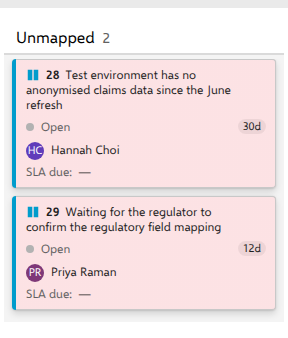
The demo shows both cleanly. On the board over types that never reach a backlog, columns come from Support Request. The two Impediments, Test environment has no anonymised claims data since the June refresh and Waiting for the regulator to confirm the regulatory field mapping, are in state Open, which Support Request does not have, so they land in Unmapped. Turn on + include Risks and the Risks join the same board in ordinary columns, because their state names (New, Triage, In Progress, In Review) do exist on Support Request. Being a foreign type is not by itself enough; the state is what decides.
What the column will and will not do
Unmapped is drawn while the board holds at least one unmapped item, and goes away when the last one leaves, whether you drag it out or its state is changed elsewhere to one the board has a column for. With swimlanes on it stands at the right of every lane row, so the columns line up from row to row, and a row without unmapped cards shows it empty with a count of 0. The filter bar does not remove it either. Hide every card in it and the column stays, still showing the unfiltered count. Its header carries only the label and a count: no state color, no WIP limit, no definition of done, no collapse control.
You cannot drop a card onto it: it is not a drop target, every path that could still place a card there refuses, and Unmapped never appears in the card menu's Move to column submenu. You can drag a card out of it into a real column, which writes that state like any other move. The server decides whether to accept it, and refuses with its own message if not.
What it means in practice
Unmapped is a diagnosis, not a workspace. Three fixes, in order of how permanent they are: narrow the query to the board's work item type; on a board whose type sits outside the backlog, change the board's work item type on the General tab so the columns match what the query returns (on a board of backlog items the General tab does not offer that, so give it a query for its level instead); or align the states in the process. Dragging a single card out is a fine answer for a one-off.