Add an item without leaving the board
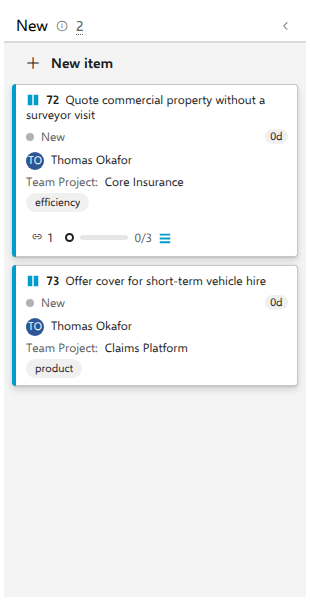
A request lands in the middle of a triage meeting and you want it on the board now, not after a detour through the work item form. The first column has a New item button: type a title, press Enter, and the card is there next to "Quote commercial property without a surveyor visit" on the demo board for what the business asked for.
Before you start
Inline add is offered only on a live board in the Board view, under the header of the first column. Three things remove it entirely: an As of snapshot (read-only); swimlanes, because the button is rendered only on the lane-less layout, so a board with lanes has no inline add at all; and showing another level through the toolbar's Level selector, because the board's query does not return items of that level, so a new one would disappear on the next refresh (see Board another level of the same query). The item is created as you, with your own permissions.
A board whose query matches nothing yet still offers it. The board draws the columns it would draw with cards, says "The query returned no items." above them, and the first column has New item, so the first bug on a new Bugs board can be added right there. The three exclusions above still apply: a board with swimlanes draws its columns without New item, and where its lanes come from a field they sit in one (no lane) row, because such a lane exists only once a card carries its value. A board with nothing to draw shows the sentence alone: the ad-hoc Board tab over a query that matches nothing, which has no work item type to read states from, and a board whose lanes all hide while empty (Show empty lanes off).
Steps
- Open AnyKanban under Boards, open the board and stay on the Board tab.
- Under the first column's header, select New item. The button is replaced by a focused title box reading Title, then Enter.
- Type the title of the item.
- Press Enter. To abandon instead, press Escape. Clicking somewhere else does not cancel the box.
What you should see
The box collapses back into the New item button and a card with your title appears in the first column, at the bottom of it. Where the board may write ranks, the item is ranked one step past the largest rank on the board, so it lands at the end rather than jumping the queue. On a board of backlog items, AnyKanban leaves the backlog order alone unless rank writing is turned on for that board, so the item is created with no rank, and an item without a rank sorts last. A board whose type has no order field writes no rank either, and neither does one whose query controls the order.
The item is created in the board's own project, as the board's work item type, with no state of its own. Azure DevOps gives it the type's default state, which is what puts it in the first column. Fields the backing query pins with a plain equality condition are filled in for you, so the new item matches the query where that can be guaranteed.
Notes
Not every query can be satisfied automatically: conditions using OR,
brackets, macros or anything other than a literal equality cannot be prefilled.
Adding an item brings the board's next refresh forward, and that refresh is
what checks whether the new id came back. If it did not, the card goes and an
info toast names it at the same moment: "Item {id} was created but does not
match the board's query, so it will not appear here." Note the id, open the
item and adjust it (or the query).
There is a second reason a new card can go, and it says so differently. On a board whose query returns more than 5000 items, only the first 5000 are drawn, and a newly created item usually sorts last. The item matches the query perfectly and simply falls outside what is on screen, so the toast says that instead.
If creation itself fails, say because a process makes a field required on creation, an error toast carries the server's own message and nothing is created. Fill the required fields in on the work item form instead; the board deliberately does not put up its own creation dialog.