Build a board for bugs when bugs are tasks
In Digital Banking, the Payments Incidents team manages bugs as tasks. Its defects never reach that team's requirement backlog, so the team has no bug board: Instant payment times out but is still booked on the beneficiary side, Sanctions screening skipped for payments initiated by the batch API and others like them exist, with states, tags and priorities, and nowhere on the team's own boards to see them flow. A query finds them, and a query is all a board needs.
This is the short version. A board for bugs when bugs are configured as tasks covers why the underlying team setting is rarely one team's to change.
Before you start
Confirm the situation in Project settings → Team configuration → Working with bugs: anything other than "bugs are managed with requirements" leaves the team without a bug board. Nothing about that setting has to change. The board below is driven by the query and by the Bug type's own states. AnyKanban reads the setting of the project's default team once, when a board is created, and only to propose a default (see Notes).
Steps
- Save a Flat list of work items query:
[System.WorkItemType] = 'Bug',[System.TeamProject] = 'Digital Banking', with noORDER BYor sorted by your process's order field ascending. - In Digital Banking, open Boards → AnyKanban and select New board, then Use existing query in the gallery that opens.
- Name it Digital Banking bugs, pick the query under Backing query (flat list, or a tree of work items), and pick Bug under Work item type.
- Select Create, then open the board from the list.
- Open Settings → Cards → Fields and add Priority to Fields shown on cards: priority is the number the triage conversation is actually about.
- On the Columns tab, type
3into the WIP limit box for the in-progress column, which is Committed here, and select Save.
What you should see
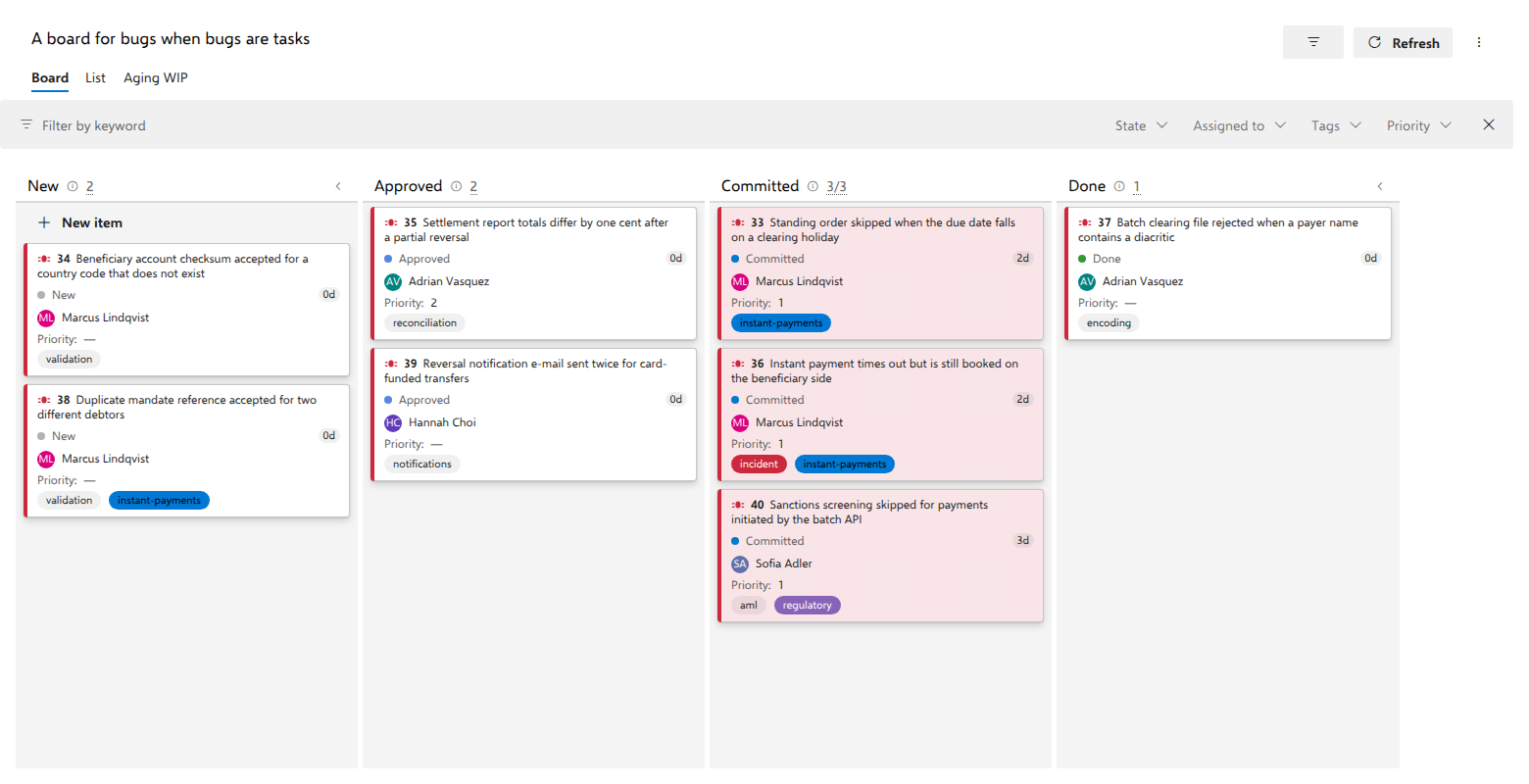
Four columns, New, Approved, Committed and Done, which are the Bug type's own states in category order. Your process will name them differently and that is fine: no state name is hardcoded anywhere, and the order follows the state category.
Committed holds Standing order skipped when the due date falls on a clearing
holiday, Instant payment times out but is still booked on the beneficiary
side and Sanctions screening skipped for payments initiated by the batch API.
The counter reads 3/3 and stays in the normal color: it turns red only when
the count is above the limit, and nothing is ever blocked either way.
Notes
Show bugs on cards is proposed once, when you create the board. If an administrator has set it under Defaults for new boards on the organization settings page, that answer is used. If not, AnyKanban asks the project's default team how it works with bugs, and ticks the box only when that team manages bugs as tasks. No other team is asked. In the demo organization, Digital Banking's default team keeps bugs with the requirements, so the box starts unticked there, even though Payments Incidents keeps them as tasks. Tick it under Settings → Cards → Annotations whenever you want child bugs on the cards.
After that the board stores its own answer and never re-reads the team setting. That is what makes the same option safe on a board spanning teams that disagree about it.
The board changes nothing outside itself. Bugs keep behaving as tasks on the backlog and on the sprint taskboard, and the board reads and writes as the signed-in user, so a rejected write reverts the card and shows the server's own message.