Build a board for types that never reach a backlog
Support requests, customer feedback, impediments and risks are real work with real states: Kestrel Logistics: claim 2026-04417 stuck after adjuster upload, Brokers find the flood exclusion wording ambiguous, Sanctions list refresh depends on one unmonitored scheduled job. None of these types sit on a backlog level, so Azure Boards has nowhere to put them and they are managed in a query result or a spreadsheet.
This is the short version. A board for types that never reach a backlog covers the state-model mismatches and the service-level styling in full.
Before you start
Pick the type whose flow the board is meant to show. That one type supplies the columns; the others ride along and are placed by state name.
Steps
- Save a Flat list of work items query over the types you want together.
For the demo support desk, Claims Platform with
[System.WorkItemType] IN ('Support Request', 'Feedback', 'Impediment'), with noORDER BYor sorted ascending by the order field the type derives: Stack Rank for Support Request in the demo, which does not carry Backlog Priority, the order field of its Scrum-derived process. - Open Boards → AnyKanban and select New board, then Use existing query in the gallery that opens.
- Name it, pick the query under Backing query (flat list, or a tree of work items), and pick Support Request under Work item type.
- Select Create, then open the board from the list.
- Optional, and usually worth it: open Settings → Swimlanes, put
System.WorkItemTypein Lane field (single-select, empty means off), leave the named lanes above it empty, and Save. The board renders one row per type.
What you should see
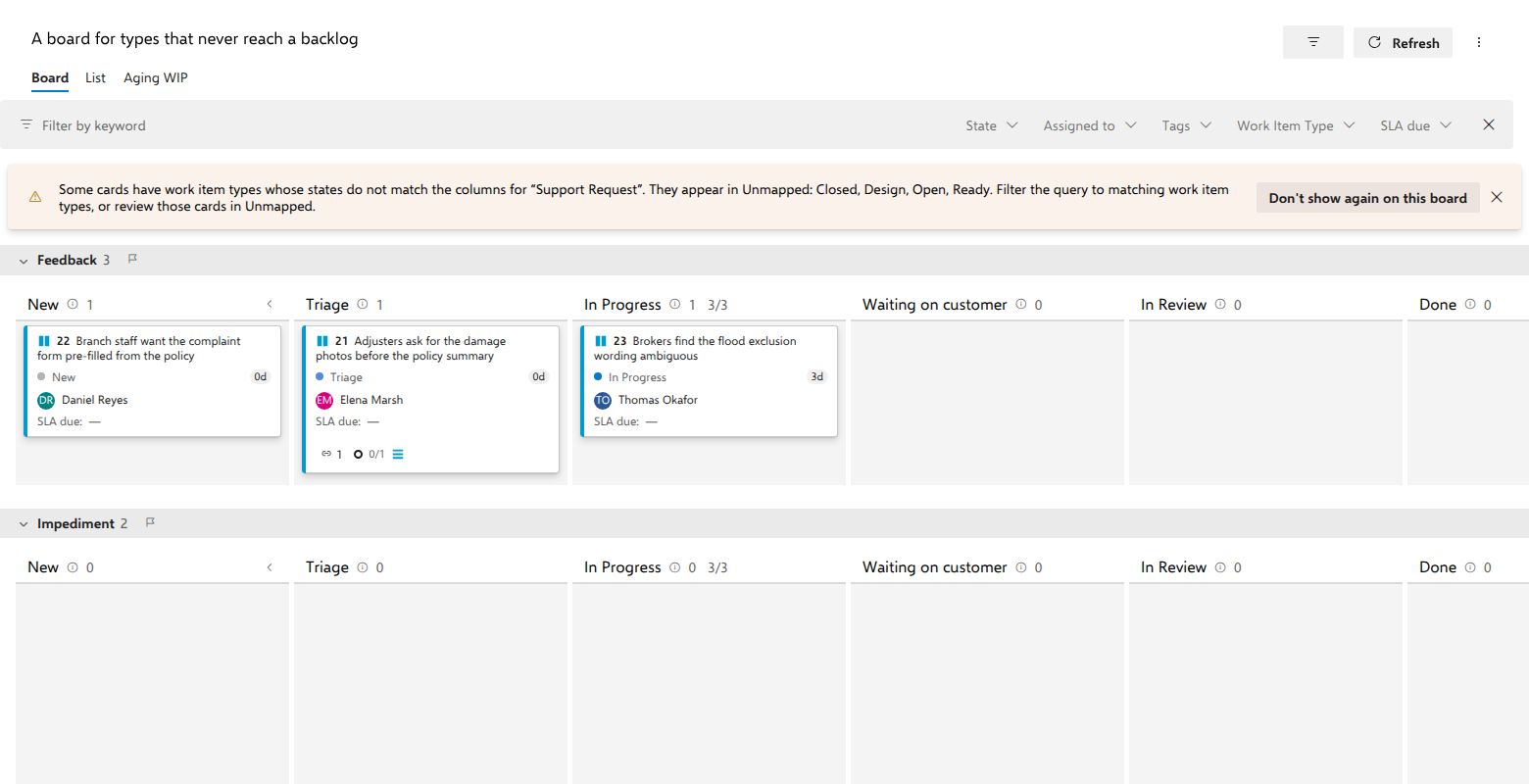
Six columns, New, Triage, In Progress, Waiting on customer, In Review and Done, which are the Support Request type's own states in category order. Waiting on customer is a column because this organization added that state; Rejected is not, because it belongs to the Removed category.
A warning card says that some cards have work item types whose states do not match the columns for Support Request, and lists the states that put them in Unmapped. With the three types above that is Open alone; the demo board in the picture also carries risks and test cases, and the test cases add Closed, Design and Ready to the list. Most items sit in ordinary columns anyway, because they share the vocabulary: Adjusters ask for the damage photos before the policy summary is a Feedback item in Triage and goes to Triage. The two impediments are the ones in Open, so they collect in Unmapped at the right. Had every foreign-type item shared the vocabulary, there would be no Unmapped column and no warning card.
Notes
Unmapped is a diagnosis, not a workspace: you cannot drop a card onto it, but you can drag a card out of it into a real column, which writes that state, and the server decides whether the item's own type accepts it.
With swimlanes on, two affordances step aside: the New item button on the first column is not rendered at all, and a WIP limit can no longer be edited by clicking the column header count. Set it on the Columns tab of Settings instead. Both come back if you clear the lane field.