Docs › Follow work through links
Link a request to the backlog items that implement it
"Let customers report a claim without calling us" is a business request, not a backlog item, because a backlog holds how the work gets built rather than what was asked for. Link the request to the epic and the feature that carry the work, and the card answers "how far along is this?" without anyone leaving the board.
Before you start
- A board over the requests. In the demo that is the board over Business Requests in Claims Platform.
- Permission to edit the request itself. Links are added on the work item form, and AnyKanban writes as the signed-in user.
Steps
- Open the board, select Settings in the header, and go to Annotations under Cards.
- Check that Show related work items on cards is ticked. A board over a type that sits outside your backlogs, such as Business Requests, has it on from the start. With it off, the linked items are never fetched and no rollup is computed. Linking is still available from the card menu on any board, but only a board with this on can show you the result.
- Click the card title "Let customers report a claim without calling us" to open the native Azure DevOps work item form.
- On the form, add a link of type Related to the epic "Digital first notice of loss" (Claims Platform), and a second one to the feature "Self-service mid-term adjustments" (Core Insurance).
- Close the form. The board asks for a refresh straight away instead of waiting for the next poll.
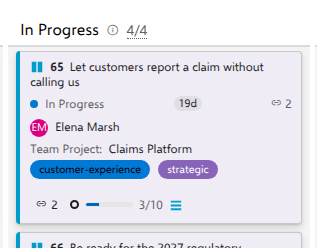
- On the card, select the link chip in the chip row, a link glyph with the number of linked items beside it, to expand the list. The same glyph next to the state counts the card's dependencies instead.
What you should see
Two rows, each a link that opens the native form: the epic and the feature. Planned work, meaning a linked item whose type sits on some backlog level of its own project, is listed first, and each row carries a colored dot taken from the state category that item's own process assigns it.
The rollup at the end of the chip row carries the count, 3/10, with the backlog item icon naming the unit: ten backlog items live under the two linked items and three of them are done. Click it and the breakdown answers level by level, in full words: Features 0/3 beside Backlog items 3/10. The rollup's tooltip adds across 2 linked items, and the breakdown lists each one. The unit, icon and word alike, comes from your process, never from us.
Notes
Cards link to backlog items as Related and never as parent or child. The direction of a hierarchy link would depend on relative level, Azure DevOps allows only one parent, and linking upward would silently replace an existing one, so linking one request to one team's epic and another team's feature at the same time, as here, is legitimate rather than a conflict. The link is bidirectional in Azure DevOps: the card also appears on the epic's own Related list.
The link chip and its rows are there as soon as the board paints, and the rollup appears at the end of the chip row a moment later, once the states of the linked work have been read. There is no spinner, and the linked rows never carry a checkbox.