Docs › Follow work through links
See which tests cover a change
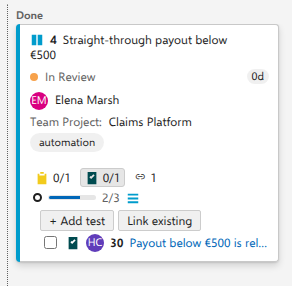
The change request "Straight-through payout below €500" is covered by one test case, "Payout below €500 is released without a second approval". The card says so on its own chip row, including whether that test has been closed yet.
Before you start
The chip is fed by Tested By links. A card with no Tested By link shows no test chip at all. Use Add test in the card's … menu to make the first one.
A new board of backlog items starts with this on. On other boards, whether support requests, risks or change requests, it starts off, so tick Show test cases on cards in board settings first; a test case is less often the thing covering those.
Steps
- Open the board, select Settings in the header, and go to Tests under Cards.
- Tick Show test cases on cards and select Save. (Skip this on a board of backlog items, unless someone has turned it off.)
- On the card "Straight-through payout below €500", select the test chip, the test type's icon with 0/1 beside it. Hovering it reads 0 of 1 Test Case completed.
- Read the row: the checkbox, the test type's icon, the assignee's initials when the test is assigned, the work item ID (when the board shows IDs), and the title as a link. The row prints no state name; the checkbox carries it, unticked here because "Ready" is not a completed state.
- Tick the checkbox once the test has passed, or click the title to open the test case in the native work item form.
What you should see
One row per Tested By link, in a stable order: state name first, then ID. Ticking moves the test to its type's first Completed-category state, "Closed" in the demo process, and the counter becomes 1/1 and the title is struck through. Nothing in this section reorders: there is no drag handle, because Tested By links have no order in Azure DevOps and inventing one would be a promise the platform cannot keep. A rejected write reverts the tick with the server's own message.
Add a test from the card
Two affordances sit directly under the chip, and they answer different questions.
Add test writes a new one. Type a title, press Enter, and the test case exists and is linked. The box stays open for the next, so a handful of tests is a handful of titles. The type is whichever test type the card already links; on a card with none, use Add test in the card's … menu, which opens the same search box as Link existing, where Create new → opens the real dialog.
Link existing finds one that is already there.
- Select Link existing. A search box opens.
- Type an id or part of a title. Matches appear with their type and state, so a Bug is not mistaken for the Test Case describing it. A title is looked for in every project the board's cards come from, so on a cross-project board a card finds its own project's test cases as readily as the board's. An id reaches any project.
- Select one to link it, or select Create new → to open the native work item dialog for a new test case, already linked back to the card. Steps, automation and your process's required fields are all there, because the dialog is the real one. AnyKanban does not reimplement it.
⚠️ We create the test case and the link, and nothing else. The native board also builds a default test plan and test suite around the work item when you add a test inline; AnyKanban does not. If your team works from plans and suites, create the test from the work item form or from Test Plans instead.
The new row appears in the section's own order (state, then id), not where you were looking: the order is a fact about the data, not about the gesture.
Notes
Membership is decided by the link type, not by the work item type. Anything linked with Tested By joins the chip, including a custom test type, which is what makes this work for teams whose test management is not Microsoft's, and why the chip is named after whatever those items actually are.
The order is deterministic rather than yours to arrange because Azure DevOps stores no ordering for these links; an order nobody controls must at least never surprise. It is compared by code units, so two people in different locales see the same list.