Docs › Follow work through links
See exactly which items a count came from
Which boards have this. The Related rollup is on boards whose own work item type sits outside every backlog: support requests, feedback, impediments, risks, business requests. On a board of backlog items the link chip shows the linked items and their states but no counts: the progress question there is about the card's own children, and the children section answers it, which is where the native board answers it too.
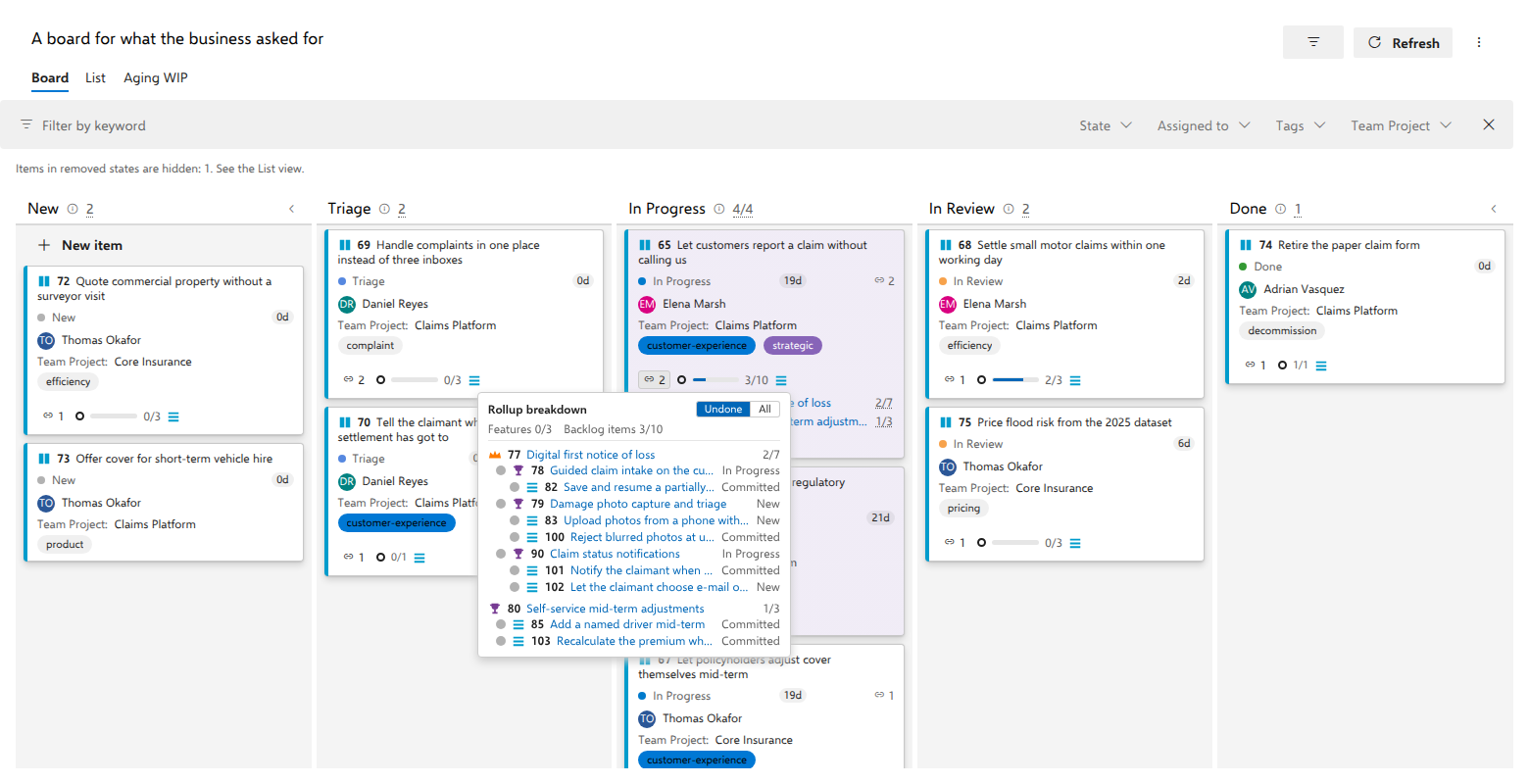
The card "Let customers report a claim without calling us" reaches two backlog levels. The card itself shows the one number that matters at a glance, 3/10, and the breakdown behind it answers per level, in full words: Features 0/3 and Backlog items 3/10. The next question is always which three, and which ten. The rollup on the card is a button that answers it, and so is the count on each linked item's row behind the link chip.
Steps
- On the card, select the rollup at the end of the chip row, the ring, the bar and the total after the link chip; its tooltip opens with Rollup breakdown across 2 linked items (just Rollup breakdown when a single item is linked). Where the linked work carries estimates, a second sentence follows it, Effort at Backlog items: 13 of 40 done, 2 without a value. The flyout opens below it, or above when there is too little room below and more room above.
- Read the strip under the title: Features 0/3, then Backlog items
3/10, top level first, one per backlog level that has judged items,
whichever linked item they sit under. The card itself shows only the
total, so this strip is where the per-level numbers appear. A linked item
the total leaves out still has its entry here: an undecomposed Feature
beside one with backlog items reads Features 0/1, and the rollup's
tooltip says One linked item has no Backlog items to add, so this count
leaves it out. What the rollup counts
says why. After the counts comes the sum of the estimates, as an
entry of its own naming its level, Effort at Backlog items: 13/40?, 2
without a value, and each linked item's heading carries its own
Σ. - Leave Undone selected, which is the default. The hierarchy is drawn parent before children, indented by depth, trimmed to what is still open: the seven backlog items not yet done, under the features that hold them. Every row carries its work item type's icon, so a feature is told from the backlog item beneath it without counting indents.
- Select All. The same hierarchy, now complete: the three finished items join the list with a green dot, and anything excluded from the count is dimmed with the reason written on its row.
- When everything is finished, Undone has nothing to list and says so, with "Nothing is left undone", rather than showing a heading per linked item with no rows beneath it. Select All to see the whole tree.
- Select any title to open that item in the native work item form. To close the flyout, select the same rollup again, which toggles it, or press Escape, or select anywhere outside it. All three return focus to the control you opened it from.
- To scope the answer to one link, open the link chip and select the count on a single row instead of the rollup.
What you should see
The list and the number cannot disagree, because both are read from the same judged data. Items left out of the count are dimmed and carry the reason as text on the row: Removed (not counted), Another project (not counted), Unknown state (not counted), or Unavailable (not counted). Undone answers "what is left"; All answers "what was counted", finished work included. Rows at the level the estimates are summed at print their value after the state, or no value. Rows on other levels print nothing more, and neither do rows from a project whose process maps no effort field. See What the rollup counts for what the sum adds up.
Notes
A count ending in +, as in "8/22+", is a lower bound: the descendant tree hit a size cap, or items it promised could not be read. The flyout then ends with a note saying so and the board carries a warning. Deliberate exclusions never produce a +; they are reported as dimmed rows instead.
A linked item with nothing beneath it appears once, as its own heading with its ratio. There is no separate row under it, because the heading already IS that item.
Per-row counts need not add up to the header count. The card counts each distinct work item once, even when two linked items share a subtree, while every row keeps its own full truth, so a row can legitimately read higher than the card.