Work with a column that has hundreds of cards
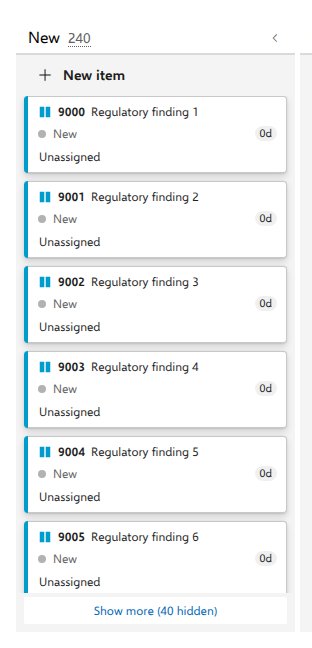
A support board whose New column collects every request nobody has triaged yet will outgrow what a browser should paint in one go. Columns render their first 200 cards and offer the rest behind a button, so the board stays usable well past a thousand items.
Steps
- Open the board. Every column renders its first 200 matching cards.
- Scroll to the foot of the column and press Show more (N hidden). N is the number of cards that pass the current filter but are not rendered yet, not the column total.
- Press it again for each further 200, until the button disappears.
- Or narrow first: any filter reduces how many cards there are to render, and the hidden count follows the filter.
- The List view pages the same way, with the same button at the foot of the rows.
What you should see
The button vanishes once nothing is left hidden. The count in the column header does not move while you page, because it is the unfiltered total for that column, and it is the number a WIP limit is compared against, so header count and hidden count deliberately answer different questions.
Dropping a card on the empty area of a paged column lands it after the last visible card, never below cards you cannot see. A dependency arrow whose other end is still hidden behind Show more is simply not drawn.
Notes
The page size is tracked per column name, so showing more in In Progress shows more in every swimlane row's In Progress at once, and it resets to 200 whenever you switch view, reload the board or reopen the tab, because it is component state and not a saved preference. Above the paging sits the real ceiling: a board loads at most 5,000 work items. When the query returns more, it warns "This board is showing the first 5000 of 7412 matching items. Narrow the query to show every item.", with your own counts in place of 5000 and 7412. Azure DevOps itself refuses a query above 20,000.