What the chart is telling you, and what to do about it
Seven shapes you will actually see, what each one means, and the move it asks for. Every picture below is a real board, seeded and then photographed, rather than a drawing.
If you have not met the chart yet, read Read the Aging WIP chart first; this page assumes you know what a point, a tail, a ring and the shaded fields between the lines are.
One rule runs through all of it: passing a line is never a reason to deprioritise. An item that has already taken too long is the last thing worth abandoning, because the customer is still waiting.
1. Nothing above the top line
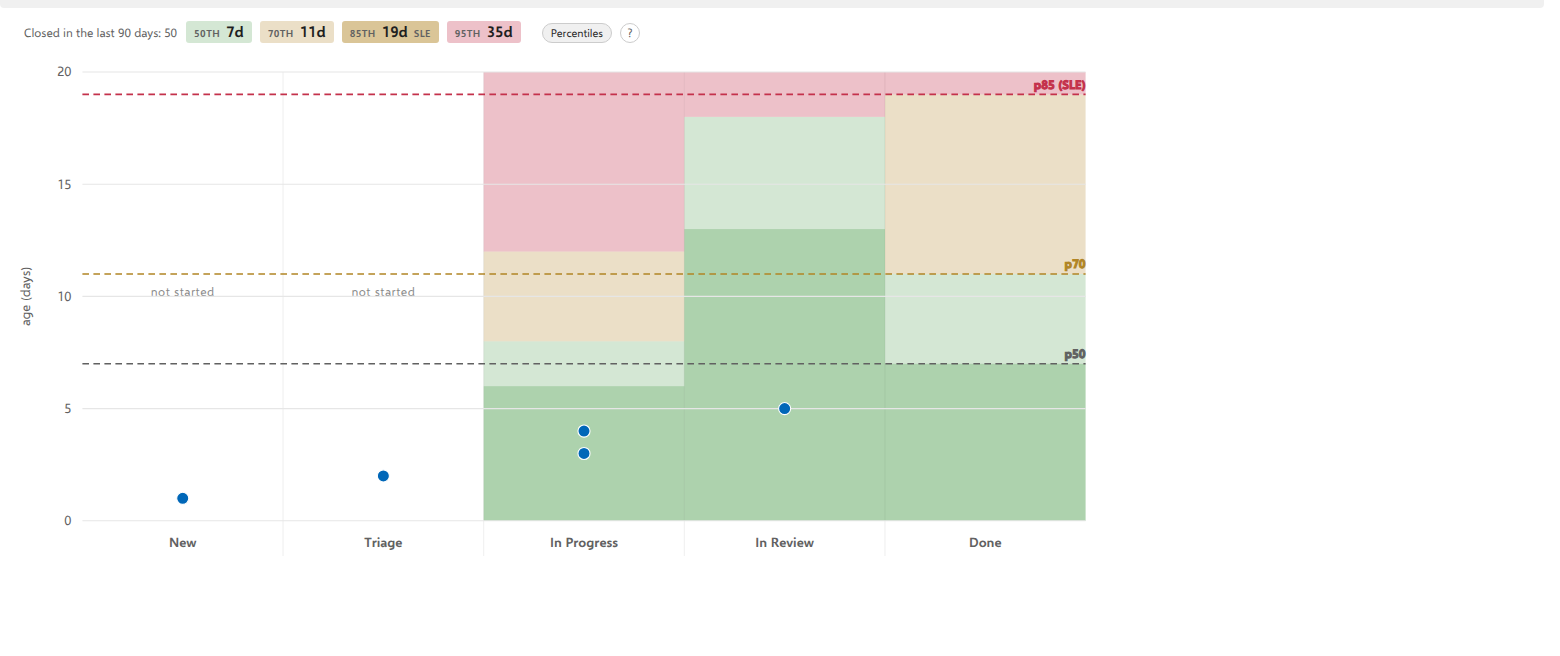
What it means. Everything in flight is inside what this board normally takes. This is the ordinary state of a healthy board, and it is worth knowing it on sight, because the temptation is to look for a problem until you find one.
What to do. Nothing. Close the tab. Silence is a reading.
2. One point far above the line
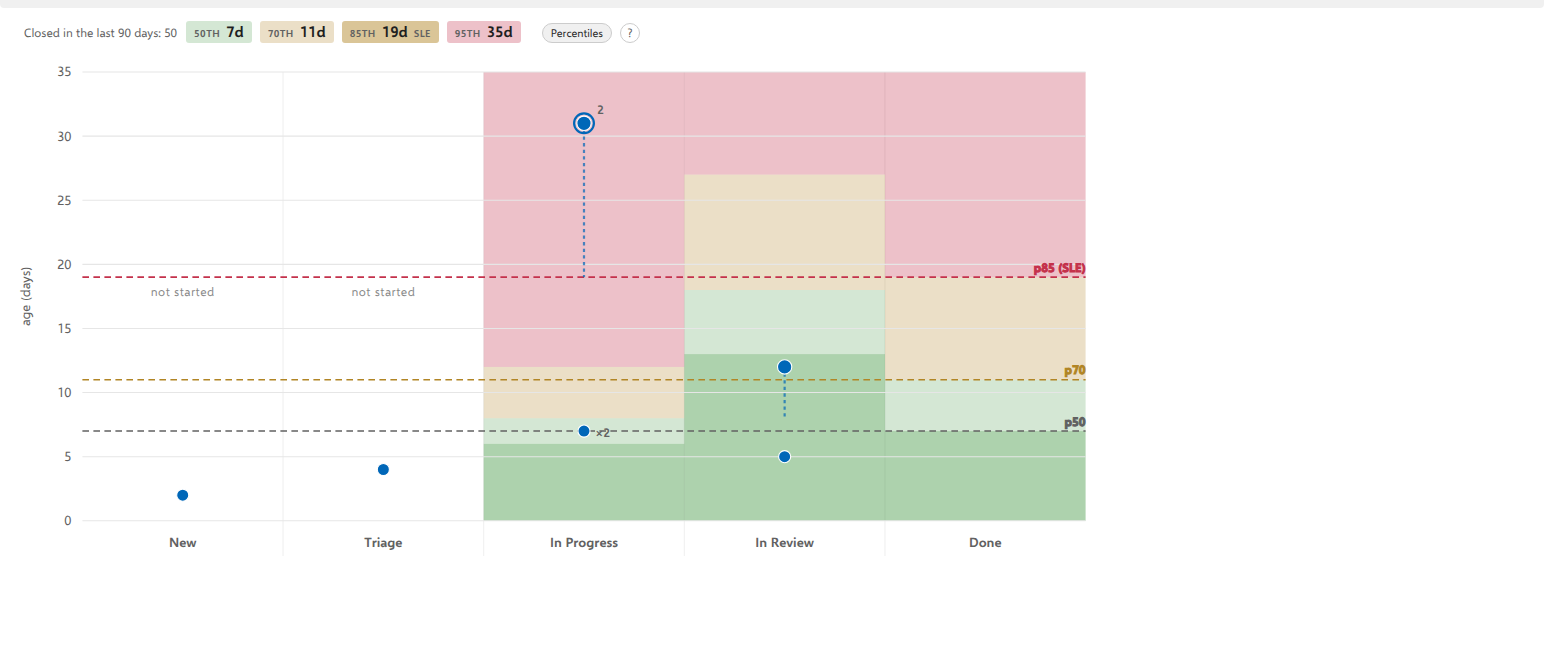
What it means. One item has outlasted 85% of everything this board has finished. The board can no longer tell you when it will land. Not "it is late", but "there is no forecast left".
What to do. Name it out loud today. Three questions, in this order:
- Is something blocking it? If it is, that blocker is the work, not the card.
- Can it be swarmed? More people on the oldest item beats more items started.
- Can it be split? Half of it finishing is a real outcome; all of it nearly finishing is not.
If the answer to all three is no, you have learned something worth saying at the retrospective: this kind of work does not fit the way the board is set up.
3. A high point with a long tail, in an early column
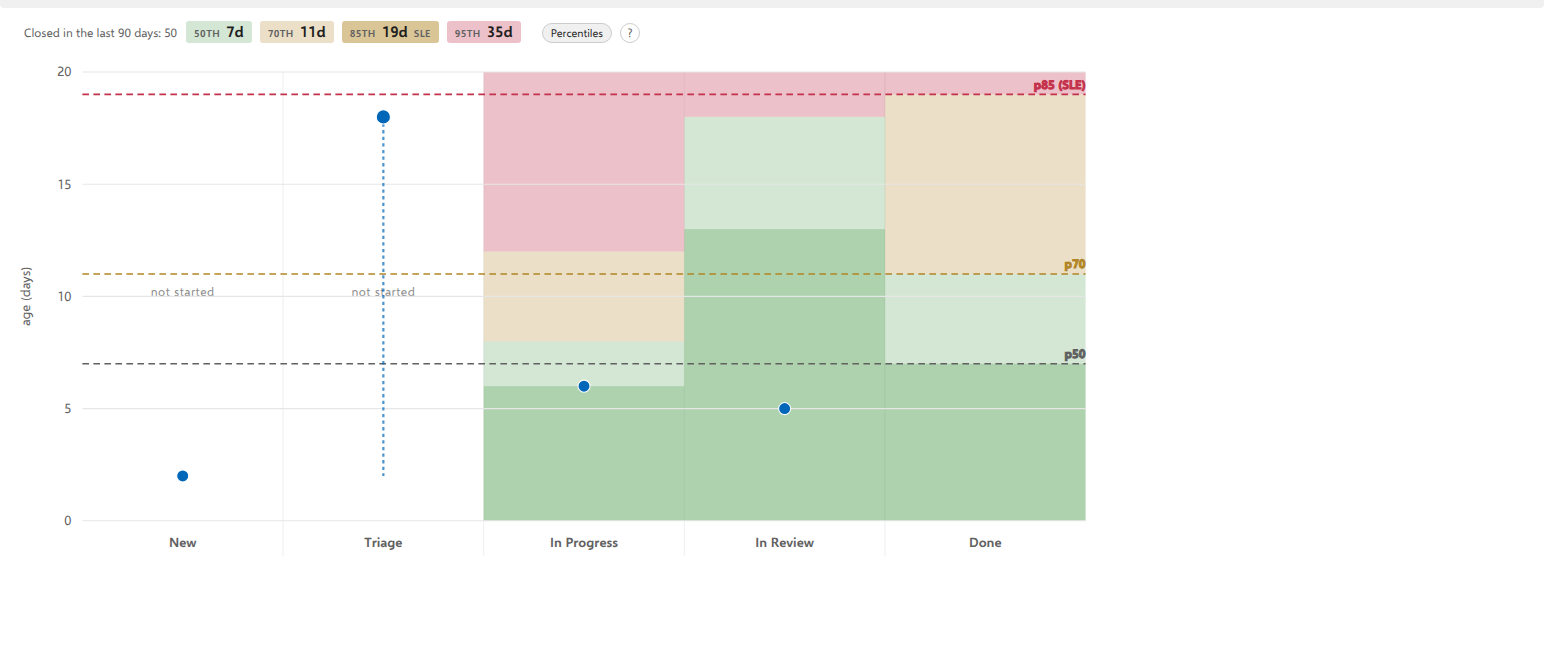
What it means. This is the earliest warning the chart can give. The item is old and almost all of that age was spent standing still exactly where it is now, because the tail is nearly as tall as the point. It has not been worked on; it has been waiting, in a column near the start of the flow.
What to do. This one is almost never a "work harder" problem. Ask what the column is waiting for: a person, an approval, an environment, a decision. Then move that, not the card.
A card like this in the last column before Done means something different and worse: the work is finished and the handover is not.
4. A crowd just under the top line, in one column
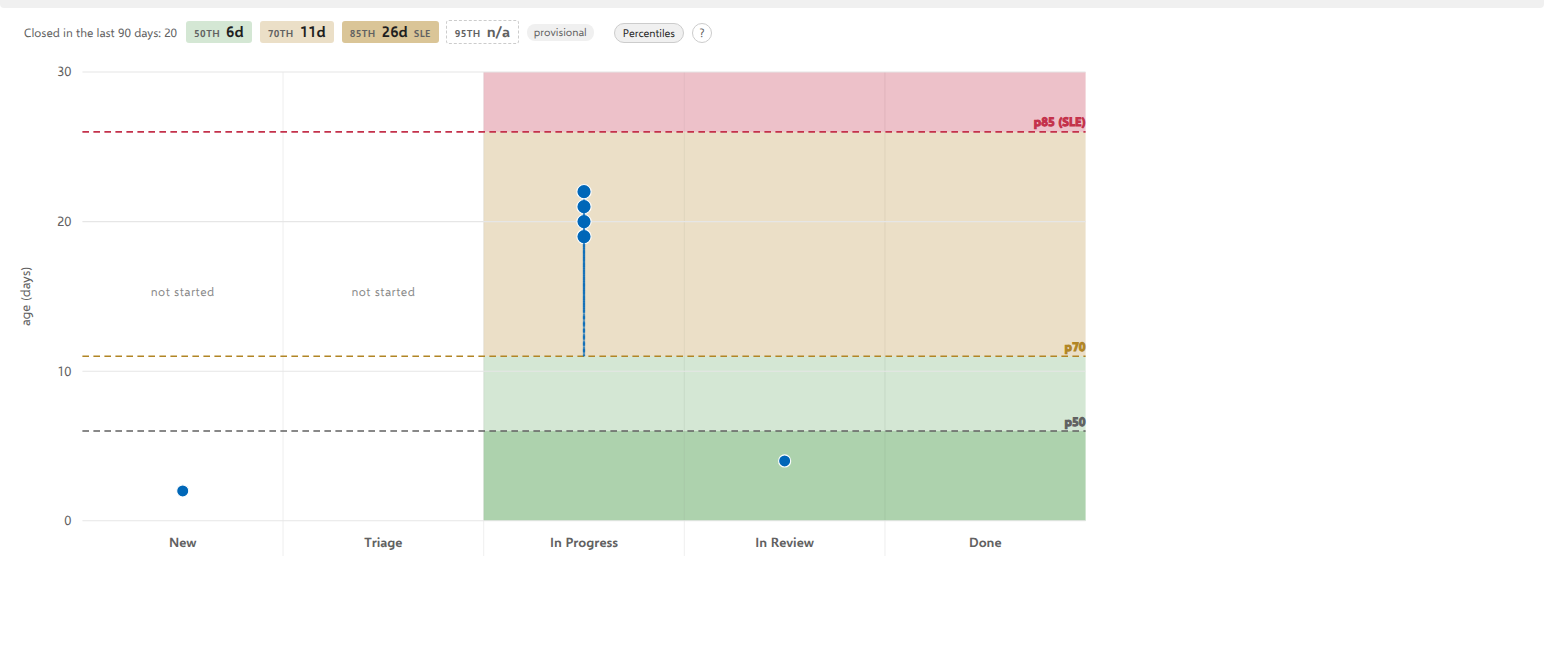
What it means. Not one bad card but a shelf of them, in one column, all approaching the line together. No single item explains this, and treating it one card at a time will not fix it. The column is the constraint.
What to do. Stop starting. The fastest way to move a shelf like this is to put people on what is already there rather than pulling anything new in, and then to ask whether that column's work-in-progress limit is doing its job, or whether it has no limit at all.
This is the shape that most often means the system, not the people.
5. Two cards equally old, one of them ringed
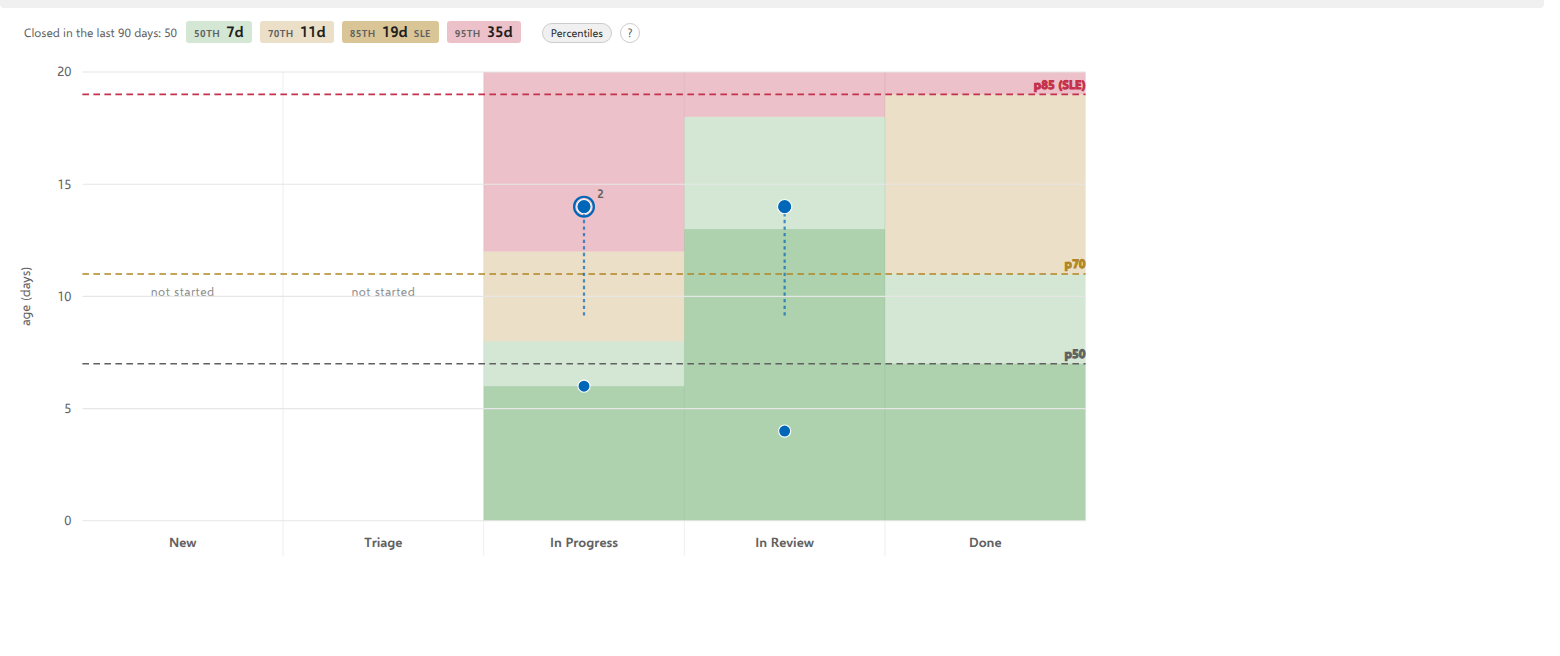
What it means. They are equally urgent by age. They are not equally expensive to leave alone: the ringed one is holding up other work, and the number beside the ring says how many items.
What to do. Start with the ringed one. Everything waiting on it is aging too, invisibly, and those items may not even be on this board.
The count is a lower bound: a successor outside this board cannot be seen from here.
6. No lines at all
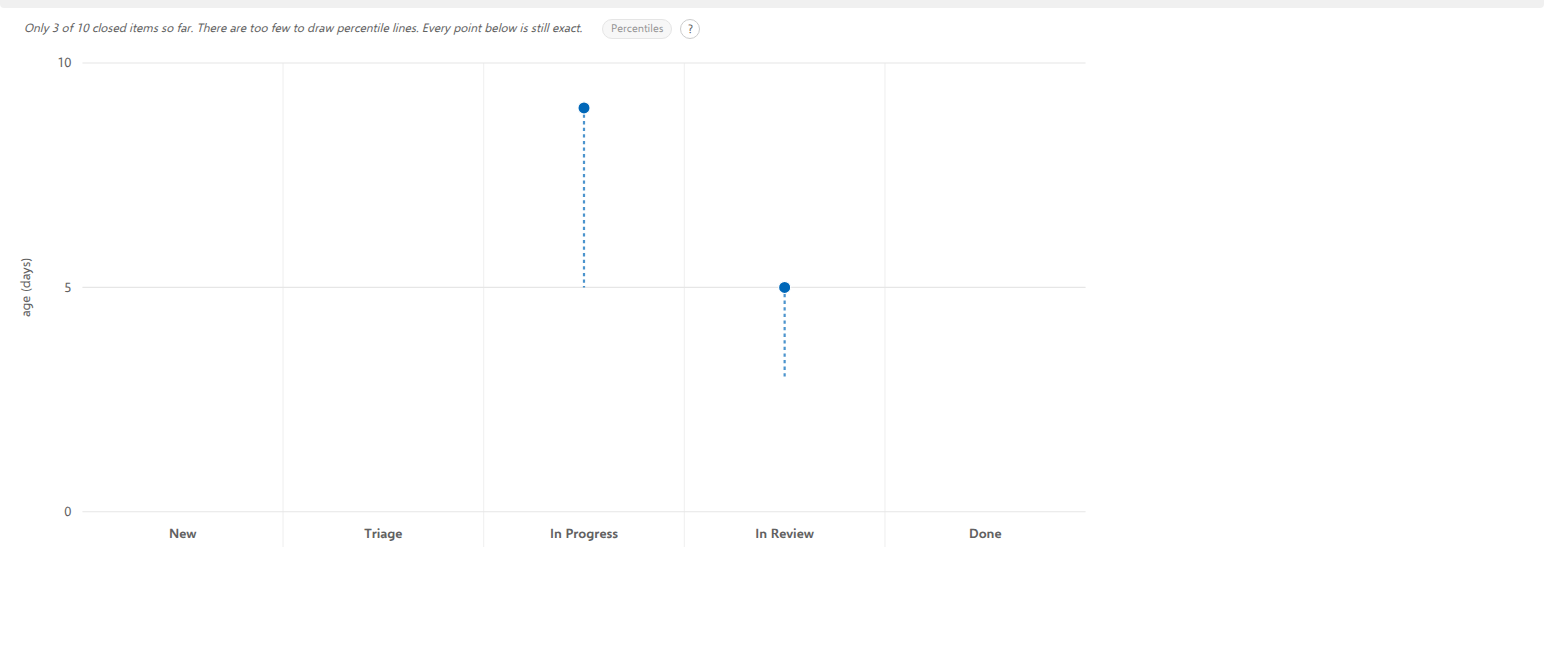
What it means. Usually, that this board has not finished enough work for a percentile to be honest: fewer than ten items in the last 90 days, and fewer than ten in the last 12 months either, which is the wider window the chart falls back to before it gives up. The chart keeps its axes and its points and refuses to draw a line it cannot stand behind, so there is no shading either and the Percentiles switch is there but cannot be used. The line above the chart says how much is missing, and the switch says the same thing on hover.
Read that line first, because it names the reason. If it says instead that the flow history could not be read at all, the missing lines say nothing about how much your board has finished. Three causes, each named in that line: flow metrics are not part of your Azure DevOps access level, which only an administrator can change; Azure DevOps is rate limiting the account; or the read simply failed. For the last two, use Refresh to try again.
Everything the chart can still stand behind is drawn: each point is a real age, and a point standing for ONE card carries its tail, which is how much of that age has been spent standing still in the column it is in now. That comparison needs no history at all, which is why it is the one the chart keeps making here. A point standing for several draws no tail: the cards behind it arrived in that column on different days, so a single tail would claim a history belonging to none of them. Open it and each one states its own.
What to do. Use the board, and come back. Ten or twelve closed items is enough for a first answer; thirty makes it steady. If the sentence says nothing has finished in the last 12 months, that is not a chart waiting for data. It is the finding: the ages on the plot are exact, and a board where nothing completes in a year is worth a conversation of its own. In the meantime the Board tab is not blank on this subject either: its aging mode marks the card that has sat longest in each column, which needs no history and is a different, weaker claim: this one, of these rather than this is unusual.
You will see the same emptiness on a board whose work item type nobody ever closes, a Risk register, say. That is not a defect, it is the honest answer: percentiles describe finished work, and there is none.
7. A column that is almost entirely red, with nothing in it
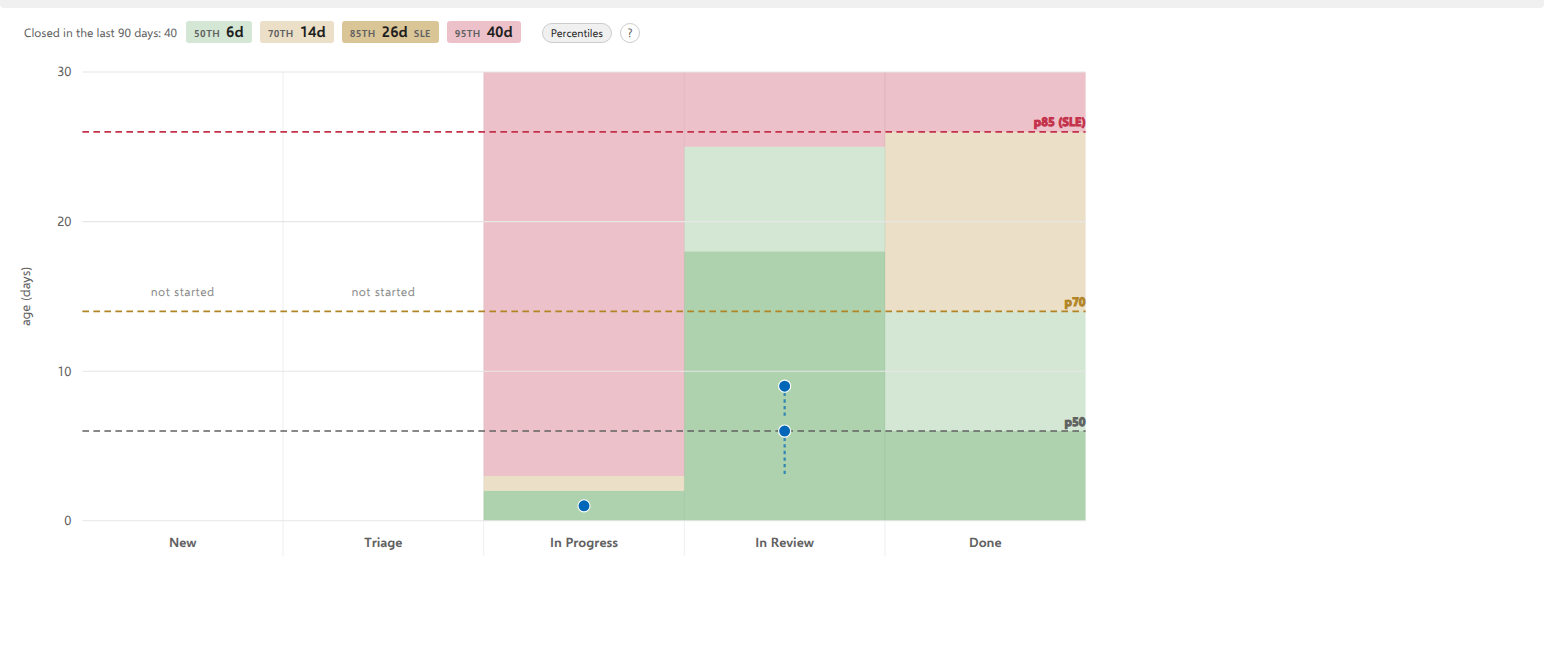
What it means. Nothing. That stage is fast: work normally leaves it within a day or two, so almost the whole height of the plot is older than anything that has ever passed through. The color describes the stage, not your cards.
This is the one shape on this page that reads as an alarm and is not one, and it catches everybody once. The test is simple: look at the points, not the field. If they are in the green, the column is doing what it always does.
What it is worth for. A column like this is the most sensitive detector on the chart. Because its bands are so low, a card that lingers there crosses into red within days rather than weeks, which is exactly where you want to catch it, since returning work to the backlog early is cheap and doing it late is not.
The move. When a point does appear high in such a column, treat it as a different kind of question from a late card further along: it usually means the item was not ready to start. Missing information, an unresolved dependency, or work that was pulled because somebody had capacity rather than because it was next. Putting it back is a legitimate answer, and the only stage where it is cheap.
When the same shape keeps coming back
None of the moves above changes anything if the shape returns every week. Three things do, and the flow-metrics literature is unanimous about them:
- Less work in progress. Age is time in the system; the more items in the system, the longer each one waits. This is the one lever with arithmetic behind it rather than encouragement.
- Smaller items. A smaller item cannot age as far before it finishes.
- Fewer dependencies. Every ring on this chart is an item that could not finish on its own.
A chart full of old cards is not a team working slowly. It is usually a team that started too much, and each of those three fixes that.
The habit this chart is for
None of the above needs a report, a meeting, or a data specialist. It needs two minutes a day. Julia Wester's Want to be more Predictable? Do These Two Things Every Day puts the whole practice in two habits: finish before you start, and watch the age of what is already in flight. This chart is the second one made visible.
The reason it is worth the two minutes is that it is a leading indicator. Every other flow measurement tells you what already happened; the points on this chart are items you can still do something about. By the time an old card shows up in a cycle-time report, the conversation that would have helped is months past.
So: open it at the daily meeting, look at what is high or in a warm band, and ask about those before asking what anybody started yesterday.