See what changed since the plan was set
Two weeks into the quarter, the planning group asks what is still the plan: which requests came in after the freeze, which moved to another quarter, and which dropped out altogether. Set baseline records what every lane held at one moment, and from then on the board marks what is different.
Steps
- Open the board and open the … overflow in the header command bar.
- Press Set baseline. The board records, for every lane it draws, the moment, your name and every card in that lane with its lane value (the iteration path on a board laned by iteration, the field value on a board laned by a field).
- To set the baseline of one lane only, press the flag button at the end of that lane's header (Set baseline for lane). The other lanes keep the baselines they had. If the board is still saving a card you just moved, Set baseline says so and records nothing; set it once the move has landed.
- Work as usual. Cards are dragged between lanes, new requests arrive, and some leave the query.
- Read the strip above the lanes, and press Show what left to see what each lane has lost since.
- When the plan is reset, press Replace baseline. The board asks first and names who set the current one and when, and if that one was taken on another backlog level or while the lanes came from somewhere else, it says which. Setting one lane over that lane's baseline asks the same way. Clear baseline also asks first, names who set it, and removes it for the whole board. To remove one lane's baseline only, press the clear button beside that lane's Baseline chip (Clear baseline for lane); the board asks first, and the other lanes keep theirs.
What you should see
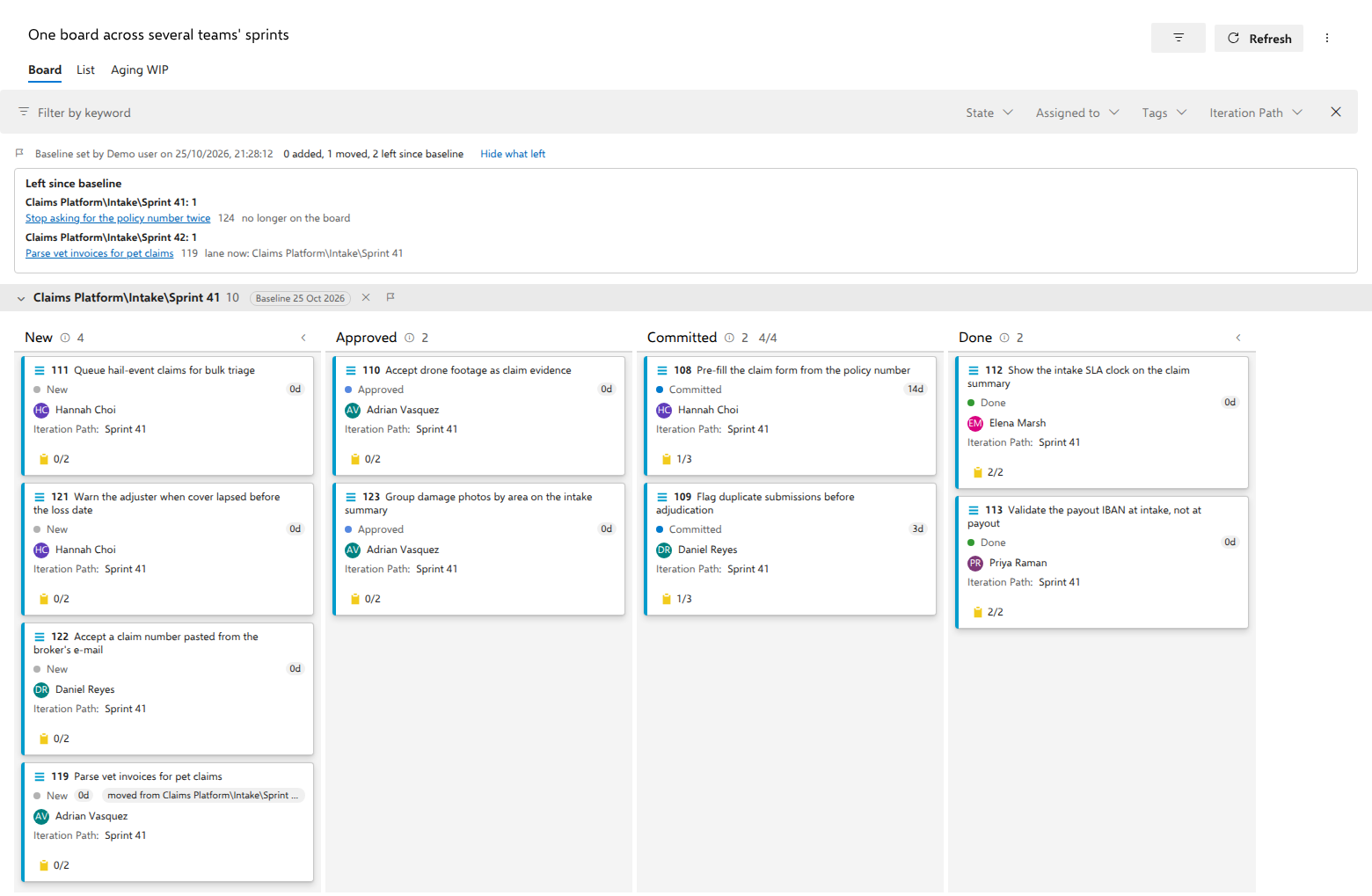
A strip above the lanes reading "Baseline set by {name} on {date and time}", and beside it the counts, in the picture below "0 added, 1 moved, 2 left since baseline".
On the cards, in the row with the state:
- added on a card that was not in its lane at the baseline;
- moved from lane on a card that was in another lane at the baseline.
A card that is where it was carries nothing. A baseline set for the whole board also covers a lane that appears later, for example when a card is given a lane value nobody had used yet: a card there is moved from the lane it was in, or added if it was not on the board. That holds while the lanes come from where they came from when the baseline was set. A lane whose own baseline was set while the lanes came from somewhere else, or on another backlog level, did not appear later: somebody set it, so its cards are not marked until its baseline is set again here. Clearing one lane's baseline stops comparing that lane and no other: a lane that appeared later stays compared. A baseline set for one lane covers that lane only. The lane header shows a Baseline chip with the date, and hovering or focusing it gives the same counts for that lane alone and says what the lanes came from.
Show what left opens a panel listing, under each lane, the items that lane held at the baseline and does not hold now. Each says either lane now: lane or no longer on the board, and its title opens the work item.
When lanes were set at different moments, the strip says so: "Baselines set at different times, the newest by {name} on {date and time}".
Without pressing anything: the iteration start
A sprint or a quarter has a start date, and the plan is what the period held when it started. So a board does not wait for Set baseline where it can read the start itself:
- on a board whose lanes come from an iteration node (see Get one lane per period from the iteration tree), every lane whose period is in progress compares with the plan at that period's start plus one day. A period that has ended, one that has not begun, and a node without dates show nothing;
- on a board whose flat query names one iteration, with
[System.IterationPath] UNDERor=a node, or with@CurrentIteration, the whole board compares with the plan at that iteration's start plus one day, in whatever lanes the board draws.
The strip then reads "Baseline at the start of Sprint 41 plus 1 day", the lane chip's tip names the iteration instead of a person, and the marks, the counts and Show what left mean exactly what they mean for a baseline set by hand. There is no clear button beside such a chip, because nothing is stored: the board reads the plan from the work items' own history each time it loads.
One day is the default because a planning day's changes belong to the plan. Settings, the Swimlanes tab, Baseline from the iteration start: set Days after the start to 0 for the plan as the period began, or to more days; untick Compare with the plan at the iteration start to turn it off for the board.
A baseline somebody sets wins. Set one for a lane and that lane is compared with it while the other lanes keep theirs from the iteration start; set one for the whole board and nothing from the iteration start is compared. Clear a lane's baseline and that lane stays uncompared while another lane's baseline stands, because you said so; clear the last one, or the whole board's baseline, and the lanes compare with the iteration start again, which Clear baseline says before it does it.
Notes
A baseline is shared. It is stored with the board in your Azure DevOps, so everyone who opens the board sees the same baseline and the same marks, and the strip says who set it. Setting a new one replaces it for everyone.
The comparison is with the stored snapshot, not with a replay of history. An
edit to the board's query does not change what the baseline holds, and it
works on a board whose query is a tree of work items, where As of is not
offered. The board reads the baseline once with every load, beside the rest
of the board, and never on a timer; for a set, a replace or a clear over a
baseline the board has already read, it reads the baseline once more, right
before the write. Comparing with a stored baseline costs no work item
request: the marks come from what the board has already loaded. A baseline
from the iteration start is read from history instead, and costs one query and one work item read per period in progress, with every load: the same query as of the
instant, and the items it returned as they were then. A board whose query
names an iteration reads the project's iteration tree once, kept for the
life of the tab, to find the period's dates; one whose query says
@CurrentIteration also reads its cards' iteration paths once more, where
it had not already loaded them, to know which iteration that is. A board on a
tree query cannot be read as of a date, so it shows no baseline from the
iteration start: where its lanes come from an iteration node the strip says
so, and a tree query that names an iteration is not read at all; set one by
hand instead. A board switched to
another backlog level shows the relatives of what its query returns, and
the plan at the iteration start can be read only for the query's own rows,
so it shows none either, and says so. If the read fails, the strip says so
and the next load reads it again. Changing the board's lane field in its
settings reads the plan once more under the new lanes. An answer that
arrives while you are holding a card waits until you drop it: the strip
appears above the lanes, so showing it mid-drag would move every lane under
the card.
When somebody else cleared the baseline after your board read it, all of it at once or one lane at a time until none was left, the board says so instead of acting on what it last showed you. Clearing a lane then clears nothing, because nothing is left, and setting a lane records that lane alone and tells you no other lane is covered any more.
The comparison is of two moments, the baseline and now. A card that went from one lane to another and back reads as unchanged, and an item that was created and closed between the two was never in either. Order within a lane is not compared, and neither are other field changes.
The panel shows the title an item had when the baseline was set. That is the only thing the board can say about an item that has since left it, and for an item in a project you cannot open it is the only name there is. It is also why a baseline is the one thing AnyKanban stores that contains work item titles; Security and data handling lists it.
The List view is not marked. Items in a removed state are hidden on the board and are left out of the baseline for the same reason. A filter narrows what you see, not the plan, so the counts and the panel ignore it.
A baseline is compared only with the board it was taken of. If the board's lanes now come from somewhere else (another field, lane rules, or the iteration tree), or the board now shows another backlog level, the strip says who set the baseline, what it was taken under, and that nothing is compared; no card is marked. Switch back to compare again, or set a new baseline. When only some lanes were set under the old configuration, the strip says those are not compared and counts the rest. A lane's own clear button appears only beside a Baseline chip the board shows; a baseline taken under the old configuration is replaced or cleared from the … overflow, which names who set it.
If a colleague set or replaced a baseline after you opened the board, Set baseline, Replace baseline and Clear baseline do not act on it silently: the board shows theirs and asks again, naming them. The same holds for a lane's own clear button and that lane's baseline. If a colleague cleared the whole baseline after you opened the board, setting or clearing one lane does not bring the rest of it back: the board keeps that one lane's change and nothing else.
Deleting a board in the hub deletes its baseline too.
In an As of snapshot there is no baseline at all: the baseline compares the plan with now, and a snapshot is not now. Returning to the current board brings it back.
A board opened from a query that was never saved has nowhere to keep a baseline, so Set baseline is not offered there.