Read the Aging Work In Progress chart
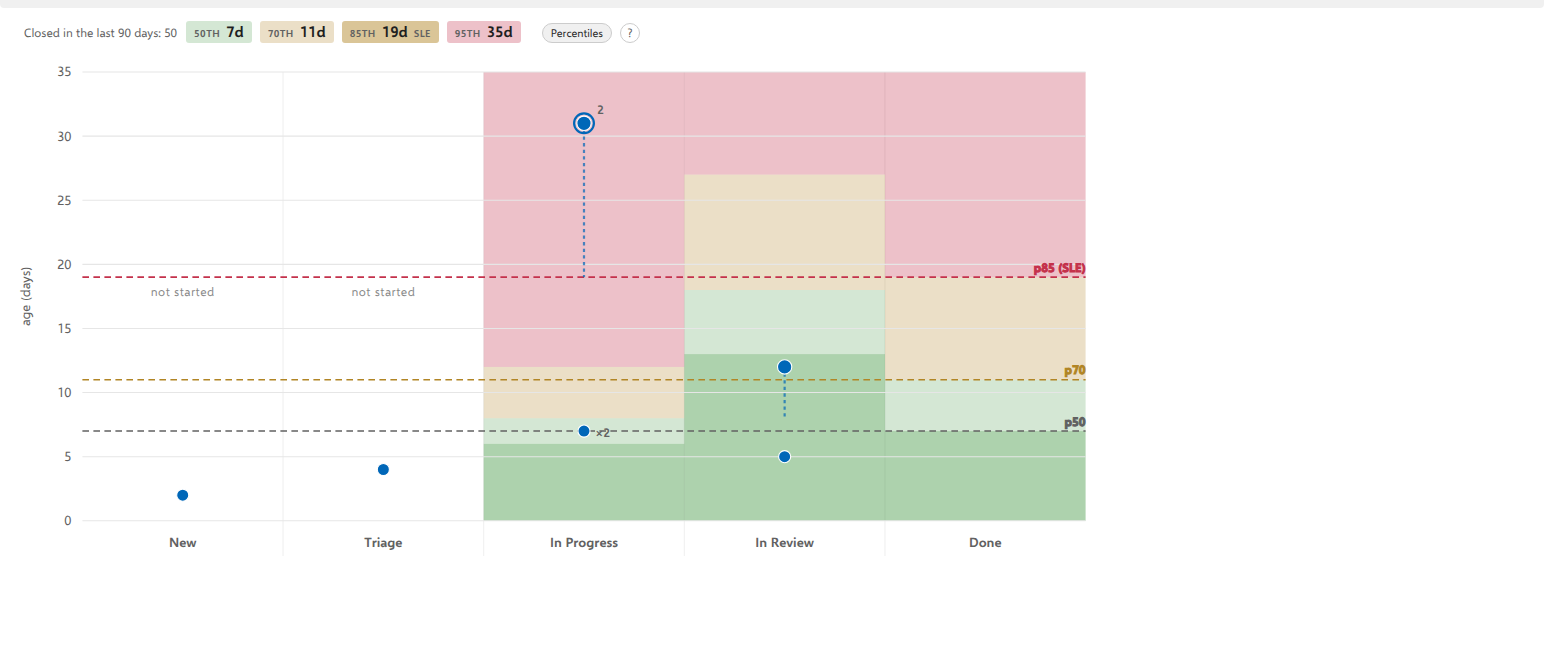
The Aging WIP tab sits beside Board and List on a board in the hub, and beside Board on any query's results page, where it charts that query and, on a saved query, keeps the filter you set on its Board tab. It plots every card that is in flight: the column it is in across the bottom, how old it is up the side, and three lines, with the ages between them shaded, drawn from finished work of this board's types in its projects.
No number on it was typed in by anyone, and the only thing you can set is whether those lines and their shading are drawn at all.
What each part is
| A point | one card that has started and not finished. Rest on it to see its card, or click to keep that card open. A card nobody has started yet has no age and is not plotted, because an age of zero would claim work began today. |
| Left to right | the board's own columns, in board order. |
| Up the side | the item's age: time since work on it first started, which never resets. Not the time in the current column, which is the tail. |
| The axis label | the unit the whole board speaks: days on most boards, hours on one whose work finishes inside a day. It is read from the durations of your work in motion, so items lying in Done or waiting in New do not pick it (a board with nothing in motion follows what it shows), and the counters on the cards use the same unit, so the board and this picture never disagree. |
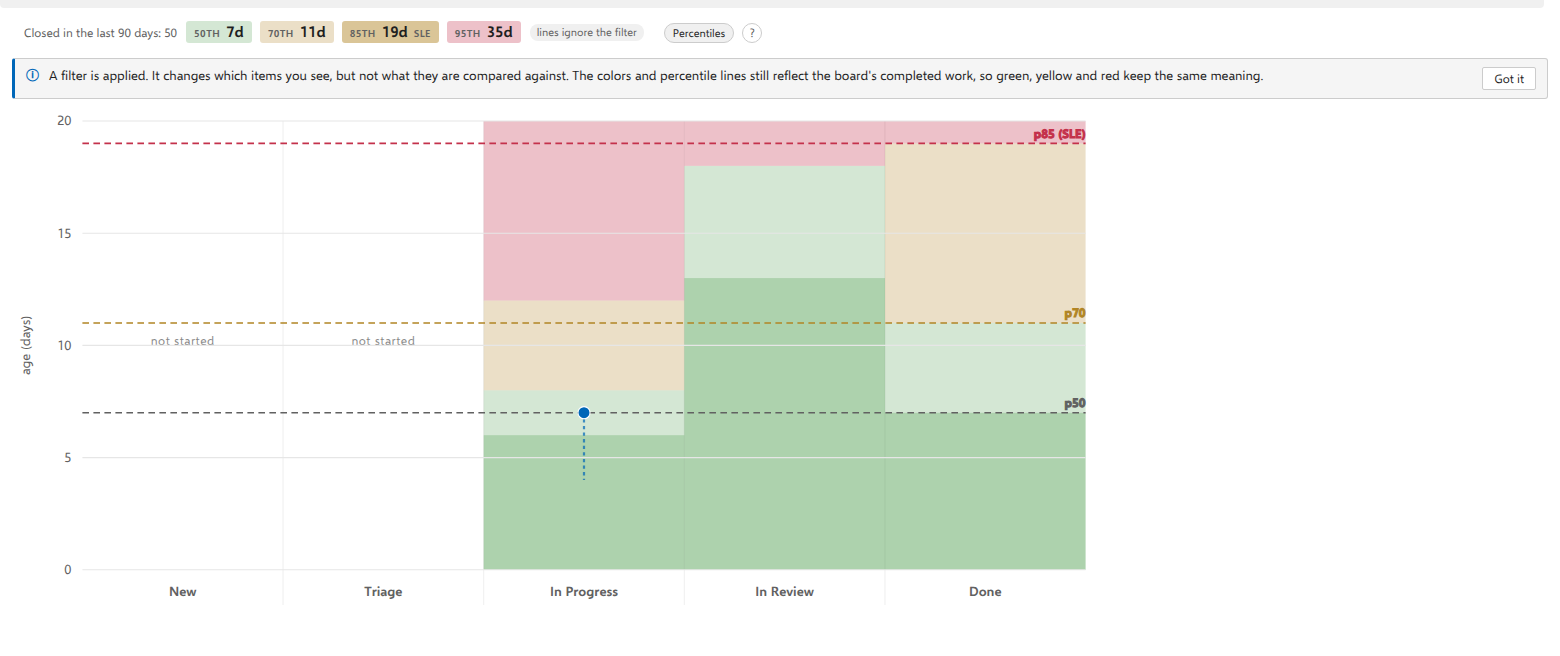
| The dashed lines | p50, p70 and p85 (SLE), from the cycle times of work items of this board's types that finished in its projects in the last 90 days, or in the last 12 months when that quarter holds fewer than ten closed items. Analytics counts by type and project, not by the board's query, so finished work your query leaves out still counts. Hover any of them and it explains what it is claiming, window included. |
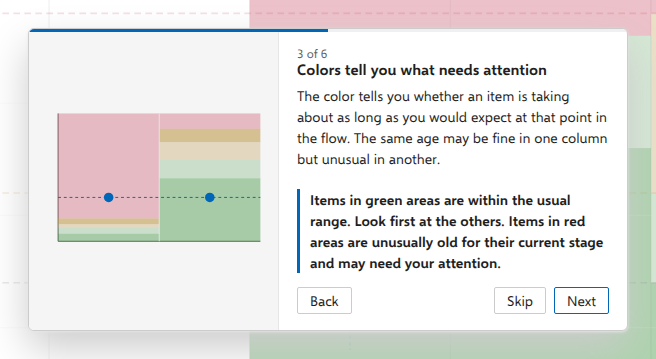
| The shading behind them | a traffic light, floor to top, and cut separately for every column. Each stage is shaded by how old your finished work was when it LEFT that stage, so the bands rise from left to right and the same age can be green in one column and red in the next. That is the reading: not is this item old, but is it late for where it is. Green up to the 50th, light green to the 70th, amber to the 85th, red above. A fifth step appears once you have thirty closed items. Below that the ladder has four rungs and the picture says so. |
| A column shaded like its neighbors | that stage has too little history of its own, so it is being judged by the board's overall distribution instead. Nothing is wrong; it simply cannot yet say anything a stage-specific comparison would add. |
A column marked not started |
work has not begun in that column's state, so the cards waiting there have no age to judge and the column gets no shading. A point can still appear in it: a card that started and was later moved back keeps the age it has already earned. |
| The columns | separated by a faint line each, so a point's column can be read where the point is. |
| A point | one color, always. How bad an age is comes from the field it sits in rather than from the dot, so a point tells you WHERE something is and the shading tells you how that reads. Past p70 it is drawn slightly larger, which is the one part of that signal Windows High Contrast can keep. Who owns the card, what type it is and which project it is in all live in the hover and the click, because a color that means two things means neither. |
| A tail | how much of that age has been spent standing still in the column the card is in now. Drawn from p50 upwards; hovering reveals it on any point. |
| A ring | this card is holding up somebody else's work. The number beside it says how many unfinished items depend on it. |
| A dashed outline | the card has also sat in its column past a limit your team set, if you set one. |
| ×N | several cards of the same age in the same column, drawn as one point. |
| The last column | deliberately empty. Finished items are not points here: they are the history the lines are drawn from. |
What the colors measure
The shading is the part of this chart that does the work, and it measures something specific enough to be worth one paragraph.
For each column, the board looks at work that has already finished and asks: how old was each of those items at the moment it left this column? Not how long it spent there, but how old the item was in total. That distribution is cut at the same four percentiles as the lines, and those cuts become the bands behind that column.
Two consequences follow, and both are the point:
- The bands rise from left to right. An item is normally older by the time it leaves review than by the time it leaves triage, so the same age sits in different bands in different columns. A five-day-old card can be red in the first column and green in the last.
- A red column is not a warning about your cards. It says that stage is normally fast, and the whole plot is above what has ever been usual there. If no point is in it, nothing is wrong.
⚠️ This is why a band and a point can be compared at all. Both are measured on the same clock: total age since work started. A band cut from time spent in the column would be a different measurement drawn at the same height, and every comparison a reader made against it would be meaningless while looking exactly as convincing.
Where a column borrows
A column needs a history of its own before it can judge by one. With too few finished items that have passed through it, it is shaded by the board's overall distribution instead, the same bands as everywhere else. Nothing is wrong; that stage simply cannot yet say anything sharper than the board can.
The chart does not mark which columns borrowed. If you want to know, the question is really has enough work been through here, and the answer is in the same place as everything else on this chart: your own finished work.
How this differs from the colors on the board
The Aging colors on the board itself answer a different question, and they are deliberately not the same scale:
| asks | measured against | |
|---|---|---|
| a card on the board | is this card old for this process, or for its column | how long finished work has spent in that column |
| a point on the chart | is this age late for the stage it is in | how old finished work was when it left that stage |
So a card can be amber on the board and sit in a green band on the chart without either being wrong. They are two questions, and the answer to one is not the answer to the other. If you only ever want one of them, the board's colors are the one to use at the daily meeting and the chart is the one to use when you want to know where the time is going.
The line above the chart
Closed in the last 90 days: 50, followed by one chip per percentile, names the distribution everything below it is compared with. The chips read 50th, 70th, 85th (tagged SLE, the service-level expectation) and 95th, each with its age, as in the picture at the top of this page. The 95th reads n/a until thirty items have closed. Short labels can appear after the chips, and resting on one gives the whole explanation:
- 12 months. Fewer than ten items closed in the last 90 days, so every number on this line comes from the last 12 months instead.
- provisional. Fewer than thirty closed items. The numbers are worth showing and worth doubting; they will still move.
- lower bounds. Azure DevOps held some rows back, so the history behind these numbers is incomplete and every percentile you see is a lower bound.
- some ages missing. Azure DevOps did not return every item in progress, so some cards have no age. A missing point means the card could not be read, not that it is new.
- lines ignore the filter. A filter is on. It changes the points, not the lines or the bands (see the notes below).
With too little closed work the sentence says so, and what this chart does about it: it draws the points and no lines.
A limit your team has agreed does not replace this sentence here, and that is the difference between this tab and the Board tab. On the board the limit wins outright, because a percentile describes what has happened while your limit is what you promised, and the board colors cards against the promise. This chart always draws the measured distribution, because the lines are the picture; your limit shows up on it as a dashed outline around any card that has sat in its column past it, and that point's card says so in words.
The Percentiles switch
Beside the line above the chart. It draws or hides both the lines and the shading, because they are one statement in two forms, so hiding one and keeping the other would leave colors on screen with nothing to explain them. The points do not move either way, and neither does the scale: the same card is at the same height with the switch on or off, so two readings of the same board can be compared.
Your answer is remembered for you, on every board, the same way the explanation panel stays closed once you have closed it. It is not a board setting: it changes what you see, not what the board is, so nobody else on the team inherits it.
If your board has not finished enough work yet, the switch is there but cannot be used, and says so. The line above the chart says how much is missing. Ten closed items is the floor. Below that there is no distribution to draw from, and drawing one anyway would be this product making up a comparison.
The window is the last 90 days, and it widens by itself when that quarter cannot supply ten: the board asks again over the last 12 months and draws its lines from those. It says which window it used everywhere it quotes a number, because a year describes a longer stretch than a quarter and may include a period the team has already left behind. A board of long-lived work, with support requests open for a year and risks nobody closes, is the case this exists for: its quarter is empty however long you wait.
The card behind a point
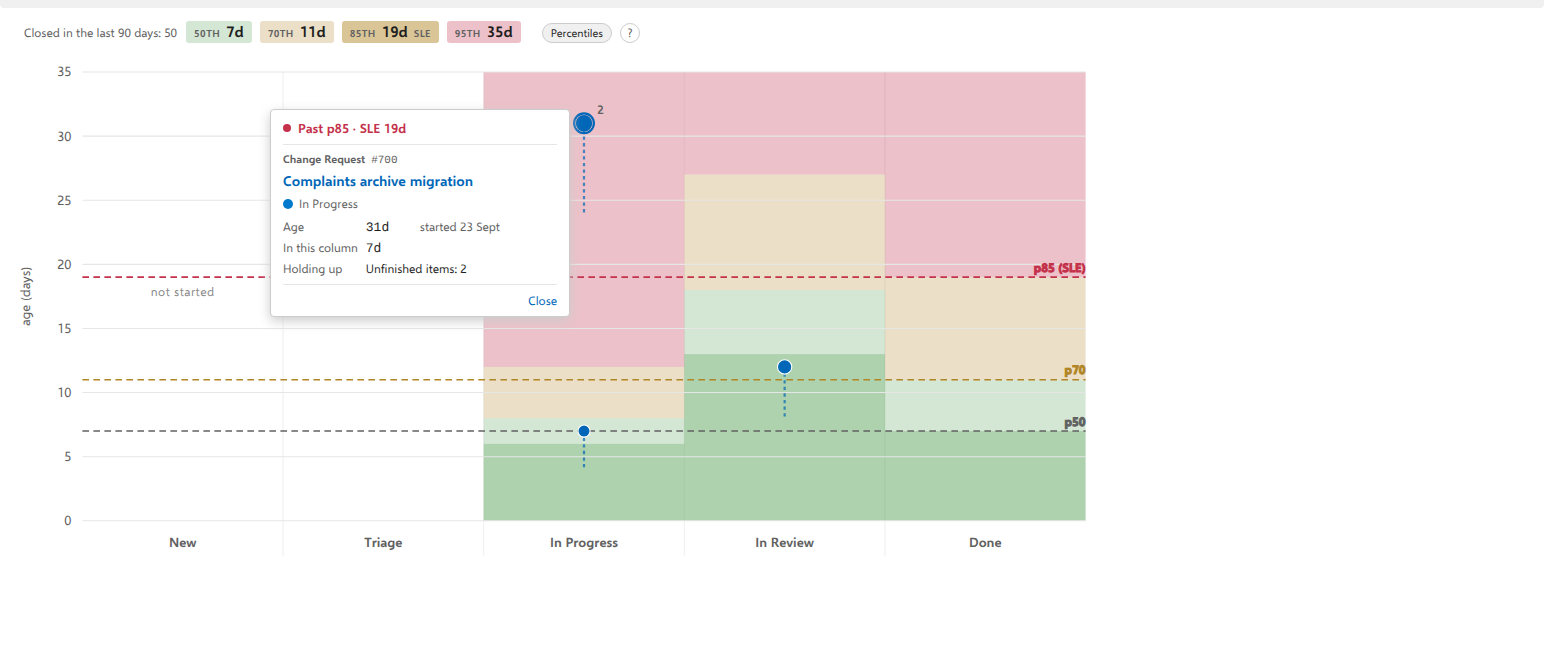
Resting on a point brings up its card; clicking keeps it open. It carries what the point cannot say for itself, in one order every time:
| The line at the top | where this age stands against your own closed work, and the percentile it has just crossed. It is always there, and a card below the median reads Under p50 with the median's age beside it, because a line that vanished on the quiet cards would make its own presence the alarm. When the board has too little closed history to compare against, it reads No comparison · too little history instead. |
| The work item | its type, its id, and its title as a real link. Click it for the native form, or Ctrl+click (Cmd+click on a Mac) or middle-click it to open the item in a new tab. Below it, the state with the same dot the board uses and, when the item is assigned, who it is assigned to: the person to ask about it. |
| Age | time since work started, and the date it started, so the number can be checked rather than believed. |
| In this column | how long it has stood still where it is, which restarts on every state change. Two different measures, kept apart on purpose. |
| Holding up | how many unfinished items depend on this one, when any do. A lower bound: a successor outside this board cannot be counted. |
What the card does not carry is advice. Past the median a chart can tell you that something is unusual; it cannot know whether to swarm it, split it or escalate it, and a sentence saying so on every card stops being read by the second one. That reasoning is in the walk-through and in What the chart is telling you, where it is asked for rather than repeated.
Esc closes the card, and so does a click anywhere else on the chart.
Points that share an age
Three cards, all fourteen days old, all in the same column, are one point that says ×3. Its card carries all three: the footer counts them (1 of 3 at this age), the arrows step between them, and All 3 at this age opens the list of every one, where a click on a row takes you to that item's card, and ‹ Back to 1 of 3 returns you to the one you were reading.
The card opens beside the point you clicked, with that point ringed, so a cluster of three never leaves you guessing which one you hit.
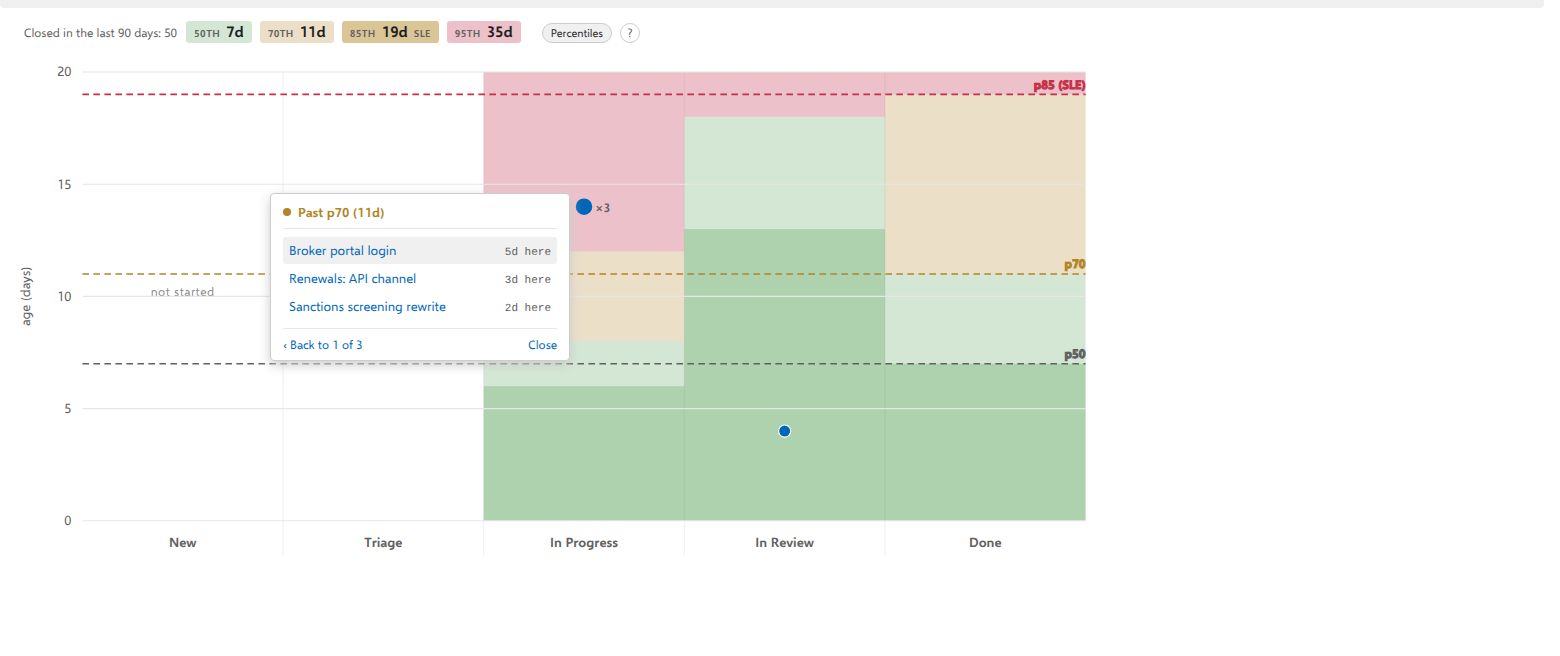
Drawing them on top of each other would hide exactly the pile you are looking for. Cards whose ages are close but not equal are spread sideways instead, and the spread is worked out from the work item ids, so a point never moves between one look and the next.
Whether two points are "close" is a question about the picture rather than the calendar: on a board whose oldest card is a week old a day is a wide gap and nothing moves, while on one whose oldest is a year old a day is thinner than a point. So a point sitting a little off the center of its column is a near miss being kept countable, and the sideways position means nothing else. Only the height is a measurement.
When the chart is empty
A chart with no points on it is an answer, not a failure, and it says which answer under the line above it:
- no unfinished work has started yet. Every card that is not finished is still waiting, so there is no age to plot. The sentence names how many are waiting, and a card in a finished column is not one of them. Start dates are read once, when the chart first opens, so a card that moves into an in-progress state gets its point after you select Refresh on the toolbar. The board's automatic refresh does not read them again.
- the filter keeps nothing that has started. The started cards are still there, the filter is holding them out of sight.
That sentence answers a different question from the line above it: the line is about the percentile lines (what has finished), and this is about the points (what has started). A young board legitimately shows both at once.
The first time you open it
A short panel floats on the chart and offers a six-step walk-through. Each step draws the shape it is describing and highlights the matching part of your chart, so the lesson works whether or not you have a card past the top line today. Nothing is dimmed behind the panel, so the chart stays readable and stays clickable while you read. Close it and it stays closed, for you, on every board; the ? beside the line brings it back.
On a board that has not closed ten items yet, the panel does not open by itself. There are no percentile lines on that chart, and four of the six steps are about them. The ? still works and runs a three-step version: the points, what the lines are measured from and what makes them appear, and where to read the rest. Once the tenth item closes the lines appear, and the panel offers itself then, the way it would have on the first visit.
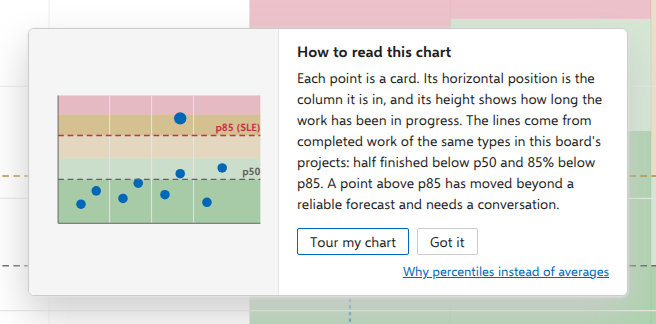
Step three is the one worth reading twice, because it is the part of the picture nothing else can show you: the same age, judged two different ways, because the two stages have different histories behind them.
What you should see
Every element explains itself on hover, including the lines. If you want the reasoning rather than the mechanics, read Why percentiles instead of averages; if you want to know what to do about what you are looking at, read What the chart is telling you.
The demo on the website has the tab on every board, and each board shows a different picture: a request far past the top line that two other requests are waiting on, a shelf of three approaching it in the same column, a change stuck in its first column with its whole age as the tail, a support stage so fast that its column reads red while its own card sits in the green, a bug board with nothing above the median, and a sprint board whose ladder is still provisional. The histories behind those lines are seeded, so the numbers stay where the pictures need them.
Notes
The board's filter bar applies to the chart, so whose work is aging is a filter away. There is no "group by assignee" and there will not be one: the chart locates where to look, not who to blame.
⚠️ A filter changes which cards you see, not what they are measured against. The percentile lines and the per-stage bands are cut from everything this board's types have finished, filtered or not, so green, yellow and red go on meaning exactly what they meant before you typed. That is the reading the notice exists to protect: a reader who assumed the bands re-shade to whatever is left would read every color on screen wrongly.
It is also deliberate rather than convenient. A service level that moved as you typed would not be a service level, and it is the number you quote to somebody outside the board. The chart says so the moment a filter goes on, and keeps a small note in the strip for as long as one is.
The chart reads your own organization's Analytics and works everything out in your browser. Nothing leaves your Azure DevOps. Opening the tab costs three reads, or four on a board that closed fewer than ten items in the last 90 days, because the chart then also reads the last 12 months. Reopening it costs none until you refresh or reload the board.
In an As of snapshot the chart plots nothing: no lines and no cards. The line above it says that percentiles describe today's process and that you can leave the snapshot to see them.
Switching the percentiles off costs nothing and buys nothing, because the lines and the shading are drawn from numbers the tab already read when it opened, so hiding them asks Azure DevOps for nothing and showing them again asks for nothing either.
If your team has set a day limit for the board, that limit does not change what this chart compares against. The lines are always the measured distribution. What it does here is mark a card that has sat in its column past the limit, with a dashed outline; the point's card says so in words.