Show the board as it was at the start of the month
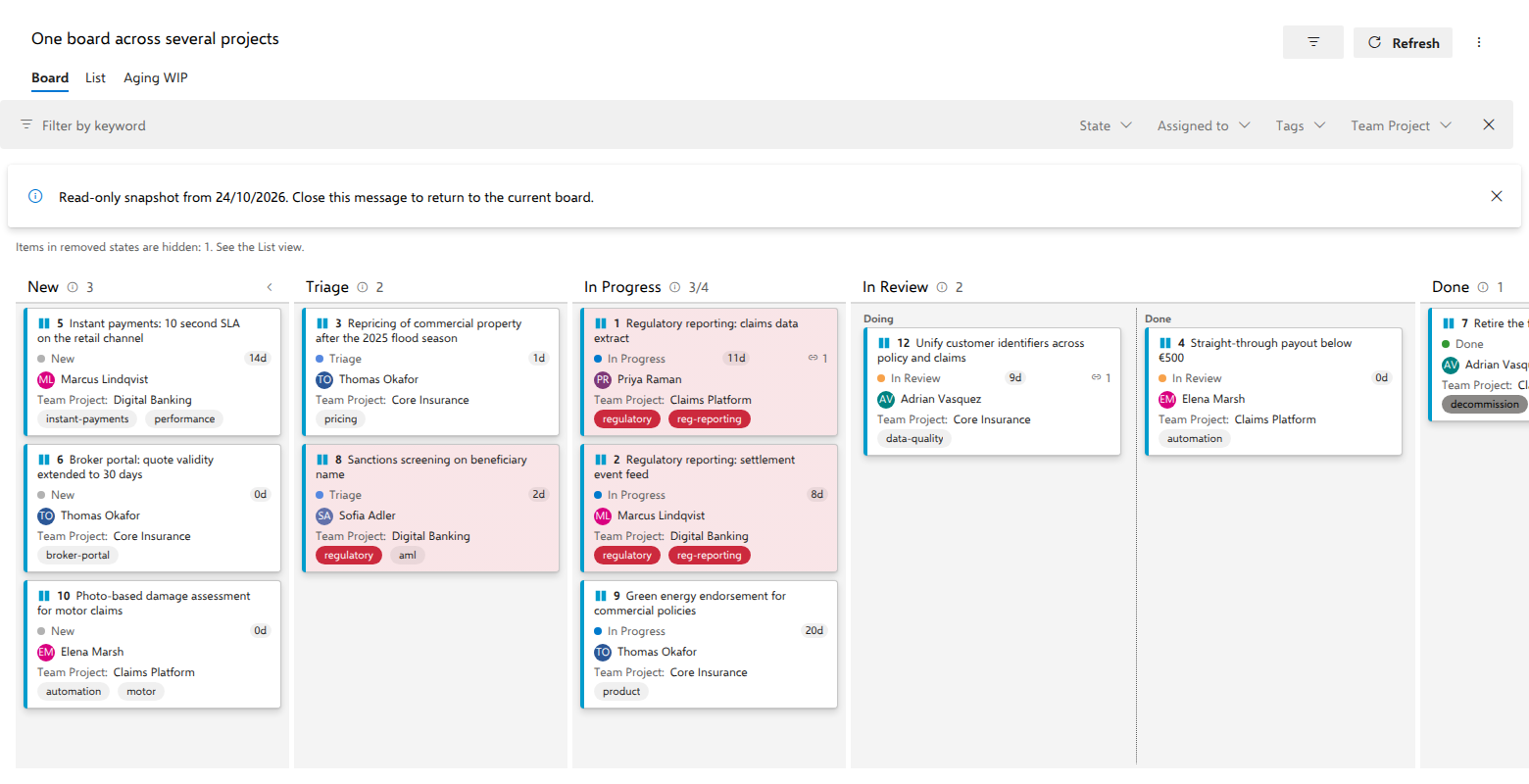
A retrospective asks what the board actually looked like when the month began, or an auditor asks when Regulatory reporting: claims data extract moved into In Progress. As of rebuilds the whole board from work item history and hands it back read-only.
Steps
- Open the board and open the … overflow in the header command bar. As of is a rare action and lives there rather than as a top-level button.
- Pick a date in the date box (today is the latest it accepts), or press one of the presets: Yesterday, A week ago, Start of this month.
- Read the board. Card placement, order and field values all come from the item history at the end of the chosen day, so everything that happened during that day is included. The columns are the exception: they are read from the process as it stands today, because a snapshot replays the items, not the process.
- Narrow what you are reading if you need to. The Board and List tabs and the filter bar all work inside a snapshot.
- Leave the snapshot: dismiss the banner, or reopen the panel and press Back to now.
What you should see
A banner above the board reading "Read-only snapshot from {date}. Close this message to return to the current board.", and the command itself now reading As of ✓.
Everything that writes is gone rather than merely refusing: no dragging, no right-click Move to menu, no click-to-edit fields, no New item button in the first column, no editing a WIP limit from its header. Background refresh stops completely too, so a snapshot never moves under you while you are reading it.
Notes
As of is not in the menu on a board whose query is a Tree of work items or a Work items and direct links query. Azure DevOps cannot run a tree query as of a past date, and the board treats both link query types alike. Use a flat list of work items when you need a snapshot. If the saved query becomes a link query while a date is set, the board drops the date, shows current data, and a notice says why.
Card chips and the linked-items list, and therefore the rollup, are not built in a snapshot at all. Descendant counts have no historical support, and pairing today's hierarchy with the snapshot's field values would be a quiet lie, so the sections are omitted rather than shown as of today. Dependency arrows do work, because the relations behind them are read at the same past instant.