Get one lane per period from the iteration tree
Your quarterly plan has a lane per quarter, and every quarter somebody adds the next one by hand, names it exactly as the iteration is named, and sets its condition. A lane generated from the tree does that for you: pick the node whose children are the quarters, and the board draws one lane per child, reading the tree again every time it loads. The same works for the area tree, one lane per team area under a node.
Before you start
- A named board with the Swimlanes tab available, which means a board that does not take its layout from a team's board.
- An iteration or area node in the board's project whose children are the
rows you want:
Test\2027withQ1toQ4beneath it, or the project root with the top-level iterations beneath it. - The board's items in one project. A board over several projects still works, but items from the other projects sit in (no lane), because the node belongs to one project's tree.
Steps
- Open the board and select Settings, then the Swimlanes tab.
- Under Lanes from a tree node, set Tree to Iteration Path (or Area Path for areas).
- Pick the Node whose children should be the lanes, for example
Test\2027. The list is the project's own tree, indented by level. The board reads three levels of the iteration tree and five of the area tree, so a node at the deepest level offered is marked as having no children read; pick its parent instead. - Under Lane for unplanned items, keep the name
Unassignedor type your own, and choose what it holds: items on the project root (the usual meaning of unplanned in a quarterly plan), items on the node itself, or nothing. - For iterations, keep Order lanes by on start date, then path, or switch to path. Keep Show empty lanes on so that a quarter with nothing in it yet can receive its first card.
- Select Save.
What you should see
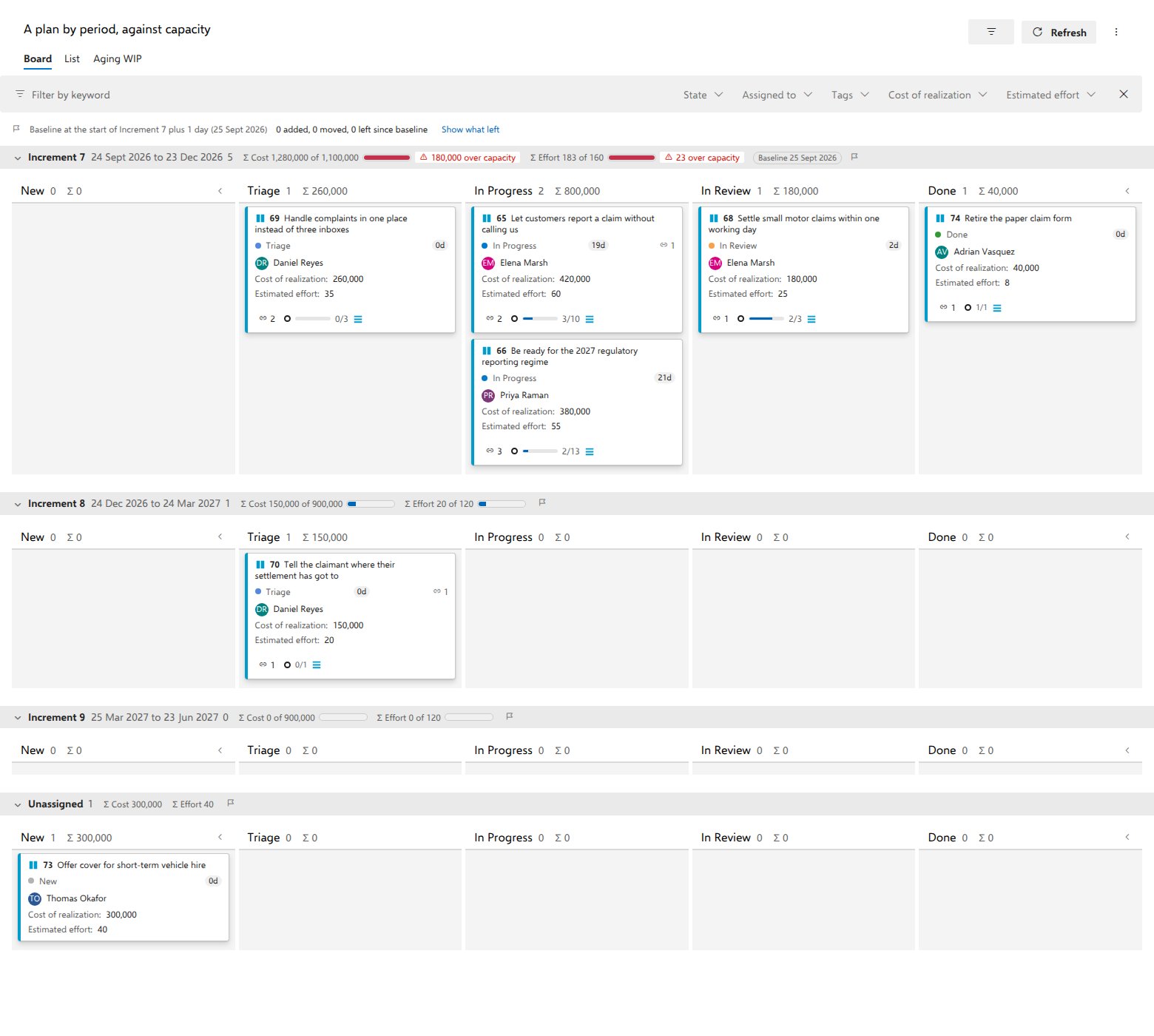
One row per child of the node, in start-date order for iterations and in path order for areas, each named as the child is named. An iteration lane with dates prints its period after the name, Q1 · 1 Jan 2027 to 31 Mar 2027. After the children comes the Unassigned row, and after it (no lane), which appears when an item sits outside the node, or on the node itself while the Unassigned row holds the project root.
An item on a deeper node, say a sprint under Q1, sits in Q1's lane; its card
still shows the sprint. Drag a card from Q1 to Q2 and the card's iteration
becomes Test\2027\Q2, the node itself, never a sprint beneath it. Drag a card
into the Unassigned row and its iteration becomes the project root.
The named lanes and the lane field on the same tab are ignored while a node is chosen; the tab says so. A team's own rows, on a board that takes a team's layout, still win over everything on this tab.
Notes
Lanes are re-read at every load. A quarter added in Azure DevOps is a lane the next time the board loads, with nobody editing the board; a renamed quarter is a renamed lane. A capacity set under Lane totals belongs to a lane by its name, so a renamed child needs its capacity set again (see Compare demand with capacity, per lane).
At most 24 lanes are drawn. Further children share one row at the end, +3 more, which holds their items and cannot be dropped into. The (no lane) row cannot be dropped into either: an item leaves it by getting an iteration under the node, from its work item form or by dragging it from a lane it can reach. While a card is in the air, both rows are dimmed with the reason as their tip.
If the node is deleted from the tree, the board draws no swimlanes and a notice names the node; choose another in the settings. If the tree cannot be read on one load, the board says so and draws no swimlanes until the next load.
A lane whose period is in progress also compares its cards with the plan at the period's start plus one day, with no baseline set by hand: cards that arrived since are marked added, cards that came from another period moved from it. The block Baseline from the iteration start on the same tab sets the number of days or turns it off; See what changed since the plan was set explains the marks.