Compare demand with capacity, per lane
Your quarterly plan is a board whose swimlanes are the quarters and whose cards are the requests, each carrying a cost estimate. Dragging a request from Q1 to Q2 is the planning act; what you could not see is what each quarter then adds up to, and whether Q1 is already over what it can hold. Lane totals put that sum in every lane header, against a capacity you set.
Before you start
- A named board with swimlanes, either named lanes or a lane field (see Give expedited work its own lane and Get one row per work item type).
- A numeric field on the board's work item type that holds the quantity you want to add up: a cost, an effort, story points, or a field of your own. Whole-number fields count too. Fields you can add up lists the ones Azure DevOps provides and the types that carry them.
Steps
- Open the board and select Settings, then the Swimlanes tab.
- Under Lane totals, pick the Sum field, for example
Cost of realization. Give it a Short label such asCostif the field's name is long; the label is what the header prints. - Optionally pick a Second sum field, for example
Estimated effortwith the short labelEffort. Two is the most a lane header can carry on one line; the first field is the one the cells show. - Under Capacity per lane, type a number into the box of each lane that
has one, for example
1000000for Q1 2027. Leave a box empty for no capacity. With a lane field, add a lane by typing its value first. - Select Save.
What you should see
Every lane header now reads its count and then one group per sum: Q1 2027 · 6 · Σ Cost 1,240,000 of 1,000,000 · Σ Effort 85 of 120. A sum with a capacity carries a small bar; a lane over its capacity says so in words, 240,000 over capacity, beside a warning icon. Inside each lane, every column header counts that lane's cards and shows the primary sum, Ready 2 · Σ 220,000; hover or focus the number for both sums.
Drag a request from Q1 to Q2 and both headers change at once: the value travels with the card.
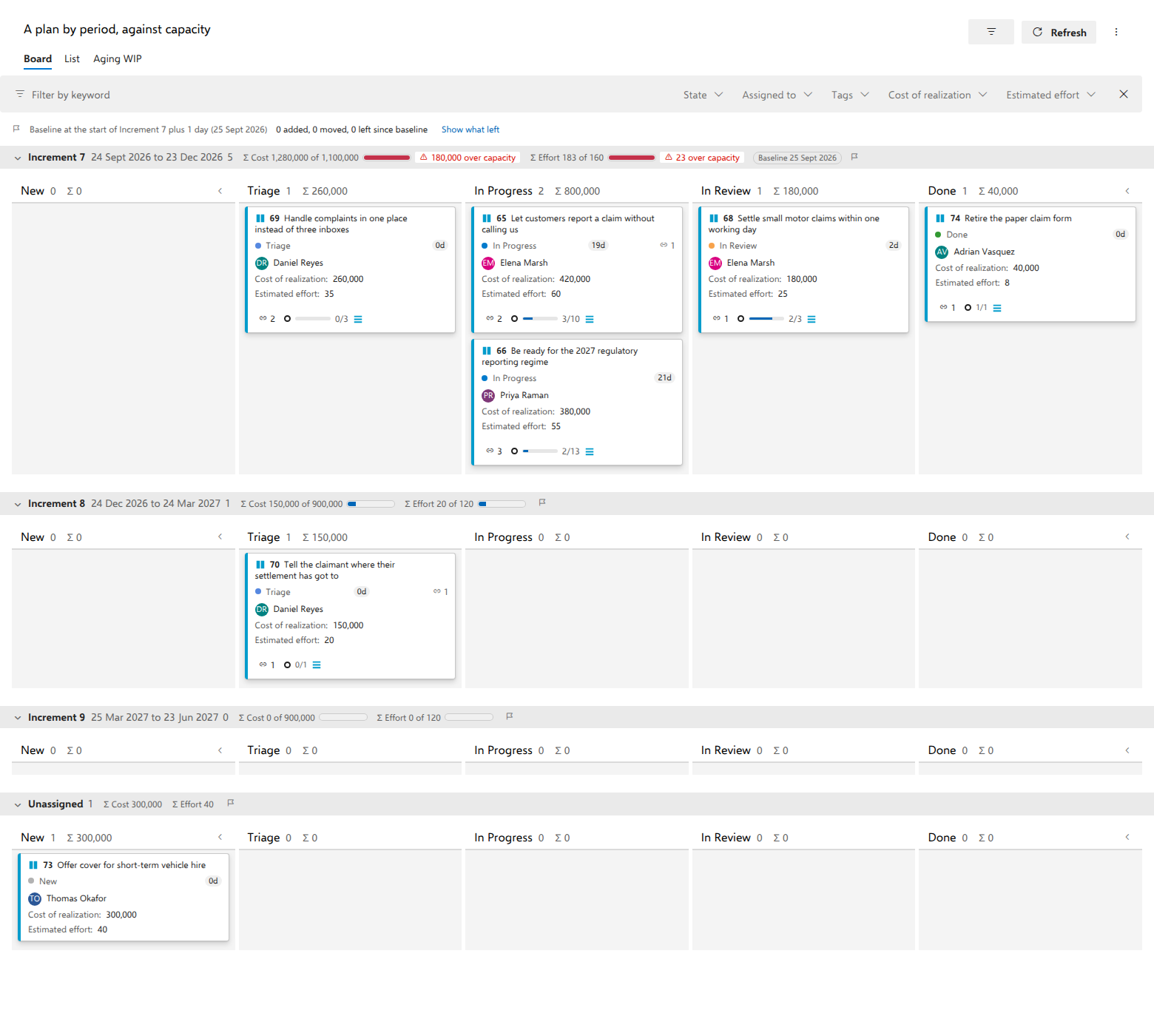
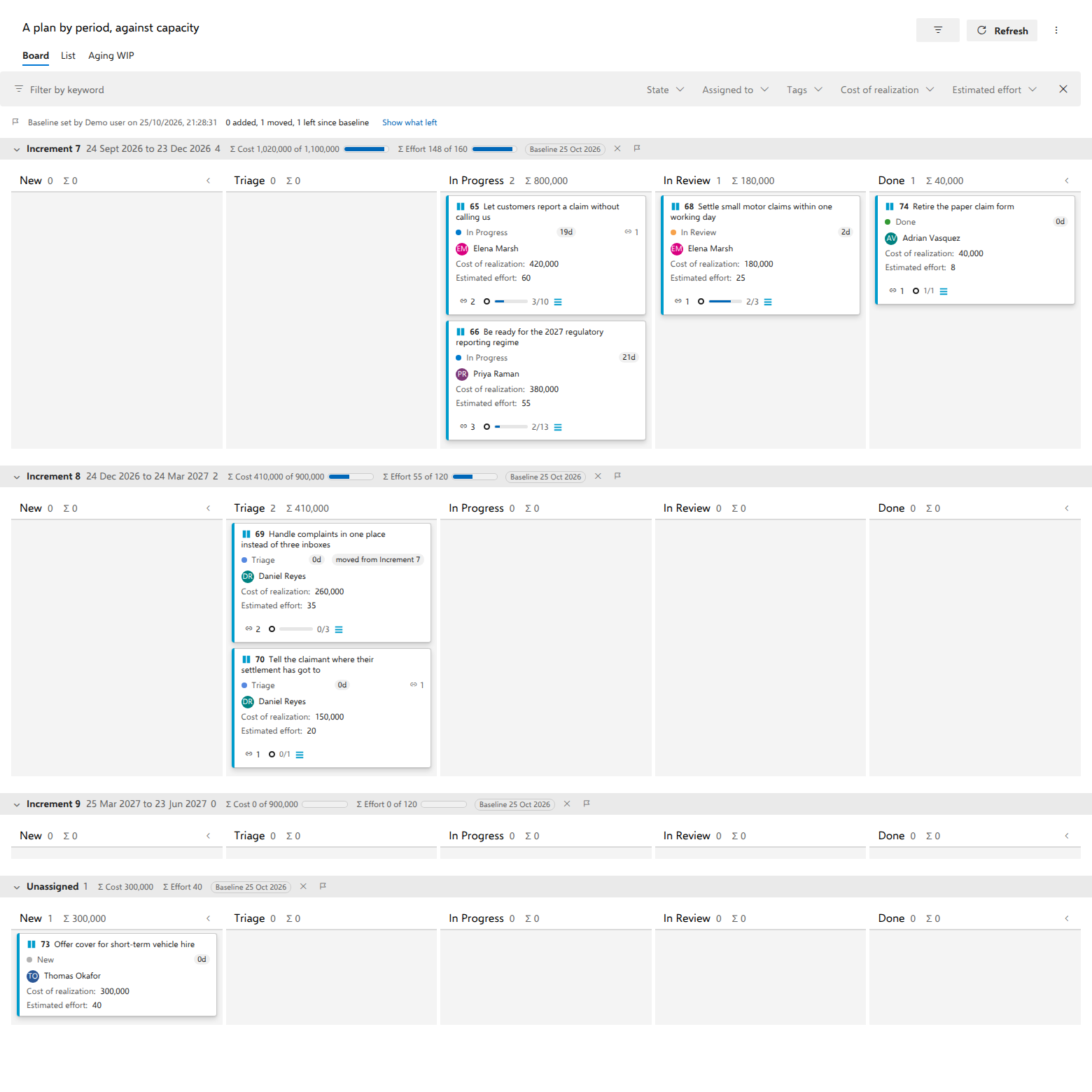
The demo's A plan by period, against capacity board is this page in practice: Claims Platform's requests by increment, Increment 7 over both its capacities. Move Handle complaints in one place instead of three inboxes to Increment 8 and Increment 7 comes back within them, while the card, with a baseline set, says where it came from.
Notes
A card without a value is counted and named, 2 without Cost, and never treated as 0: the total is the sum of what has been estimated, and the words beside it say how much has not. With a filter on, the sums cover the cards you can see and the header says Σ filtered; the counts stay the full counts, like every count on the board.
Numbers are printed the way your browser's language prints them. The totals are stored in the board definition, so everyone who opens the board reads the same numbers, and the sum fields ride the board's ordinary refresh: a total never costs an extra call to Azure DevOps.
A column's WIP limit measures the whole column, every lane counted, so inside a lane it is printed beside the lane's own count, 2 · 5/4, with the same over-limit mark as before.
A capacity belongs to a lane by its name. If you rename a lane, set its capacity again. A field Azure DevOps does not know at all is left out of the totals, and a notice above the board says so; on a board over several types, a field that only some of them carry is summed over the cards that hold it, and the others are named as cards without a value.
The number in a lane header counts that lane's cards on the board, like every column count; an item in a removed state, which the board hides, is in neither the count nor the sums. A cell's sum is the sum of what was estimated in that cell, and its tip names the cards there without a value.
Fields you can add up
The Sum field and Second sum field pickers offer the numeric fields your board's work item type carries, decimal or whole. Every numeric field your organization created is in them, because only you know what it holds. Of the fields Azure DevOps provides, they offer only the eight that hold a quantity: Effort, Story Points, Size, Original Estimate, Remaining Work, Completed Work, Business Value and Time Criticality. Priority, Stack Rank, Backlog Priority, ID, Rev and the link and attachment counts are numbers as well, and they are left out because their sum means nothing.
Which of the eight your type carries depends on its process. In the four system processes, these types carry them:
| Process | Work item type | Fields the picker offers |
|---|---|---|
| Agile | User Story | Story Points |
| Agile | Bug | Story Points, Original Estimate, Remaining Work, Completed Work |
| Agile | Issue | Story Points, Remaining Work |
| Agile | Task | Original Estimate, Remaining Work, Completed Work |
| Agile | Epic, Feature | Effort, Business Value, Time Criticality |
| Scrum | Product Backlog Item | Effort, Business Value |
| Scrum | Bug | Effort, Remaining Work |
| Scrum | Impediment | Effort |
| Scrum | Task | Remaining Work |
| Scrum | Epic, Feature | Effort, Business Value, Time Criticality |
| CMMI | Requirement | Size, Original Estimate |
| CMMI | Bug | Size, Original Estimate, Remaining Work, Completed Work |
| CMMI | Change Request, Issue, Risk | Size, Original Estimate, Remaining Work |
| CMMI | Review | Size, Remaining Work |
| CMMI | Task | Original Estimate, Remaining Work, Completed Work |
| CMMI | Epic, Feature | Effort, Business Value, Time Criticality |
| Basic | Issue | Effort |
| Basic | Task | Remaining Work, Completed Work |
Every other type in those processes carries none of them, including Basic's Epic and the three test types, Test Case, Test Plan and Test Suite. A process inherited from one of them offers the same on the same types, plus any of the eight an administrator has added to a type.
A work item type your organization created gets none of the eight from Azure DevOps unless it sits on the requirement backlog or the task backlog. Azure DevOps gives every type on the requirement backlog that level's estimate field (Effort on Scrum and Basic, Story Points on Agile, Size on CMMI), and every type on the task backlog Remaining Work. The demo's Business Request has none of them, so its board adds up two fields created for it, Cost of realization and Estimated effort.
To sum one of the eight on a type that lacks it, an administrator adds it in Azure DevOps under Organization settings > Process > (your inherited process) > (the work item type) > New field > Use an existing field. A system process cannot be changed, so on one of those the administrator first creates an inherited process and changes the project to use it.