Give expedited work its own lane
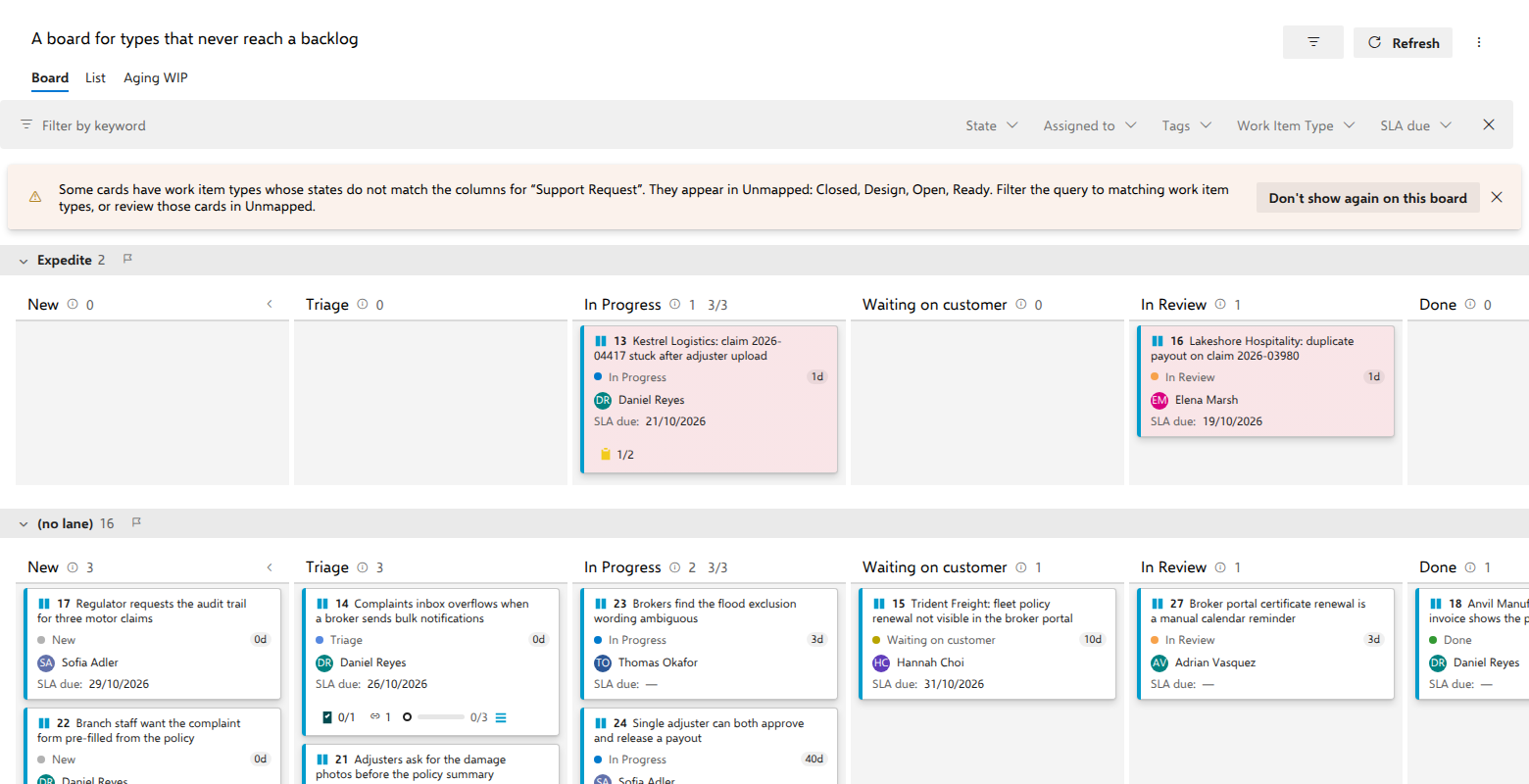
Two support requests have breached their SLA: "Kestrel Logistics: claim 2026-04417 stuck after adjuster upload" and "Lakeshore Hospitality: duplicate payout on claim 2026-03980". They sit in different columns, one in In Progress and the other in In Review, so nobody sees them as one thing. A lane puts them in their own row, across the whole board.
Before you start
A named board in the AnyKanban hub that does not take its layout from a team's board. On a board that does, the Swimlanes tab shows that team's rows instead of a lane editor, with a link to the team's board, where the rows are changed. Named lanes take precedence over the Lane field, so if that box is filled in, it is ignored from the moment the first named lane exists.
Steps
- Open the board and select Settings.
- Open the Swimlanes tab.
- Select Add lane and type a Lane name, for example
Expedite. - Select Add condition and set it: field
Tags, operatorcontains, valuesla-breach. - Add a second condition if the lane needs one. All conditions of a lane must match. Add further lanes the same way; they are matched from the top down and the first lane that matches takes the card.
- Select Save.
What you should see
The board is now a stack of rows: one per named lane, in the order you defined them, then a (no lane) row at the bottom holding everything that matched nothing. That last row appears the moment an item matches no lane and is not drawn while nothing is in it. Each row has a chevron, its name and a count, and repeats the full set of columns.
Both breached support requests are in the Expedite row, in whichever column their state puts them.
Notes
Dropping a card into a lane applies that lane's literal = conditions as field
writes, which is the native swimlane rule. A lane defined with contains, or with a
macro value, has nothing to write, so cards cannot be moved into it by
dragging; they arrive when the data matches. The same holds for the
(no lane) row, which collects items that match no lane and cannot be aimed
at. While a card is in the air, every such row is dimmed, with the reason as
its tip; releasing the card there cancels the move and changes nothing on the
item, its order included. A lane with no conditions at all never matches
anything.
Every empty cell the card may enter opens into a dashed slot one card high while the card is in the air, so there is something to aim at; at rest the rows stay compact. A drop into an empty cell changes the lane, and the state when the cell is in another column, but never the order: the card keeps its place. The same holds for an empty column on a board without swimlanes. Dropped below the last card of a cell that has cards, it lands right after that card, not at the end of the whole column.
The row count is every loaded item in that lane, including items in removed states and items sitting in Unmapped, so it can legitimately exceed the sum of the column counts in its row. Note also that the inline New item button is not shown while swimlanes are on.