Write down what a column actually means
"In Review" means one thing to the person who moved the card there and another to the person who has to pick it up. Write the rule down once, on the column, where anyone can read it without asking.
Before you start
A named board in the AnyKanban hub, and a work item type selected on General. The Columns section starts from the states of that type, one column each.
Steps
Open the board and select Settings.
Open Columns in the left rail, under Board.
Select the column in the strip of column tabs, say In Review, and type into the Definition of done box below it. The box is multi-line and takes a small subset of markdown; the placeholder says as much.
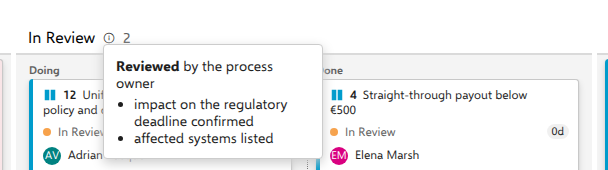
For the demo's regulatory program board, the one across several projects, the text on In Review reads:
**Reviewed** by the process owner

- impact on the regulatory deadline confirmed
- affected systems listed
Select Save.
What you should see
An info icon appears right after that column's name in the header, before the item count. Hover it, or give it keyboard focus, and a tooltip opens with the text rendered: the bold run is bold, the dashes are a bullet list. Columns without a text carry no icon.
The supported subset is **bold**, *italic*, `code`, links written as
[text](https://…), headings with #, ## or ###, - or * bullets, 1.
numbered lists, and blank lines between paragraphs. Anything else is shown as
the literal text you typed.
Notes
Empty texts are discarded on save, so clearing the box removes the icon. Removed-category states, the demo's Rejected among them, are not offered in the Columns section at all and therefore cannot carry a definition of done. The icon is also not rendered on a collapsed column, since a collapsed column has no room for a header.