Make regulatory work impossible to miss
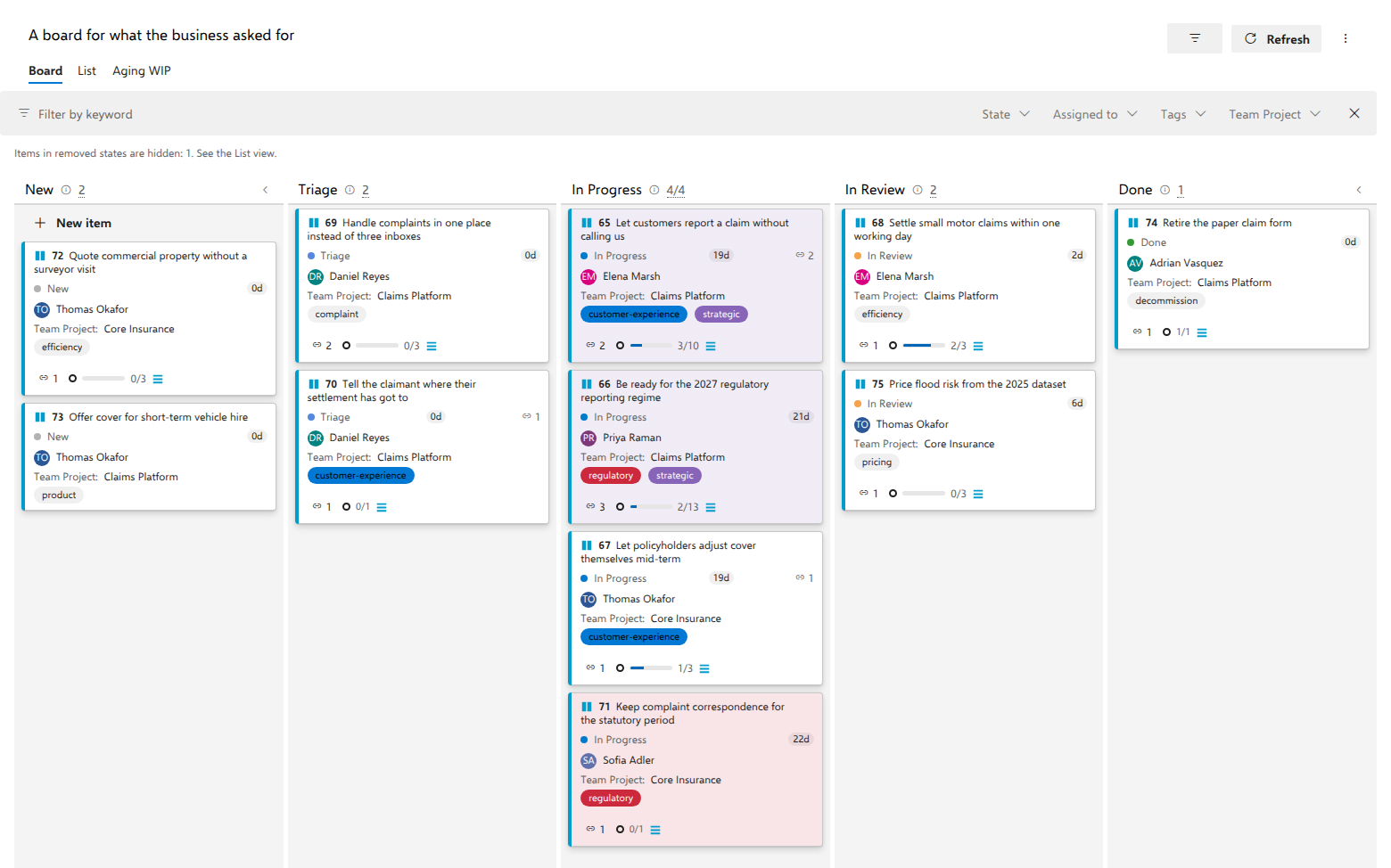
Two of the business requests on the board carry a regulatory deadline: "Be ready for the 2027 regulatory reporting regime" and "Keep complaint correspondence for the statutory period". They should be recognizable from the other side of the room, not after reading eleven card titles.
Before you start
A named board in the AnyKanban hub. Conditions are built from the fields of the board's work item type, so the type must be chosen on the General tab.
Steps
- Open the board and select Settings.
- Open the Styles tab.
- Select Add rule and type a Rule name, for example
Regulatory deadline. - Pick a color by selecting one of the ten swatches. There is no free color box.
- Select Add condition and set it: field
Tags, operatorcontains, valueregulatory. - Add further conditions if the rule needs them, remembering that all conditions of a rule must match, then select Save.
What you should see
Cards tagged regulatory that no earlier rule already claims now carry a light
tint of that color behind the card. The 4 px strip down the left edge does not
change: it always shows the work item type's color, the way native Azure
Boards uses it, so a tinted card still tells you what it is.
On the demo board "A board for what the business asked for", "Keep complaint
correspondence for the statutory period" takes the new color; "Be ready for
the 2027 regulatory reporting regime" is tagged strategic as well, so it
keeps the tint of the board's Strategic rule, which sits higher in the list.
If Aging colors is turned on in the board's ⋯ menu, no rule colors any card: the tint shows card age instead, and cards it does not mark stay plain. Turn it off and your rules apply again.
Nothing else changes: the rule's name is configuration only and is never shown on the board, and the coloring is a Board-view signal, and the List view renders the same items unstyled.
Conditions are not limited to tags. Priority = 1, a state, a picklist
value, a date field: any field of the type can drive a rule, and for boolean
and picklist fields the value box becomes a dropdown of the allowed values.
Notes
Rules are evaluated from the top down and the first rule whose conditions all
match wins, but Add rule appends to the bottom of the list and there is no
control for moving a rule up, so a new rule loses every card an older rule
already claims. Deleting and re-adding the older rule is what changes the
order. Note also that contains on Tags matches a whole tag
case-insensitively, not a fragment of one, and that a rule saved with no
conditions is discarded.
Blocked work: a rule, or a column?
Both are common, and the choice is worth making deliberately rather than by habit. The demo shows both, on purpose, on one board: the support board, "A board for types that never reach a backlog".
- Waiting for a customer is a state,
Waiting on customer, alongsideIn Progress. Plenty of real service-desk processes model it exactly that way, and AnyKanban renders whatever states your type has. - Blocked work is a tag,
blocked, with a rule on it. The card stays in the column where the work actually is, and turns red.
The rule approach usually ages better, for three reasons that only show up later:
- Blocking is a condition, not a stage. A blocked item is still in the column it was in; it has not moved forward, and moving it sideways to say so loses where it really was.
- It keeps the time where the work is. A waiting column moves the card away from the stage it was in, so the time it spends blocked is counted against a separate column. As a flag, the card keeps aging in its real column: its time in that step includes the wait, and the red tint says why it is taking so long.
- Waiting multiplies. Waiting on the customer, on a vendor, on legal, on the regulator: each becomes its own column, and returning from one means a backwards move that muddies the item's state history.
None of this makes a waiting state wrong. If your process has one, use it. That is the process talking, and the board follows the process rather than arguing with it. But if you are choosing today, a tag and a rule cost one condition and no schema change at all.